Reply to reviews
Customers can rate you after they confirm a job is done. Your average rating and number of reviews appear on your profile and in search results, and pros with better ratings show up higher.
Go to Profile → My reviews.
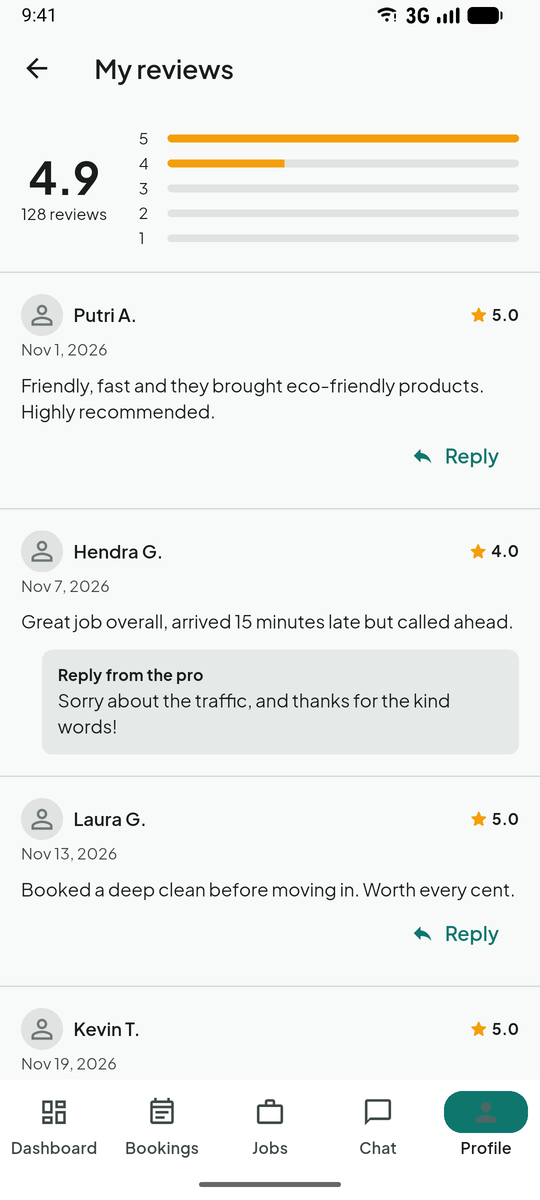
Each review shows the customer's name, the stars, the comment and the date.
Reply
- Tap Reply under a review.
- Thank the customer or respond to their feedback.
- Tap Post reply.
You can reply once to each review, and your reply is public: it appears under the review on your profile, marked Reply from the pro. Keep it short and polite, especially for critical reviews; future customers read how you respond.
If a review breaks the marketplace's rules, contact support. Only the marketplace team can hide a review.