Earnings and payouts
Go to Profile → Earnings (or the earnings shortcut on the dashboard).
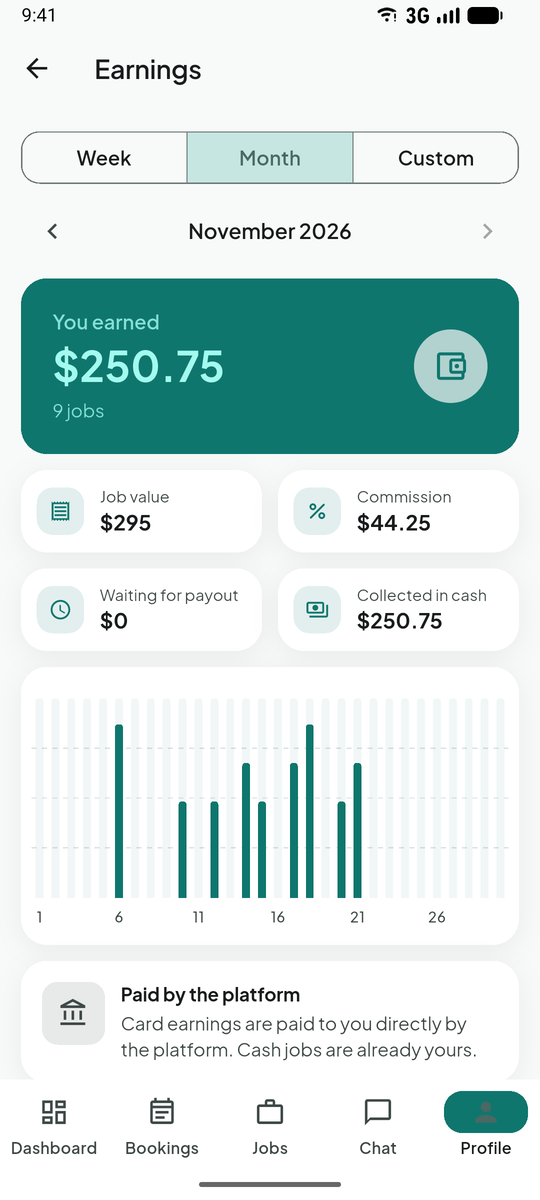
Choose a period
Pick Week, Month or Custom dates at the top. Use the arrows to move to the previous or next period.
The summary
| Line | Meaning |
|---|---|
| You earned | What you keep: job value minus commission. |
| Job value | The total price of your completed jobs in the period. |
| Commission | The marketplace's share. |
| Waiting for payout | Card earnings not yet sent to your bank. |
| Paid out | Card earnings already sent to your bank. |
| Collected in cash | Money customers paid you directly. |
| On hold (disputed) | Earnings from jobs where the customer reported a problem, held until support resolves it. |
A bar chart under the summary shows what you earned on each day of the period.
Completed jobs
Below the summary, Completed jobs lists each job with its date, the job value and commission (Job $45.00 · Commission $6.75) and a status:
| Status | Meaning |
|---|---|
| Cash | Paid to you in cash. |
| Pending | Card payment waiting to be paid out. |
| Paid | Paid out to your bank. |
| On hold | The customer reported a problem. |
Commission on cash jobs
When a customer pays you in cash, you've received the full price, including the marketplace's commission. After you tap Cash received on the booking, that commission is added to what you owe. The earnings page shows You owe $X in commission, and the marketplace tells you how to pay it.
Payouts
Card payments reach your bank account through payouts. The card at the top of the earnings page shows where you stand:
| You see | What to do |
|---|---|
| Payouts not set up | Tap Set up payouts. Cash jobs are already yours. |
| Payout account under review | Tap Continue setup if more details are needed. |
| Payouts active | Nothing. Card earnings are paid to your bank. Open Stripe dashboard shows your payout history. |
| Paid by the platform | The marketplace pays you directly; no setup needed. |
Setting up payouts opens Stripe, the marketplace's payment partner, in a browser tab. Stripe checks your identity and bank account. When you're done, come back to the app.