Mindset
In the App Store as Mindset: Solo Founder Pomodoro
A Pomodoro timer with stretch breaks that also tracks time and money per project, so a freelancer can see what their work really earns per hour.
- For
- Freelance software engineers
- Runs on
- Mac, iPhone, with Android planned
- Requires
- macOS 15 or iOS 18 or later
- Price
- Free, with an optional subscription for sync
- Status
- Coming to the App Store
A freelancer's week holds more than billable hours: writing proposals, meeting clients, admin, their own product, and rest. Mindset records that time as a side effect of its timer and puts your earnings and costs beside it, so at the end of the week you can see what your work really paid per hour.
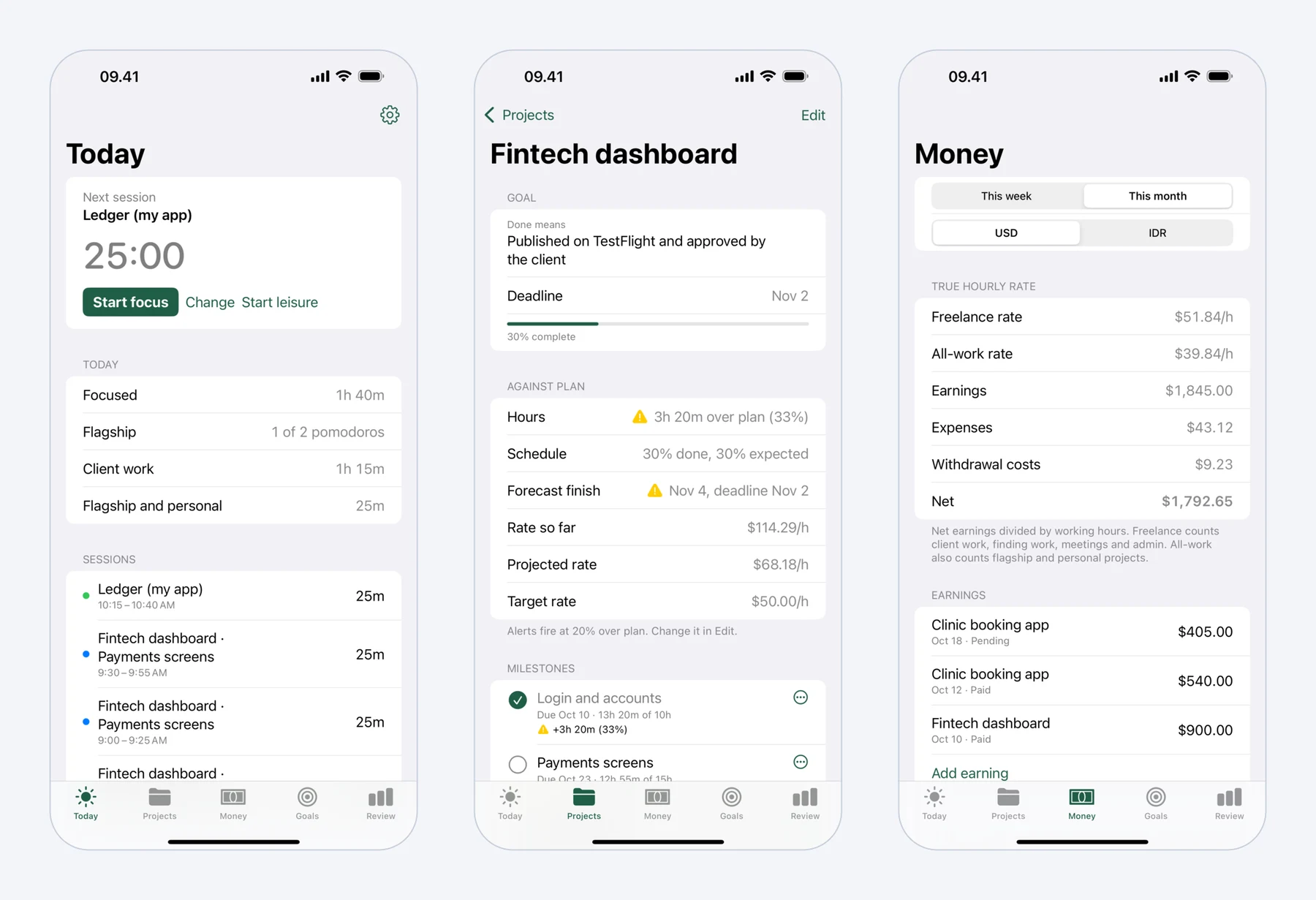 Today, a project page and Money on iPhone, with sample data. The Mac app keeps the timer in the menu bar.
What you get
Time tracking you don't have to remember
Every pomodoro is logged with its project and kind of work: client work, finding work, admin, or your own product. There is no separate timesheet to fill in.
Your real hourly rate
Mindset divides what you earned, minus what you spent, by all the hours the work took, including proposals, meetings and admin. That number is usually lower than the rate on the contract, and it's the one that pays your bills.
Breaks that look after your body
Each break comes with a short guided routine for the parts desk work strains, so a long coding day doesn't end with a stiff neck and tired eyes.
Projects that warn you early
Milestones carry planned dates and hours. Mindset compares them with the time you actually log and tells you when a project runs over, before the client notices.
Features
Focus
- A Pomodoro timer in the Mac menu bar and on iPhone, with a long break after every fourth round.
- Choose 25 minutes of focus and 5 of rest, 50 and 10 for deep coding, or lengths of your own.
- Starting is one tap and continues with your last project and milestone. A second control changes the project before or during a session.
- A soft chime when focus or a break ends. Otherwise the app stays silent.
- A daily minimum for your own product, such as two pomodoros, sits at the top of the day.
- On iPhone, a Live Activity shows the running timer on the Lock Screen.
Stretch breaks
Breaks come with guided routines for neck and shoulders, wrists, lower back, and eyes. Short breaks get a short routine and long breaks a longer one. You mark each break Stretched or Skipped, and the weekly Review shows how often you skipped. Reminders pause during leisure. The routines are general exercises, not medical advice.
Projects and milestones
Each project has a source (Upwork, a direct client or yourself), a billing type (hourly, fixed price or unpaid) and its own currency. Add milestones with planned dates and hours, and the project page shows four kinds of deviation:
| Deviation | What it compares | Example |
|---|---|---|
| Hours against plan | Logged hours against planned hours, per milestone and for the project | Payments screens: 26 hours against 20 planned |
| Schedule | Progress expected by today against actual progress, with a forecast finish date | 50% done, 65% expected; at this pace you finish 7 days late |
| Money | The effective hourly rate against your target rate | USD 1,500 fixed price over 40 hours: USD 37.50 an hour against a USD 45 target |
| Weekly time | This week's pomodoros on the project against its weekly target | Your own app: 7 of 10 pomodoros |
A notification arrives when a project runs 20% over plan, a milestone is forecast to miss its date, or a weekly target falls behind. You can change the threshold per project.
Money in two currencies
Record earnings per project as pending or paid, and expenses such as Upwork Connects, subscriptions, hosting and domains, hardware, and transport or meals for client meetings. Amounts can be in US dollars and your local currency, converted at that day's rate, and you can enter the rate your bank actually charged. A withdrawal records what was sent and what reached your bank, so fees and the exchange rate spread count as a cost.
The rate Mindset shows is earnings minus expenses, divided by hours. $2,000 earned from 40 hours of client work looks like $50 an hour. Add 12 hours finding work, 6 hours of meetings and travel, and $60 spent on Connects and transport, and the freelance rate is $1,940 over 58 hours: about $33 an hour.
Goals and the weekly Review
Set targets by day, week, month, quarter or year: hours or pomodoros on a project or kind of work, earnings, a ceiling on expenses, stretch breaks, or leisure time. Progress is calculated from what you log, never typed in. The Review shows your week: focused hours per day, time by category, your freelance rate, stretch breaks and how often you skipped them, and your weekly targets.
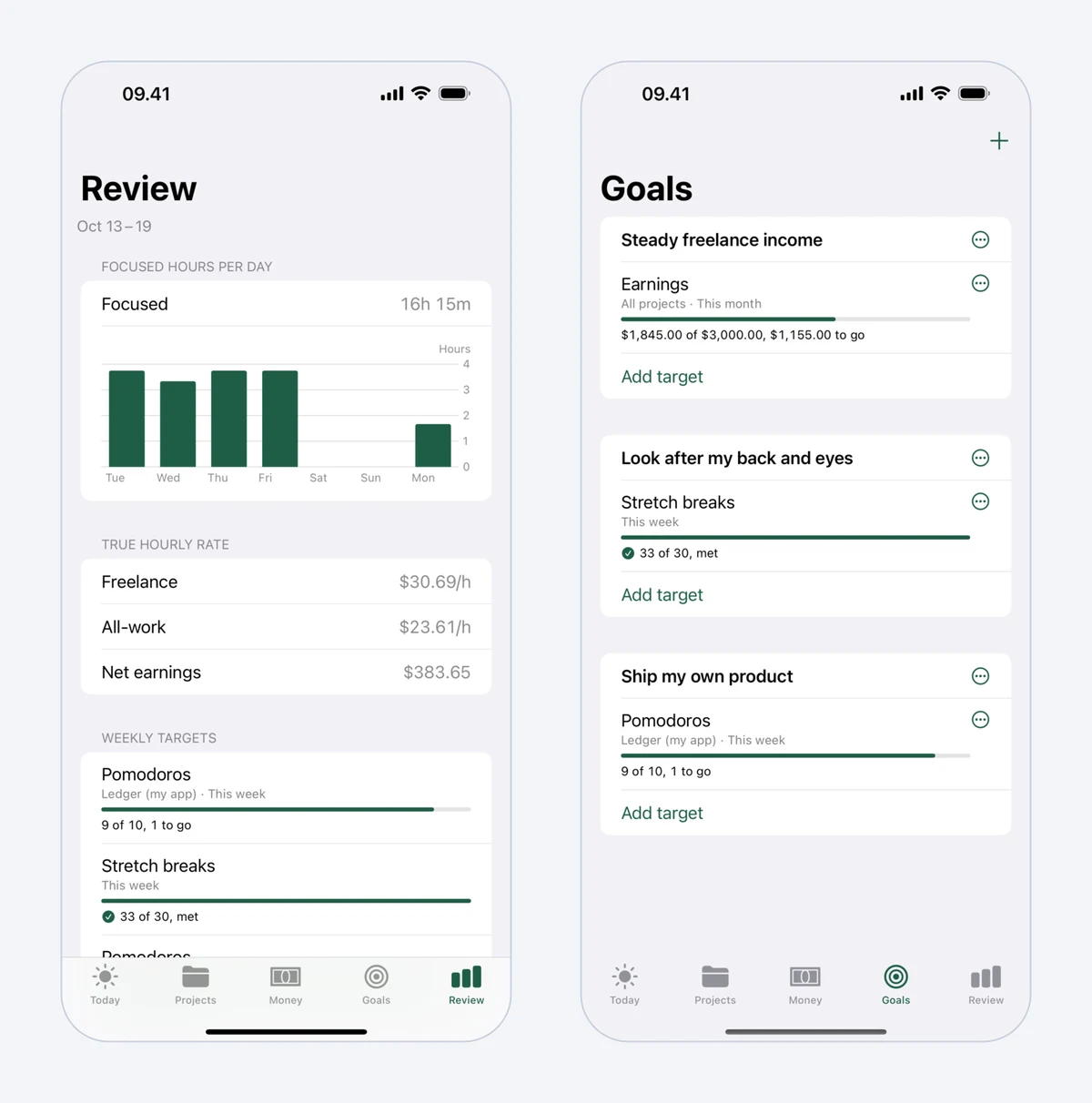 The weekly Review and Goals, with sample data.
How to use Mindset
- Install Mindset on your Mac, where it lives in the menu bar, or on your iPhone, once it is released on the App Store.
- Choose how you like to work: 25 minutes of focus and 5 of rest, or 50 and 10.
- Add your projects with their billing type, and give fixed-price work its milestones.
- Start a pomodoro with one tap. When it ends, follow the stretch routine and mark it Stretched or Skipped.
- Log earnings and expenses as they happen, and each withdrawal with the amount that reached your bank.
- At the end of the week, open Review to see where your time went and what it paid.
Pricing
| Free | Subscription | |
|---|---|---|
| Price | USD 0 | USD 4.99 a month or USD 39.99 a year, after a two-week free trial |
| Account | Not needed | Sign in with Apple, Google or an email link |
| Devices | One | Mac and iPhone, kept in sync |
| Timer and stretch breaks | Yes | Yes |
| Projects, milestones, deviation and alerts | Yes | Yes |
| Earnings, expenses and two currencies | Yes | Yes |
| This week's and this month's rates, goals and Review | Yes | Yes |
| Reports over longer periods | No | Yes |
The subscription is sold through the App Store, and in some countries the price there is lower. Without it, your data stays on your device.
How Mindset compares
| Mindset | Toggl Track | Clockify | Be Focused | |
|---|---|---|---|---|
| Free version | Everything on one device | For up to 3 users | For up to 5 users | iPhone app with ads |
| Paid price | USD 4.99 a month or USD 39.99 a year | From USD 9 per user a month, billed yearly | From USD 3.99 per seat a month, billed yearly | iPhone Pro USD 19.99 a year; Mac USD 19.99 once |
| Pomodoro timer | Yes | Yes | In the browser extension and desktop apps | Yes, focus and break intervals |
| Guided stretch breaks | Yes | Not listed | Not listed | Not listed |
| Earnings and billable rates | Yes, free | From the Starter plan | From the Basic plan | Not listed |
| Expenses | Yes, free | Not listed | On Pro and Enterprise plans | Not listed |
| Account needed | No | Yes | Yes | Not stated |
| Runs on | Mac, iPhone | Web, Mac, Windows, iPhone, Android | Web, Mac, Windows, Linux, iPhone, Android | Mac, iPhone, iPad, Apple Watch |
Details of the other apps come from their own websites and App Store listings, read on 19 October 2026: Toggl pricing, Clockify pricing, Be Focused on the App Store and Be Focused Pro for Mac. Prices are in US dollars before tax and can change. "Not listed" means we found no mention of it.
Toggl Track and Clockify track time for teams and client timesheets. Mindset is for one person who wants focus, health and money in the same place, and to know whether a week of work was worth it.
Requirements and privacy
Mindset needs macOS 15 or iOS 18 or later. Free use needs no account, and your data stays on your device. It never blocks other apps or websites: it tracks and reminds, and leisure stays your choice. Read the Mindset privacy policy, or see Mindset support for questions.