dbPlus
A native database client for the Mac. Browse, edit and query PostgreSQL, MySQL, MariaDB, SQLite and SQL Server, and see every change before it runs.
- For
- Developers who work with SQL databases every day
- Runs on
- Mac
- Requires
- macOS 14 Sonoma or later, Apple silicon or Intel
- Price
- Free, with dbPlus Premium at USD 19 a year
- Status
- Coming to the Mac App Store
dbPlus is a database client made for the Mac: native, fast, and careful with your data. Connect to PostgreSQL, MySQL, MariaDB, SQLite or SQL Server, directly or through an SSH tunnel. Browse tables a page at a time, even with millions of rows, then filter, sort and edit in a grid that works like a spreadsheet. Nothing reaches the database until you've seen it.
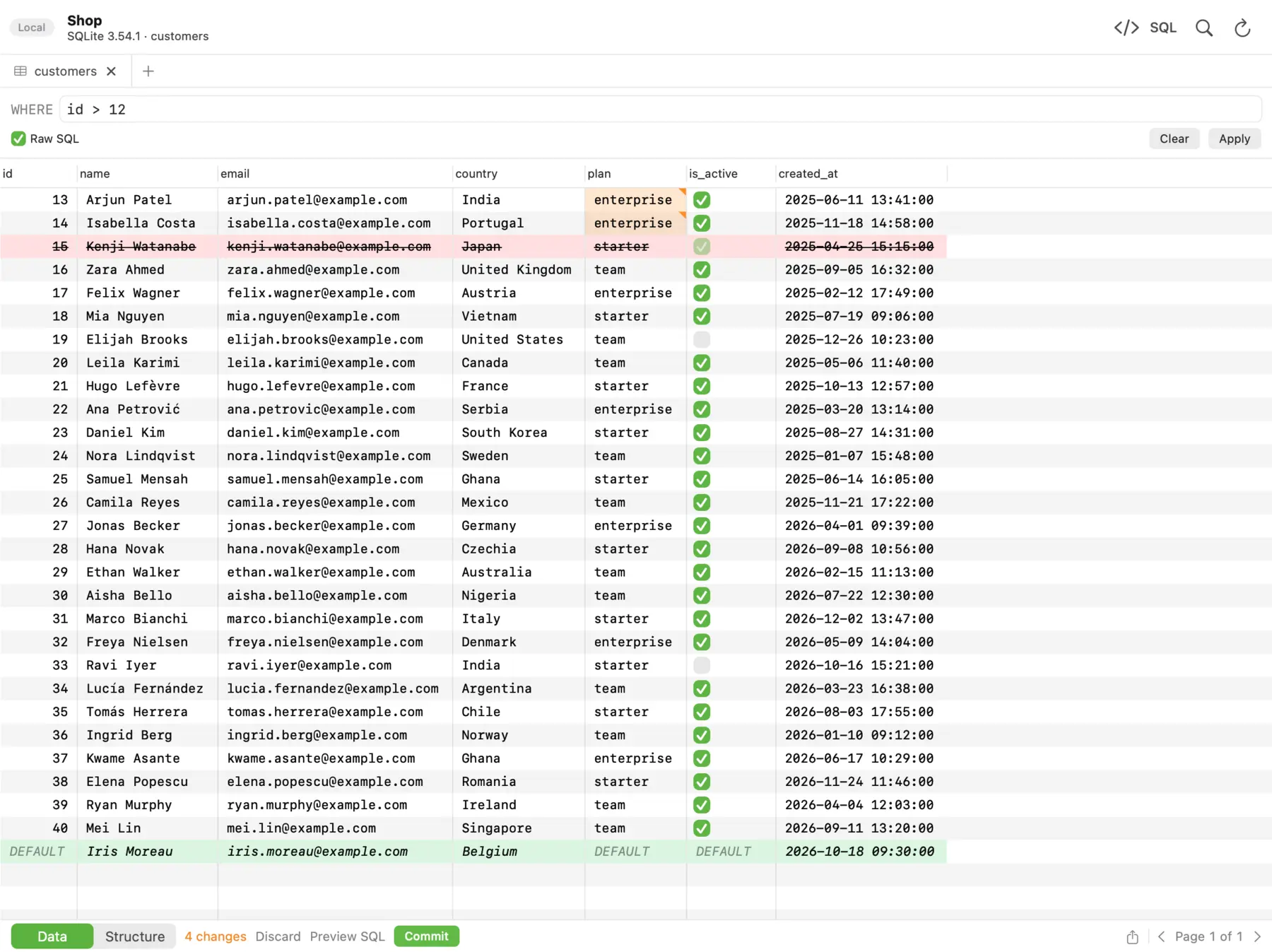 Edits wait in the grid: amber for changed cells, red for deleted rows, green for new ones. The footer counts them until you commit or discard.
What you get
Every change shown before it runs
Edits are staged, not executed. Preview the exact SQL, then commit it all in one transaction. If one statement fails, nothing is saved and the failing row is marked with the server's error.
Guard rails for production
Mark a connection as Production and dbPlus asks before anything writes to it. Read-only connections are enforced by the database where it allows it, and an UPDATE or DELETE without a WHERE clause always asks first.
A Mac app, not a port
dbPlus is built with Apple's own frameworks. It uses the Keychain for passwords, works with window tabs, and follows the system's light and dark appearance. Every common action has a keyboard shortcut.
Free for everyday work
Every supported database, the full SQL editor and row editing are free. Premium costs USD 19 a year.
Features
Edit data safely
- Double-click or press Return to edit a cell, Tab to move on, Esc to cancel. Set a value to
NULLor, in a new row, to its default. - Insert, duplicate and delete rows, with undo and redo for each change.
- Preview SQL shows the statements that will run. Commit runs them in one transaction.
- After a commit, changed rows are read back, so defaults and values set by triggers appear.
- Tables without a primary key or a unique index open read-only, with a banner that says why.
- After sleep or a dropped connection, dbPlus reconnects by itself, and tells you when an open transaction was lost.
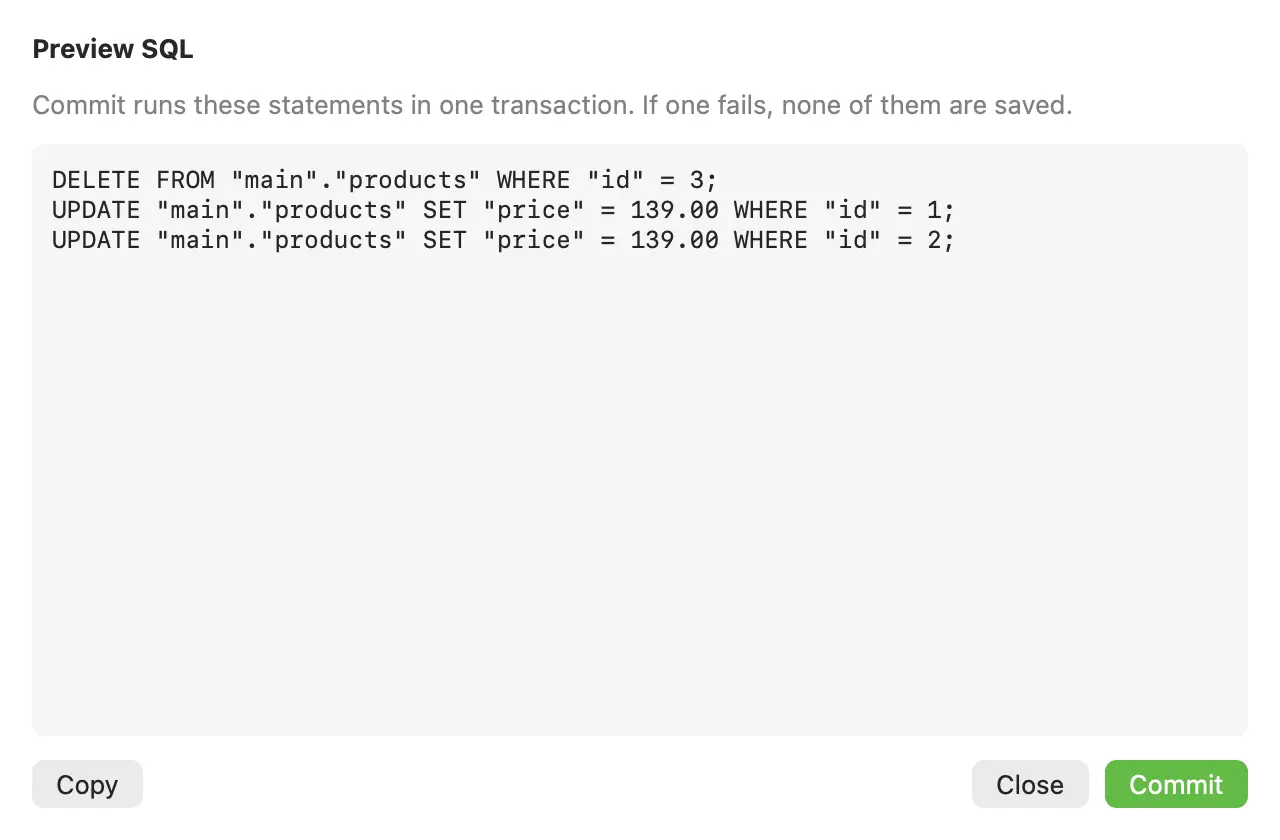 Preview SQL before committing to a Production connection. If one statement fails, none of them are saved.
Write and run SQL
- Highlighting for each database, autocomplete for tables, columns and aliases, snippets, and Format SQL.
- Several cursors, find and replace, and commands to move, duplicate and comment lines.
- Run the statement at the cursor, a selection, or everything, and cancel a long query.
- Parameters such as
:customer_idask for a value when you run and remember it. - Explain shows the query plan as a tree and points out the slow steps.
- Filter and sort results without running the query again, pin a result, and compare two runs row by row.
- Results from one table can be edited in place, and copied as CSV, JSON, Markdown or SQL.
- Saved queries are plain
.sqlfiles in a folder you choose, so they can live in a git repository.
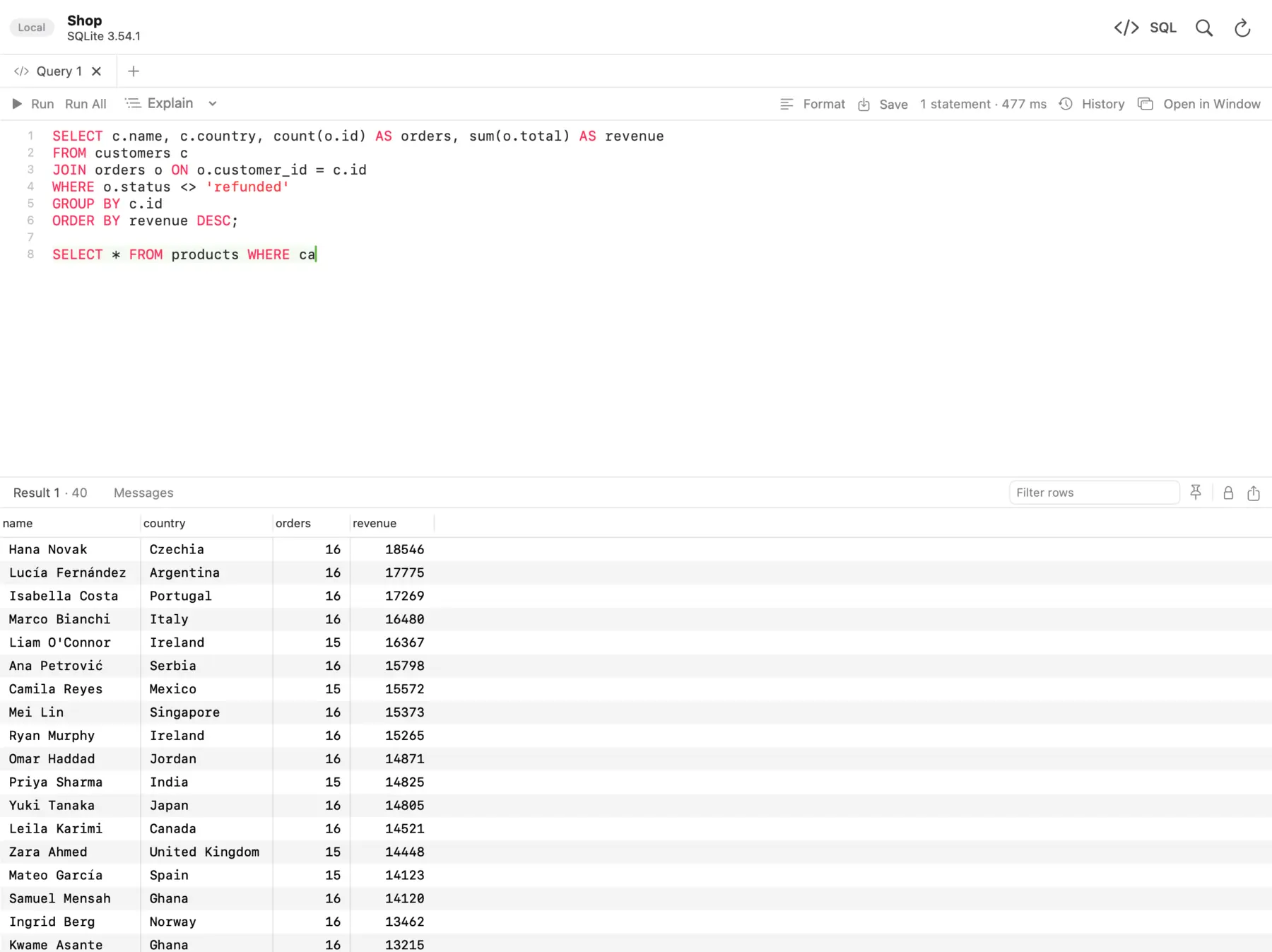 The SQL editor with results below. The statement under the cursor is highlighted, so you always see what will run.
Work with structure
See columns, indexes, foreign keys, checks, triggers and the CREATE statement of any table. Create tables, change columns and types, and manage indexes and foreign keys, with the SQL shown before it runs. On SQLite, dbPlus rebuilds a table safely when SQLite can't change it in place.
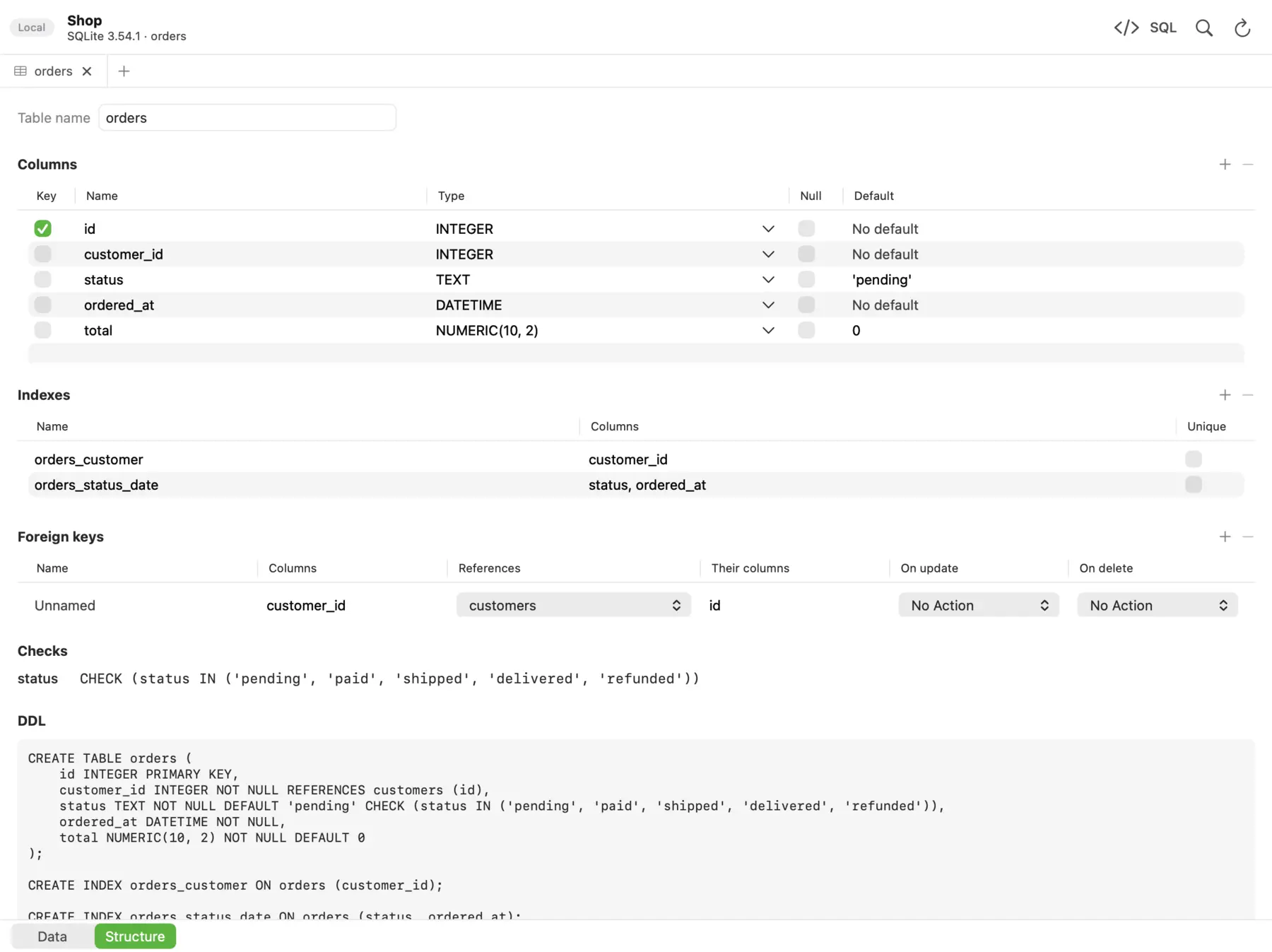 The Structure view of a table, with its DDL at the bottom.
Connect anywhere
Paste a URL such as postgres://user@host:5432/database and the form fills itself in. Connect through an SSH tunnel with a password or a private key. Test a connection before saving it, colour it by environment (local, development, staging or production), and keep it in a group. Connections can be imported from TablePlus, or shared in a file with the passwords encrypted by a passphrase.
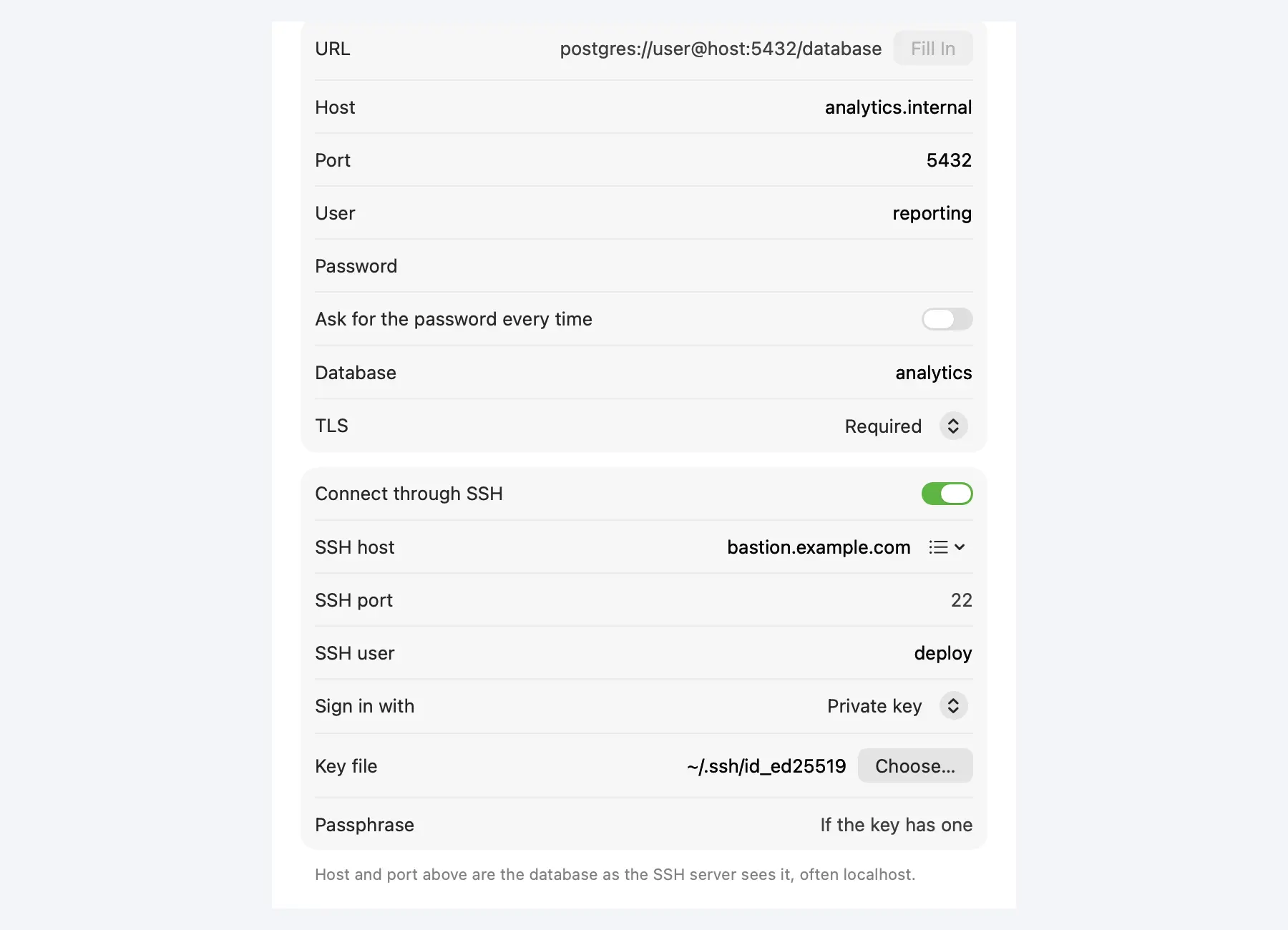 A PostgreSQL connection through an SSH bastion. The password stays in your Keychain, or dbPlus can ask for it every time.
Move data
Export tables and results to CSV, Excel, JSON, Markdown, HTML or SQL INSERT statements. Import CSV, Excel and JSON files into new or existing tables. Dump a database to a .sql file and restore it, including files from pg_dump and mysqldump, and copy tables between databases, even from one engine to another.
How to use dbPlus
- Install dbPlus from the Mac App Store once it is released. It runs on macOS 14 Sonoma or later.
- Add a connection: paste its URL or fill in the form, choose an environment, and press Test Connection. For a server behind a bastion, turn on Connect through SSH.
- Open the connection. Tables, views and functions are in the sidebar; press
⌘Pto jump to any of them by name. - Filter with
⌘F, sort by clicking a column header, and press Space to see a whole row at once. - Edit cells, add rows with
⌘Ior delete them with⌫. Press⇧⌘Pto preview the SQL, then⌘Sto commit. - Press
⌘Efor a new SQL query and⌘↵to run the statement at the cursor.
Keyboard shortcuts
| Action | Shortcut |
|---|---|
| Quick open a table, view or function | ⌘P |
| New SQL query | ⌘E |
| Filter rows, or find in the editor | ⌘F |
| Data or Structure | ⌥⌘1 / ⌥⌘2 |
| Row inspector | Space |
| Insert, duplicate or delete rows | ⌘I / ⌘D / ⌫ |
| Preview SQL, commit | ⇧⌘P / ⌘S |
| Undo or redo a change | ⌘Z / ⇧⌘Z |
| Run the statement or selection, run all | ⌘↵ / ⇧⌘↵ |
| Cancel a query | ⌘. |
| Import CSV, export | ⇧⌘I / ⇧⌘E |
Supported databases
| Database | Versions |
|---|---|
| PostgreSQL | 12 and newer |
| MySQL | 8.0 and newer |
| MariaDB | 10.6 and newer |
| SQLite | Local database files |
| SQL Server | 2017 and newer, and Azure SQL Database |
Pricing
| Free | Premium | |
|---|---|---|
| Price | USD 0 | USD 19 a year, after a one-week free trial |
| Every supported database | Yes | Yes |
| Browse, filter, sort and edit rows | Yes | Yes |
| SQL editor and saved queries | Yes | Yes |
| Import connections from TablePlus | Yes | Yes |
| Connections and tabs open at a time | 2 connections, 3 tabs | Unlimited |
| SSH tunnels | No | Yes |
| Create and change tables | No | Yes |
| Import, export, dumps and copying between databases | No | Yes |
Premium is a yearly subscription through the Mac App Store, which shows the price in your own currency. Cancel any time in your Apple account; Premium stays active until the end of the year you paid for.
How dbPlus compares
| dbPlus | TablePlus | DBeaver | DataGrip | |
|---|---|---|---|---|
| Free version | 2 connections and 3 tabs open at a time | Trial: 2 tabs, 2 windows, 2 advanced filters | Community edition, open source | For non-commercial use |
| Paid price for one developer | USD 19 a year | USD 99 per device, once, with a year of updates | From USD 113 a year (Lite) | USD 109 for the first year |
| Built as | Native Mac app | Native app | Java (Eclipse) | Java (JetBrains Runtime) |
| Runs on | Mac | Mac, Windows, Linux, iPhone | Mac, Windows, Linux | Mac, Windows, Linux |
| Edits wait for you to commit | Yes, with Preview SQL | Yes | Yes | Yes, with a preview |
| SSH tunnels | Premium | Yes | Yes | Yes |
Details of the other clients come from their own websites, read on 19 October 2026: TablePlus pricing, DBeaver editions, DataGrip pricing. Prices are in US dollars before tax and can change, so check before you buy.
If you need Windows or Linux, or databases beyond these five, those clients cover more ground. dbPlus is for developers who work on a Mac with these databases and want a careful, low-cost client that feels like the rest of macOS.
Requirements and privacy
dbPlus needs macOS 14 Sonoma or later and runs natively on Apple silicon and Intel Macs. It collects no data and sends nothing to Nicecoder: your connections stay on your Mac and your passwords in its Keychain. Read the dbPlus privacy policy, or see dbPlus support for questions.