Best SQL Server clients for Mac after Azure Data Studio
Azure Data Studio is retired and SSMS is Windows-only. These are the SQL Server clients that work on a Mac in 2026, with prices, limits and local setup tips.
Azure Data Studio was retired on 28 February 2026, and SQL Server Management Studio has never run on macOS. For most Mac users the best replacement is Microsoft's own: Visual Studio Code with the free MSSQL extension. If you'd rather use a dedicated database app, DataGrip, TablePlus, DBeaver and Beekeeper Studio all connect to SQL Server from a Mac, and so will dbPlus when it's released.
A note before the list: we make dbPlus, one of the apps covered here. We've tried to be straight about where it fits and where other apps are the better choice.
Quick comparison
| App | Best for | Price | Platforms |
|---|---|---|---|
| VS Code with the MSSQL extension | Most SQL Server work, and the closest thing to Azure Data Studio | Free | macOS, Windows, Linux |
| DataGrip | Writing and refactoring a lot of T-SQL | Free for non-commercial use, USD 109 a year for individuals | macOS, Windows, Linux |
| TablePlus | A polished, Mac-like client for several databases | USD 99 one-time for one device, free trial with limits | macOS, Windows, Linux, iOS |
| dbPlus | Careful data editing with every change previewed | Free, Premium USD 19 a year | macOS 14 or later (coming to the Mac App Store) |
| DBeaver | One free tool for many databases | Free Community edition, PRO from USD 113 a year | macOS, Windows, Linux |
| Beekeeper Studio | A free, modern multi-engine client | Free Community edition, paid plans from USD 9 a month billed yearly | macOS, Windows, Linux |
| SQLPro for MSSQL | A Mac-only app focused on SQL Server | Free download, Premium from USD 9.99 | macOS 14 or later |
| Navicat for SQL Server | Teams already standardized on Navicat | Perpetual license from USD 849, free Navicat Premium Lite | macOS, Windows, Linux |
What happened to Azure Data Studio and SSMS on the Mac
Microsoft announced the retirement of Azure Data Studio in February 2025, and it ended on 28 February 2026. According to Microsoft's What's happening with Azure Data Studio page, it no longer receives updates or security fixes, and Microsoft points users to Visual Studio Code with the MSSQL extension. Its GitHub repository is now archived.
SQL Server Management Studio isn't an option on macOS. Microsoft's SSMS FAQ answers "Does SSMS run on macOS?" with a plain no: SSMS 22 is Windows-only, though it now runs natively on Windows on Arm. Microsoft still treats SSMS as the home for SQL Server Agent jobs and full administration, which matters if you're a DBA.
If you're moving off Azure Data Studio and want a feature-by-feature map of what replaces notebooks, extensions and the rest, see our guide to Azure Data Studio alternatives on Mac.
The best SQL Server clients for Mac
1. Visual Studio Code with the MSSQL extension
The MSSQL extension is Microsoft's recommended replacement for Azure Data Studio. It works with SQL Server, Azure SQL Database, Azure SQL Managed Instance and SQL database in Fabric.
Microsoft lists these features as generally available: a connection dialog with color-coded connection groups, Object Explorer with filtering, a results grid that exports to CSV, JSON and Excel, an execution plan viewer, a table designer, a visual schema designer, schema compare, DACPAC and BACPAC import and export, backup and restore, flat-file import, a query profiler based on Extended Events, SQL notebooks and GitHub Copilot integration. It can also create a local SQL Server container for you, which helps on Apple silicon (more on that below).
Table data editing is careful by default. Your edits stay pending until you choose Save Changes, and a Show Script pane displays the DML the grid will run.
It's for almost anyone who used Azure Data Studio, and for developers who already live in VS Code. Both VS Code and the extension are free, and the extension runs natively on Intel and Apple silicon Macs. Version 1.46.0 shipped in late September 2026.
The drawbacks: it's SQL Server only, so you'll need other extensions or apps for PostgreSQL or MySQL. It lives inside a code editor, which some people love and others find cramped for data work. SQL Server Agent isn't included; Microsoft sends you to SSMS for that.
2. DataGrip
DataGrip is JetBrains' database IDE, and its T-SQL editor is the strongest on this list for people who write a lot of SQL. Completion understands your schema, refactoring renames objects across scripts, and inspections flag problems before you run anything. It connects to SQL Server and Azure SQL along with most other popular databases, and it runs on macOS, Windows and Linux.
DataGrip is free for non-commercial use such as learning, hobby projects and open source, but JetBrains says that license requires sending anonymous usage statistics, with no opt-out. Paid work needs a commercial license: USD 109 for the first year for individuals, then USD 87 and USD 65 in later years, or USD 259 per user a year for organizations.
It's best for developers who work across several engines and spend their day in SQL scripts. The drawbacks are weight and cost: it's a full IDE, and the subscription is a real line item for a freelancer. We compare it with our app in dbPlus vs DataGrip.
3. TablePlus
TablePlus is a polished, Mac-like client that supports SQL Server alongside PostgreSQL, MySQL, MariaDB, SQLite, Redis and others. Grid edits are held for review before they're committed, and a safe mode helps protect production connections. Among the established multi-engine apps here, it feels the most at home on a Mac.
It's for developers who touch SQL Server as one of several databases and want something lighter than an IDE. The free trial is limited to two tabs, two windows and two advanced filters at a time. A Basic license costs USD 99 for one device with a year of updates, and you keep using your version after that. It needs macOS 12 or later.
TablePlus is a query and data tool, not an administration console, so for Agent jobs or server configuration you'll still need SSMS. The price is also steep if SQL Server is the only thing you connect to.
4. dbPlus
dbPlus is our native Mac database client. It's coming to the Mac App Store and isn't released yet. It supports SQL Server 2017 and newer and Azure SQL Database, along with PostgreSQL, MySQL, MariaDB and SQLite.
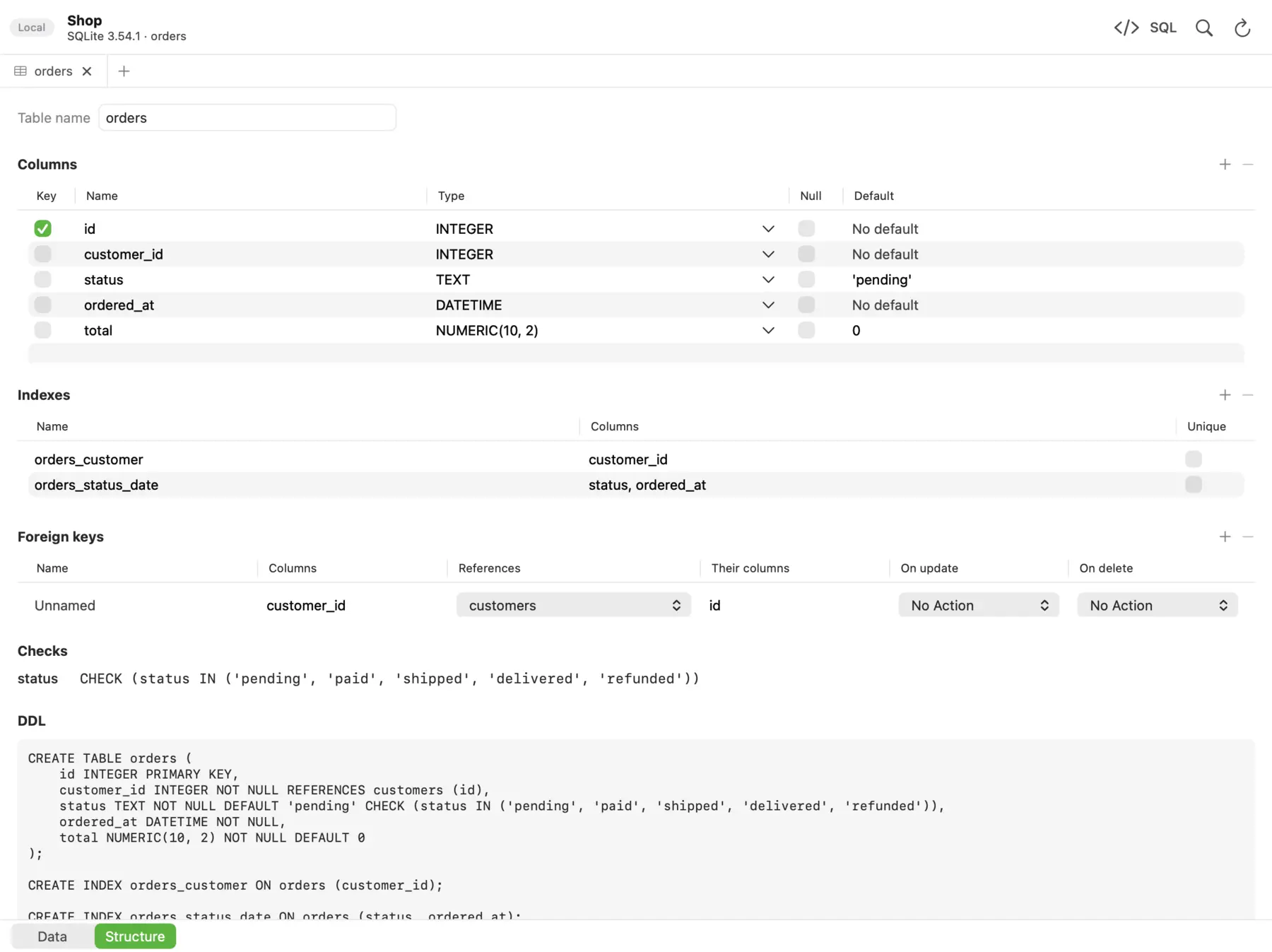 The Structure view in dbPlus shows a table's columns, indexes, foreign keys, checks and CREATE statement.
Its focus is safety when you edit data. Edits are staged first: changed cells turn amber, new rows green and deleted rows red, and you can preview the exact SQL before committing everything in one transaction or discarding it. You can mark a connection as Production, and dbPlus asks before anything writes to it. An UPDATE or DELETE without a WHERE clause asks first. Read-only connections are enforced by the database itself where the database allows it. After sleep or a dropped connection, dbPlus reconnects by itself and tells you if an open transaction was lost.
The SQL editor has autocomplete for tables, columns and aliases, several cursors, Format SQL and parameters such as :customer_id that prompt for a value. Explain shows the query plan as a tree and points out slow steps. Saved queries are plain .sql files in a folder you choose, so they can live in git.
It's free with two connections and three tabs open at a time. dbPlus Premium costs USD 19 a year, with a one-week free trial, and adds unlimited tabs, SSH tunnels, structure editing, import, export and copying tables between databases. It needs macOS 14 Sonoma or later. It collects no data, and passwords stay in your Mac's Keychain.
It doesn't try to cover administration: there are no notebooks, no SQL Server Agent, no profiler and no schema compare. Azure SQL Managed Instance isn't on its supported list, and Microsoft Entra ID sign-in isn't listed either. It's Mac only, and it supports five engines. If you administer SQL Server rather than work with its data, VS Code or SSMS in a VM will serve you better.
5. DBeaver
DBeaver Community is free and open source (Apache 2.0) and connects to SQL Server through its JDBC driver, along with nearly every other database. It has ER diagrams, data transfer between databases and a full SQL editor. It ships separate Apple silicon and Intel builds with Java included.
It's for people who want one free tool for many databases and are comfortable with a dense interface. Paid PRO editions cost USD 113 a year (Lite), USD 255 (Enterprise) and USD 510 (Ultimate), per DBeaver's edition comparison. Native cloud features for AWS, Google Cloud and Azure are in Ultimate and the team products.
The drawbacks are the Eclipse-based interface, which doesn't follow Mac conventions, and the sheer number of settings.
6. Beekeeper Studio
Beekeeper Studio includes SQL Server in its free, open-source Community edition, so you don't need a paid plan just to connect. Community also gives you unlimited connections and tabs, SSH tunnels, a table editor and an SQL editor, with the same features on macOS, Windows and Linux.
Check the authentication you need, though. Beekeeper's pricing table lists Azure Entra ID connections and Kerberos and Windows authentication only under the Business plan, which costs USD 18 a month billed yearly. Editing query results directly and import and export are also paid features. Indie starts at USD 9 a month billed yearly for one device, with a 14-day trial.
It's for developers who want a clean, free client for SQL Server with SQL logins. It's an Electron app, so it doesn't feel native on the Mac.
7. SQLPro for MSSQL
SQLPro for MSSQL, from Hankinsoft, is a Mac App Store app built only for SQL Server and Azure SQL. It supports Microsoft Entra ID sign-in, including multi-factor authentication, and an October 2026 update fixed connections to Microsoft Fabric warehouses.
The app is a free download, but the listing says you need Premium to work with result sets. Premium is sold as in-app purchases listed at USD 9.99 and USD 79.99, plus a lifetime option at USD 179.99. The listing doesn't say which period each of the first two covers, so check before you buy. It needs macOS 14 or later.
It suits Mac users who want a SQL Server-only app and Entra ID sign-in without VS Code. The drawbacks are the pricing clarity and the compatibility list on the listing, which only names versions up to SQL Server 2016 plus Azure. It doesn't work with MySQL or PostgreSQL.
8. Navicat for SQL Server and Navicat Premium Lite
Navicat for SQL Server is a long-running commercial client with data transfer, data and structure synchronization, backup and restore, and automation, and its Enterprise edition adds data modeling and BI features. It runs on macOS 14 or later, Windows and Linux, and one license key works on any of them. In Navicat's own store, a perpetual Navicat 18 for SQL Server license is listed at USD 849 for Standard, USD 1,129 for Enterprise and USD 569 for non-commercial use, and subscriptions are also offered.
Navicat Premium Lite is free, allowed for commercial use, and connects to SQL Server, MySQL, PostgreSQL, Oracle, SQLite and more. Each organization can use up to five free accounts. It leaves out features such as Excel import and export and the visual query builder.
Navicat makes sense for teams that already use it on other engines. For one developer, the paid editions cost several times more than the other paid apps here.
Running SQL Server locally on an Apple silicon Mac
The client is half the problem. The other half is having a SQL Server to connect to, and SQL Server doesn't run natively on Apple silicon.
Microsoft's container quickstart is direct about it: SQL Server container images are supported only on Linux hosts with Intel or AMD x86-64 CPUs, and emulation layers such as Rosetta 2 aren't tested or supported. In practice, many developers report running the x86-64 image under Docker Desktop with its Rosetta setting turned on, and it works well enough for development. It has broken before: after macOS Tahoe 26.0, the SQL Server 2025 image crashed on Apple silicon until an updated image in early 2026, according to reports in the mssql-docker issue tracker.
Azure SQL Edge, which once offered an ARM64 image, is no longer an answer. Microsoft retired it on 30 September 2025, and its last builds were AMD64 only.
Here are the options that work in 2026.
-
Docker Desktop with Rosetta. In Docker Desktop, turn on "Use Rosetta for x86_64/amd64 emulation on Apple Silicon" under Settings, General. Then run the image with the platform set explicitly:
docker run --platform linux/amd64 \
  -e "ACCEPT_EULA=Y" -e "MSSQL_SA_PASSWORD=<your-strong-password>" \
  -p 1433:1433 --name sql1 --hostname sql1 -d \
  mcr.microsoft.com/mssql/server:2025-latest
The password must be at least eight characters and use three of the four character types (uppercase, lowercase, digits, symbols), or the container stops. Connect to
localhoston port 1433 assa. If a client rejects the container's self-signed certificate, turn on its trust-server-certificate option for this local connection only. -
Let VS Code do it. The MSSQL extension's local container wizard pulls the image, creates the container, waits until the databases are ready and connects. It defaults to SQL Server 2025 and also offers 2022, 2019 and 2017. It still needs Docker running underneath, so the same emulation caveat applies.
-
Run Windows 11 on Arm in a virtual machine. Developers have installed SQL Server 2025 in a Windows 11 on Arm VM under Parallels, and SSMS 22 runs natively there. Those who've written about it report that it works for development but that some features don't, so treat it as a workaround rather than a supported setup.
-
Use a server that isn't on your Mac. An x86-64 Linux box, a shared development server or an Azure SQL Database sidesteps emulation entirely. The MSSQL extension can provision an Azure SQL database from inside VS Code, starting with the free tier. If the server sits behind a bastion host, our guide to connecting through an SSH tunnel on Mac walks through the setup.
One more thing to watch: Docker's x86 emulation on Apple silicon uses Rosetta, and Apple says in its Rosetta documentation that Rosetta stays available as a general-purpose tool through macOS 27. If you depend on emulated containers, keep an eye on what Apple and Docker announce for later releases.
Which one should you pick?
Start with VS Code and the MSSQL extension. It's free, it's Microsoft's supported path, and it's the only option here that combines notebooks, schema compare, profiling and local containers. Add SSMS in a Windows VM only if you manage Agent jobs or do deep administration.
If you write T-SQL all day across several engines, DataGrip is worth the money. If you want a native-feeling app for SQL Server plus other databases, TablePlus is the established choice, and DBeaver or Beekeeper Studio cover the same ground for free with less polish. If your organization signs in with Entra ID, check that first: the MSSQL extension and SQLPro for MSSQL support it, Beekeeper puts it in its Business plan, and dbPlus doesn't list it.
dbPlus is for developers whose main SQL Server task is reading and editing data on servers where a mistake costs something. Production marking, the WHERE-less guard and visible staged edits are its strengths, and at USD 19 a year it costs less than most paid options here. It's not out yet, it's Mac only, and it doesn't try to be an admin tool. Our roundup of the best SQL clients for Mac covers the wider field, and how to edit production data safely explains the habits that matter more than any tool.
Prices and features were checked on the vendors' sites in October 2026.
FAQ
Can I run SQL Server Management Studio on a Mac?
Not natively. Microsoft's SSMS FAQ states that SSMS is available only for Windows. You can run SSMS 22 inside a Windows 11 on Arm virtual machine on an Apple silicon Mac, or connect to a Windows machine over Remote Desktop.
Is Azure Data Studio still usable on a Mac?
It was retired on 28 February 2026 and no longer gets updates or security fixes. An existing installation may still launch, but Microsoft recommends moving to VS Code with the MSSQL extension, and we wouldn't point an unpatched tool at production data.
What is the best free SQL Server client for Mac?
VS Code with the MSSQL extension is the most complete free option and the one Microsoft supports. DBeaver Community and Beekeeper Studio Community are free dedicated apps that also handle SQL Server, though Beekeeper charges for Entra ID and Windows authentication.
Can SQL Server run natively on Apple silicon?
No. Microsoft supports SQL Server containers only on x86-64 Linux hosts. On an Apple silicon Mac you can run the x86-64 image under Docker's Rosetta emulation for development, which is unsupported but widely used, or run SQL Server in a Windows on Arm virtual machine.
What replaced Azure SQL Edge for local development on a Mac?
Nothing directly. Azure SQL Edge was retired on 30 September 2025 and had already dropped ARM64. Most Mac developers now use the regular SQL Server Linux image under Docker with Rosetta, often through the MSSQL extension's local container wizard.