How to connect to a database through an SSH tunnel on Mac
Forward a local port to PostgreSQL or MySQL with ssh -L, keep the tunnel alive, save key passphrases in the Keychain, use jump hosts and fix errors.
To reach a database that only listens on a private network, open an SSH tunnel from your Mac: ssh -N -L 5433:localhost:5432 deploy@db.example.com forwards port 5433 on your Mac to port 5432 on the server. Your database client then connects to 127.0.0.1:5433 as if the database were running locally. Everything below uses the OpenSSH client that ships with macOS, so you need nothing extra to follow along.
We make dbPlus, a Mac database client that appears in the last section, so weigh that part accordingly. The commands before it work with any client.
How local port forwarding works
Three machines are involved: your Mac, a server you can log in to with SSH, and the database host. Often the database runs on the SSH server itself. With a managed database, the SSH server is a bastion inside the same private network.
client on your Mac -> 127.0.0.1:5433 -> encrypted SSH connection -> SSH server -> database:5432
The -L option takes the form [bind_address:]port:host:hostport. The first port is the one opened on your Mac. The host:hostport part is resolved by the SSH server, not by your Mac, so localhost in that position means the server itself. By default the local port only listens on your Mac's loopback interface, so other machines on your Wi-Fi cannot use your tunnel.
Open a tunnel to PostgreSQL
ssh -N -L 5433:localhost:5432 deploy@db.example.com
-N tells ssh not to run a remote command, which is what you want for a connection that only forwards ports. The terminal will look idle; that is normal. Leave it open, and in a second terminal connect:
psql "host=127.0.0.1 port=5433 dbname=app user=app"
We use 5433 on the Mac because a local PostgreSQL from Homebrew or Postgres.app usually holds 5432 already. Any free port above 1024 works.
If the database lives on a different host than the SSH server, put that host in the forward:
ssh -N -L 5433:app-db.internal.example.com:5432 deploy@bastion.example.com
Either way, the database sees each tunneled connection as coming from the SSH server, not from your Mac. For PostgreSQL that matters in pg_hba.conf, which needs a host line for that address: 127.0.0.1 or ::1 when the database runs on the SSH server itself, or the server's private IP otherwise.
Open a tunnel to MySQL
ssh -N -L 3307:127.0.0.1:3306 deploy@db.example.com
mysql -h 127.0.0.1 -P 3307 -u app -p app_production
Use 127.0.0.1, not localhost, with the mysql client. On macOS and Linux, MySQL programs treat the name localhost specially and connect through a Unix socket file, which skips your tunnel entirely even when you pass -P 3307. The MySQL manual describes this. --protocol=TCP also forces a network connection.
One SSH connection can carry several forwards, so a server that runs both databases needs only one command:
ssh -N -L 5433:localhost:5432 -L 3307:127.0.0.1:3306 deploy@db.example.com
Run the tunnel in the background
-f sends ssh to the background after it has authenticated, so it can still ask for a passphrase first:
ssh -f -N -o ExitOnForwardFailure=yes -L 5433:localhost:5432 deploy@db.example.com
Add ExitOnForwardFailure=yes whenever you use -f. Without it, ssh stays connected even if it could not open the local port, and you end up with a background process that forwards nothing.
To stop a background tunnel, find its process ID and end it:
lsof -nP -iTCP:5433 -sTCP:LISTEN
kill 48213
The PID in the example comes from the lsof output; yours will differ. If you open and close tunnels often, a control socket is tidier:
ssh -f -N -M -S ~/.ssh/db-prod.sock -L 5433:localhost:5432 deploy@db.example.com
ssh -S ~/.ssh/db-prod.sock -O exit deploy@db.example.com
Keep the tunnel alive
Tunnels tend to die quietly when the Mac sleeps, when you switch networks, or when a firewall drops idle connections. Two options make ssh notice:
ssh -N -o ServerAliveInterval=30 -o ServerAliveCountMax=3 -L 5433:localhost:5432 deploy@db.example.com
After 30 seconds without traffic, ssh sends a keepalive message through the encrypted channel. If three in a row go unanswered, ssh disconnects instead of hanging. These options do not reconnect by themselves. For that, autossh (available in Homebrew) restarts ssh when it exits, and autossh -M 0 relies on the ServerAlive options above to detect a dead connection.
Save the tunnel in ~/.ssh/config
Typing the full command each time invites mistakes. Put it in ~/.ssh/config instead:
Host db-prod
    HostName db.example.com
    User deploy
    IdentityFile ~/.ssh/id_ed25519
    LocalForward 5433 localhost:5432
    LocalForward 3307 127.0.0.1:3306
    ServerAliveInterval 30
    ServerAliveCountMax 3
    ExitOnForwardFailure yes
Note that LocalForward takes a space between the local port and the destination, where -L uses a colon. Now ssh -N db-prod opens both forwards, and ssh -f -N db-prod does it in the background.
ssh uses the first value it finds for each option, so put specific Host blocks near the top of the file and a general Host * block at the end.
Use key authentication and the macOS Keychain
A password login means typing the password for every tunnel, and servers that accept passwords attract brute-force attempts. Create a key once and install it on the server:
ssh-keygen -t ed25519 -C "you@your-mac"
ssh-copy-id -i ~/.ssh/id_ed25519.pub deploy@db.example.com
Give the key a passphrase, then let macOS remember it. Apple's OpenSSH has two options for this, documented in man ssh_config on your Mac and in Apple's technical note TN2449:
Host *
    IgnoreUnknown UseKeychain
    UseKeychain yes
    AddKeysToAgent yes
UseKeychain yes looks up the passphrase in your login keychain and stores it there the first time you type it. AddKeysToAgent yes loads the key into ssh-agent when you first use it, so later connections in the same login session do not need the passphrase at all. IgnoreUnknown UseKeychain must come before UseKeychain; it keeps the file usable by OpenSSH builds that do not have Apple's option, such as the one on a Linux machine you share the file with.
To add the key and store its passphrase right away:
ssh-add --apple-use-keychain ~/.ssh/id_ed25519
Older guides use ssh-add -K. The ssh-add man page on current macOS says -K and -A were renamed --apple-use-keychain and --apple-load-keychain, and warns that future macOS releases will stop supporting the short forms unless an environment variable is set. ssh-add -l lists the keys the agent holds.
Jump hosts and bastion servers
A bastion is a hardened SSH server that is the only way into a private network. There are two common setups, and they need different commands.
If the database itself is reachable from the bastion, forward through the bastion directly. This is the usual case for Amazon RDS and other managed databases, where you cannot SSH into the database host:
ssh -N -L 5433:mydb.abc123xyz.us-east-1.rds.amazonaws.com:5432 deploy@bastion.example.com
If you need to log in to an internal server first and forward from there, use -J, which connects to the bastion and then tunnels your SSH session through it to the target:
ssh -N -J deploy@bastion.example.com -L 5433:localhost:5432 deploy@10.0.2.15
In ~/.ssh/config, ProxyJump does the same job:
Host bastion
    HostName bastion.example.com
    User deploy

Host db-internal
    HostName 10.0.2.15
    User deploy
    ProxyJump bastion
    LocalForward 5433 localhost:5432
With ProxyJump, your key never leaves your Mac. The bastion only relays an encrypted stream, so you do not need agent forwarding (ForwardAgent). The ssh man page also notes that options given on the command line apply to the final host, not the jump host, so settings for the bastion belong in its own Host block.
The ssh options in this guide
| Option | What it does |
|---|---|
-L 5433:localhost:5432 |
Opens port 5433 on your Mac and forwards it to port 5432 as the SSH server sees it |
-N |
Runs no remote command, only the forward |
-f |
Goes to the background after you authenticate |
-o ExitOnForwardFailure=yes |
Exits when the local port can't be opened, instead of forwarding nothing |
-o ServerAliveInterval=30 |
Sends a keepalive after 30 seconds without traffic |
-o ServerAliveCountMax=3 |
Disconnects after three unanswered keepalives |
-J deploy@bastion.example.com |
Connects through a jump host first (ProxyJump in ~/.ssh/config) |
-M -S ~/.ssh/db-prod.sock |
Opens a control socket, so -O exit can close the tunnel later |
Troubleshooting
Port already in use
bind [127.0.0.1]:5433: Address already in use
Could not request local forwarding.
Something on your Mac already listens on that port, often an old tunnel or a local database server. Find it:
lsof -nP -iTCP:5433 -sTCP:LISTEN
The COMMAND and PID columns tell you whether it is ssh (kill it) or postgres (pick another local port).
Connection refused inside the tunnel
If ssh prints channel 2: open failed: connect failed: Connection refused when your client connects, the tunnel works but nothing listens at the destination as seen from the SSH server. Check the destination host and port. A database that listens only on a private IP will refuse connections to localhost, so use that IP in the forward instead.
Permission denied (publickey)
The SSH server rejected your key. Run ssh -v deploy@db.example.com to see which keys ssh offers, check ssh-add -l, and confirm the public key is in ~/.ssh/authorized_keys on the server. ssh also refuses private keys that other users can read, so run chmod 600 ~/.ssh/id_ed25519. If you see password authentication failed for user instead, the tunnel is fine and the database rejected the login.
Remote host identification has changed
ssh stops with WARNING: REMOTE HOST IDENTIFICATION HAS CHANGED! when the server's host key differs from the one in ~/.ssh/known_hosts. A rebuilt server explains it, and so does a man-in-the-middle attack. Confirm the new fingerprint with whoever runs the server, then remove the old entry with ssh-keygen -R db.example.com and connect again. Do not turn off StrictHostKeyChecking to make the warning go away.
How GUI database clients handle SSH tunnels
Most Mac database clients have an SSH section in the connection form. You enter the SSH host, user and key or password, then the database host and port as the SSH server sees them, which is often localhost. The client opens the tunnel on a local port of its own choosing, so you never run ssh -L yourself. Two things are worth checking in any client: whether it reads ~/.ssh/config (and so understands your ProxyJump hosts), and where it stores SSH passwords and passphrases. Our roundup of SQL clients for Mac and the guides to PostgreSQL GUI clients and MySQL clients compare them.
dbPlus, our native Mac client for PostgreSQL, MySQL, MariaDB, SQLite and SQL Server, connects directly or through an SSH tunnel and keeps passwords in your Mac's Keychain. SSH tunnels are part of dbPlus Premium, which costs USD 19 a year through the Mac App Store with a one-week free trial. dbPlus is coming to the Mac App Store and is not out yet. On the free version you can still open the tunnel with ssh -N as shown above and add 127.0.0.1:5433 as a direct connection.
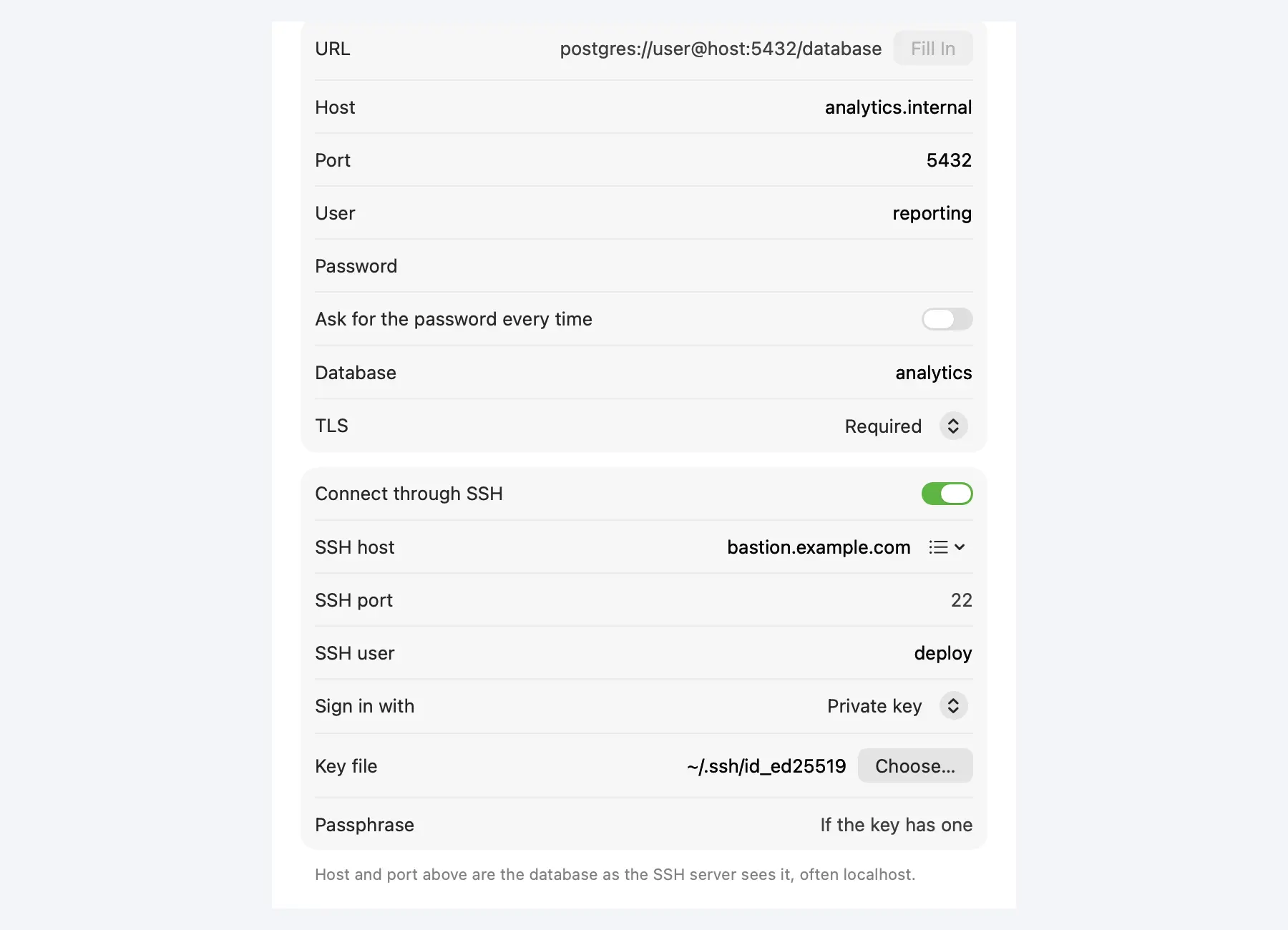 A PostgreSQL connection in dbPlus that goes through SSH with a private key. SSH tunnels are part of dbPlus Premium.
A tunnel gets you into the production database; it does nothing to stop a bad UPDATE once you are there. Our guide on editing production data safely covers that part.
FAQ
Is an SSH tunnel secure enough for a production database?
The traffic between your Mac and the SSH server is encrypted, and the database port never has to face the internet. When the database runs on a different host, the leg from the SSH server to the database is not covered by SSH, so if that leg crosses a network you do not trust, turn on TLS in the database as well. Use key authentication and keep the bastion patched.
Why does mysql -h localhost ignore my tunnel?
The MySQL client treats localhost as a request to use the local Unix socket, so it never touches the forwarded TCP port. Use -h 127.0.0.1 or add --protocol=TCP.
How do I close an SSH tunnel running in the background?
Find the ssh process with lsof -nP -iTCP:5433 -sTCP:LISTEN and kill its PID. If you started it with a control socket (-M -S path), run ssh -S path -O exit host instead.
Can I tunnel to Amazon RDS or another managed database?
Yes, through a bastion or any instance in the same private network that you can SSH into. Use the database endpoint as the destination in -L, for example -L 5433:your-endpoint:5432, because you cannot log in to the database host itself.
What is the difference between ssh -L and ssh -D?
-L forwards one local port to one fixed destination, which is what a database connection needs. -D starts a SOCKS proxy that can reach any destination the server can, and only works with clients that support SOCKS.