How to edit production data safely
Habits and settings that stop a bad UPDATE on a live database, from read-only roles and transactions to safe-updates mode, timeouts and real backups.
Editing production data safely comes down to two things: make a mistake hard to commit, and make it easy to undo. In practice that means connecting read-only unless you mean to write, running every change inside a transaction, checking the row count before you COMMIT, and having a backup you know how to restore. The examples below use PostgreSQL and MySQL, with plain psql and the mysql client.
dbPlus, the Mac database client we make, comes up in one section near the end, and we are naturally biased about that part. The habits before it need nothing but the command line.
Connect read-only unless you mean to write
Most visits to a production database are to look, not to change. A login that cannot write turns a slip of the keyboard into an error message.
PostgreSQL
Create a role that can only read, and set a password for it with \password support_ro in psql so the password never lands in your shell history or the server log:
CREATE ROLE support_ro LOGIN;
GRANT CONNECT ON DATABASE app TO support_ro;
GRANT USAGE ON SCHEMA public TO support_ro;
GRANT SELECT ON ALL TABLES IN SCHEMA public TO support_ro;
ALTER DEFAULT PRIVILEGES FOR ROLE app_owner IN SCHEMA public
    GRANT SELECT ON TABLES TO support_ro;
ALTER ROLE support_ro SET default_transaction_read_only = on;
GRANT SELECT ON ALL TABLES only covers tables that exist today. The ALTER DEFAULT PRIVILEGES line covers tables that app_owner (the role your migrations run as) creates later. On PostgreSQL 14 and newer, GRANT pg_read_all_data TO support_ro; replaces the USAGE, SELECT and default-privilege lines and covers every schema, including tables created later.
The last line adds a second layer. With it, an UPDATE fails with cannot execute UPDATE in a read-only transaction. Treat it as a guard against accidents, not as a permission: any session can run SET default_transaction_read_only = off. The grants are what actually block writes, and with them in place the same UPDATE fails with permission denied for table orders.
You can get the same guard on your normal account for a single session through the connection string:
psql "host=127.0.0.1 port=5433 dbname=app user=app options='-c default_transaction_read_only=on'"
MySQL
CREATE USER 'support_ro'@'10.0.%' IDENTIFIED BY 'use-a-long-random-password';
GRANT SELECT, SHOW VIEW ON app.* TO 'support_ro'@'10.0.%';
Limit the host part to the network you connect from rather than '%'. For a single session on an account that can write, SET SESSION TRANSACTION READ ONLY; makes later writes fail with ERROR 1792 (25006): Cannot execute statement in a READ ONLY transaction. As with PostgreSQL, the session can switch this back, so it protects against mistakes, not against intent.
Run every change inside a transaction
Autocommit is on by default in both psql and the mysql client, so each statement is saved the moment it finishes. Open a transaction first and you get a chance to look before anything is permanent.
BEGIN;

UPDATE orders
SET status = 'cancelled'
WHERE id IN (1042, 1043, 1051)
RETURNING id, status;
psql prints the returned rows and then UPDATE 3. If the count matches what you expected, run COMMIT;. If it says UPDATE 3104, run ROLLBACK; and nothing has changed. RETURNING is a PostgreSQL feature that shows the changed rows as part of the same statement.
In MySQL the shape is the same:
START TRANSACTION;

UPDATE orders
SET status = 'cancelled'
WHERE id IN (1042, 1043, 1051);

SELECT id, status FROM orders WHERE id IN (1042, 1043, 1051);
The client reports Query OK, 3 rows affected along with Rows matched and Changed counts. Then COMMIT; or ROLLBACK;.
Two differences between the engines matter here. PostgreSQL can roll back most DDL, so an ALTER TABLE inside BEGIN is undone by ROLLBACK. MySQL commits the open transaction implicitly before statements such as ALTER TABLE, CREATE INDEX, DROP TABLE and TRUNCATE TABLE, so ROLLBACK cannot undo them (MySQL manual). Transactions also only cover InnoDB tables; an old MyISAM table ignores them.
In psql you can make transactions the default. With \set AUTOCOMMIT off in your startup file, psql opens a transaction before your first statement and nothing is saved until you type COMMIT. Do not leave such a transaction open while you go to lunch, because it holds row locks and keeps VACUUM from cleaning up.
Write the WHERE clause as a SELECT first
A common production accident is a WHERE clause that matches more rows than intended, or no WHERE clause at all. Write the filter as a SELECT first, and only then change the first line:
SELECT count(*) FROM orders
WHERE customer_id = 4210 AND status = 'pending';
Say it returns 3. Now reuse the exact same WHERE clause in the UPDATE, run it inside a transaction, and compare the reported count with 3. Any difference means ROLLBACK.
For anything larger than a handful of rows, save a copy of the rows before you touch them:
CREATE TABLE backup_orders_20261020 AS
SELECT * FROM orders
WHERE customer_id = 4210 AND status = 'pending';
That works in both engines. If the change turns out wrong, put the old values back. In PostgreSQL:
UPDATE orders o
SET status = b.status
FROM backup_orders_20261020 b
WHERE o.id = b.id;
In MySQL the same restore is UPDATE orders o JOIN backup_orders_20261020 b ON b.id = o.id SET o.status = b.status;. Drop the backup table once you are sure, so it does not sit around with customer data in it.
Turn on safe-updates mode in MySQL
MySQL has a session setting that refuses an UPDATE or DELETE unless the WHERE clause uses a key column or the statement has a LIMIT:
SET SESSION sql_safe_updates = 1;
A forgotten WHERE then fails with ERROR 1175 (HY000): You are using safe update mode and you tried to update a table without a WHERE that uses a KEY column. The client option --safe-updates (also spelled --i-am-a-dummy) turns it on at connect time and also sets sql_select_limit=1000 and max_join_size=1000000, so a careless SELECT cannot flood your terminal. To make it permanent for the command-line client, add it to ~/.my.cnf:
[mysql]
safe-updates
The MySQL manual has the details. Safe-updates mode catches a missing filter, not a wrong one: WHERE id > 0 passes the check and still updates every row.
PostgreSQL has no built-in equivalent. If you run your own server, the third-party pg-safeupdate extension rejects UPDATE and DELETE statements that have no WHERE clause.
Set statement and lock timeouts
A query that runs for 20 minutes, or an ALTER TABLE stuck waiting for a lock, can hurt production as much as a bad update. While ALTER TABLE waits for its lock, new queries on that table queue up behind it, so a migration that cannot get its lock can stall the application. Set limits at the start of your session:
SET statement_timeout = '30s';
SET lock_timeout = '5s';
SET idle_in_transaction_session_timeout = '10min';
lock_timeout makes your statement give up if it waits more than five seconds for any single lock, which is what you want for schema changes on a busy table. You can attach these settings to a role with ALTER ROLE support_ro SET statement_timeout = '30s';. PostgreSQL 17 added transaction_timeout to cap a whole transaction. The PostgreSQL documentation advises against setting these globally in postgresql.conf, since that affects every session, including the application's.
MySQL has similar settings with different units:
SET SESSION max_execution_time = 30000;
SET SESSION innodb_lock_wait_timeout = 5;
SET SESSION lock_wait_timeout = 5;
max_execution_time is in milliseconds and applies to SELECT only. innodb_lock_wait_timeout is in seconds (default 50) and covers row locks. lock_wait_timeout is in seconds and covers metadata locks, the ones ALTER TABLE waits for; its default is 31,536,000 seconds, one year.
Keep a backup you have restored at least once
Before a risky change, take a quick dump of the table you are about to touch:
pg_dump -h 127.0.0.1 -p 5433 -U app -Fc -t public.orders -f orders-20261020.dump app
mysqldump -h 127.0.0.1 -P 3307 -u app -p --single-transaction app orders > orders-20261020.sql
For mistakes you only notice later, you need point-in-time recovery. In PostgreSQL that means a base backup plus archived WAL files, which lets you restore the database to the moment before the bad statement with recovery_target_time (continuous archiving). In MySQL it means a full backup plus binary logs replayed with mysqlbinlog --stop-datetime (point-in-time recovery). Managed database services usually offer point-in-time restore as a setting; check that it is on and how many days it keeps.
Restore into a new instance and copy the rows you need back, rather than rolling the whole production database back and losing every other change since. Practice the restore once before you need it, because a first attempt tends to turn up a missing step or a permission you do not have.
Make production look different
A classic accident is a statement typed into the wrong window: you think you are on staging and you are not. Make the production connection impossible to mistake.
For psql, keep a separate startup file and give it a red prompt:
\set PROMPT1 '%[%033[1;31m%]PROD %n@%M/%/%[%033[0m%]%R%# '
\set AUTOCOMMIT off
Save that as ~/.psqlrc-prod and connect with PSQLRC=~/.psqlrc-prod psql service=prod, where prod is a section in ~/.pg_service.conf. For MySQL, store the connection details with mysql_config_editor set --login-path=prod --host=... --user=... --password and use an alias:
alias mysql-prod='mysql --login-path=prod --safe-updates --prompt="PROD \u@\h [\d]> "'
GUI clients usually let you color or label a connection. Use that, and pick a color you never use for anything else. A terminal profile with a different background for production sessions helps too.
Get a second look at large changes
For anything beyond a few rows, write the SQL in the ticket or pull request, run it on staging against a recent copy of the data, and have someone read it before it runs in production. EXPLAIN without ANALYZE shows how the statement will find its rows without running it, which tells you whether a big UPDATE will use an index or scan the whole table. Our guide on reading PostgreSQL EXPLAIN plans explains the output. If you reach production through a bastion, set up the tunnel as described in connecting through an SSH tunnel on Mac.
The safeguards side by side
| Safeguard | PostgreSQL | MySQL |
|---|---|---|
| Read-only access | A role with GRANT SELECT and default_transaction_read_only = on |
A user with GRANT SELECT, SHOW VIEW only |
| Undo before it counts | BEGIN, check the row count, then ROLLBACK or COMMIT |
START TRANSACTION, check, then ROLLBACK or COMMIT (DDL commits on its own) |
Refuse UPDATE or DELETE without a key |
Not built in; the pg-safeupdate extension if you can install it | sql_safe_updates = 1 |
| Stop a long statement | statement_timeout |
max_execution_time (SELECT only) |
| Stop waiting on locks | lock_timeout |
innodb_lock_wait_timeout for rows, lock_wait_timeout for metadata |
How dbPlus helps
dbPlus is our native Mac client for PostgreSQL, MySQL, MariaDB, SQLite and SQL Server, and several of its features follow the habits above. Edits in the table grid are staged before anything runs: changed cells turn amber, new rows green and deleted rows red, and the footer counts the pending changes. You can preview the exact SQL, then commit everything in one transaction or discard it.
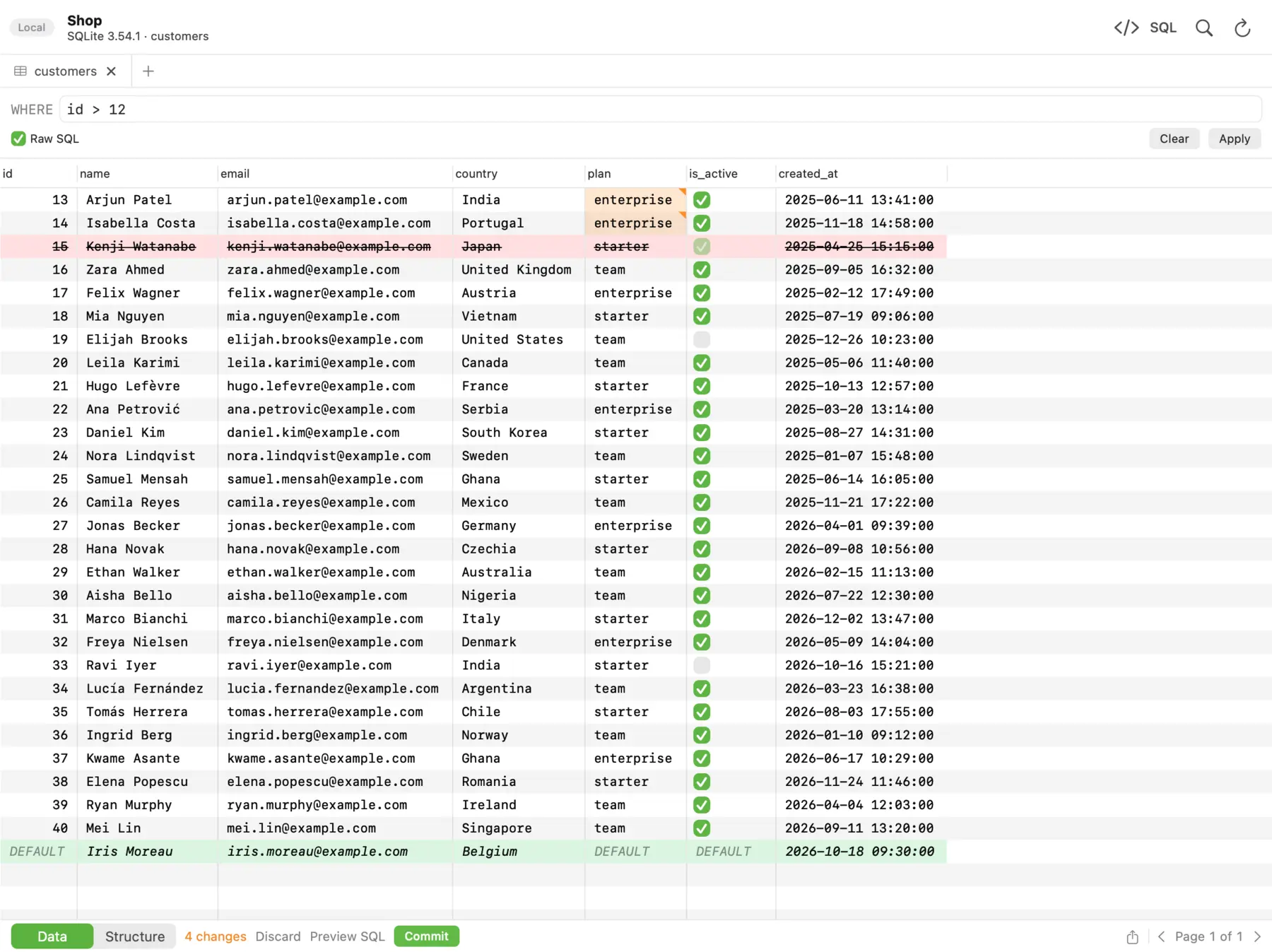 In dbPlus, changed cells turn amber, deleted rows red and new rows green, and nothing runs until you commit.
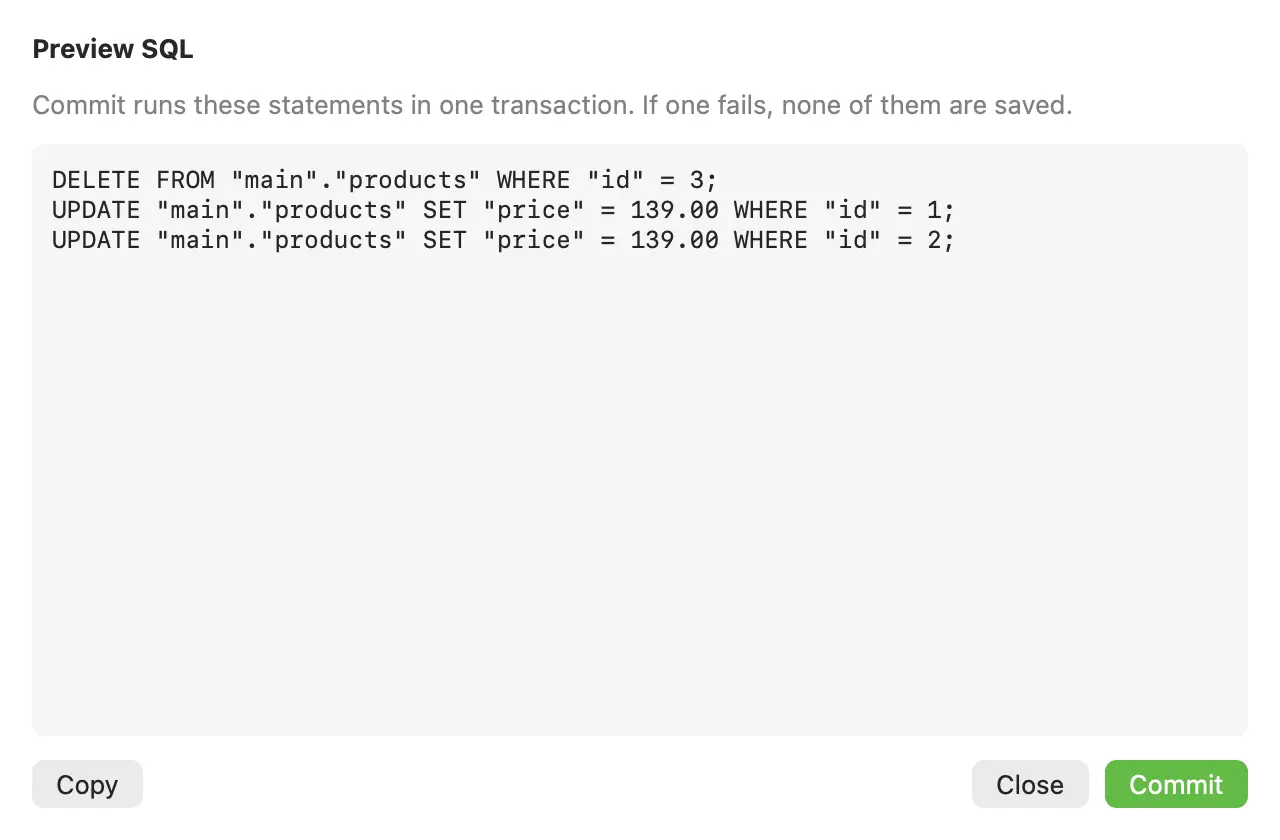 Preview SQL lists the exact statements dbPlus will run when you commit.
You can mark a connection as Production, and dbPlus then asks before anything writes to it. Read-only connections are enforced by the database itself where the database allows it. An UPDATE or DELETE without a WHERE clause asks for confirmation first. After sleep or a dropped connection, dbPlus reconnects on its own and tells you when an open transaction was lost, instead of carrying on as if your uncommitted changes were still there.
None of this replaces grants, timeouts or backups. dbPlus is coming to the Mac App Store. It is free for everyday work, including editing rows and the full SQL editor, and dbPlus Premium costs USD 19 a year. For other options, see our list of SQL clients for Mac.
FAQ
How do I undo an UPDATE that was already committed?
There is no undo once a transaction commits. If you saved the affected rows in a backup table, restore the old values from it. Otherwise, restore a backup or a point-in-time copy into a separate instance and copy the correct rows back.
Is default_transaction_read_only enough to protect production?
No. Any session can turn it off with a SET command, so it only prevents accidents. Real protection comes from a role that has only SELECT privileges.
Does PostgreSQL have something like MySQL's sql_safe_updates?
Not built in. Running changes inside BEGIN and checking the row count does the same job, and the third-party pg-safeupdate extension rejects UPDATE and DELETE without a WHERE clause if you can install extensions on your server.
Can I run EXPLAIN ANALYZE on an UPDATE in production?
EXPLAIN ANALYZE really executes the statement. Wrap it in BEGIN and ROLLBACK so the changes are discarded, and remember that it still does the work and takes the locks while it runs. On a busy table, plain EXPLAIN is the safer first step.
Should I turn autocommit off in psql?
For production sessions, yes. With \set AUTOCOMMIT off, nothing is saved until you type COMMIT. The cost is that you must remember to commit or roll back, or the open transaction will hold locks.