Azure Data Studio alternatives on Mac
Azure Data Studio retired in February 2026. Here is what replaces its notebooks, extensions and SQL Server tools on a Mac, and how to move your work over.
Azure Data Studio was retired on 28 February 2026, and the direct replacement on a Mac is Visual Studio Code with Microsoft's free MSSQL extension. It now covers most of what Azure Data Studio did for SQL Server, including notebooks, schema compare and the profiler. If you used Azure Data Studio for PostgreSQL or MySQL too, or you never warmed to working inside a code editor, a standalone client such as DataGrip, DBeaver, TablePlus, Beekeeper Studio or dbPlus may suit you better.
We make dbPlus, one of the alternatives below. Keep that in mind as you read; we've tried to say plainly where each app, including ours, falls short.
What Azure Data Studio did
Azure Data Studio was a free, cross-platform database tool built on the same code base as VS Code, and for years it was Microsoft's main graphical SQL tool for macOS. Out of the box it gave you a T-SQL editor with IntelliSense, Object Explorer, server groups, a results grid that exported to CSV, JSON and Excel and could chart results, and dashboards with widgets for server health.
Two parts made it more than a query tool. The first was Jupyter notebooks: .ipynb files with SQL, Python and Spark kernels, often used for runbooks and troubleshooting guides. The second was extensions, which added SQL Server Agent, Profiler, Schema Compare, SQL Database Projects, Azure SQL migration and even other engines through PostgreSQL and MySQL extensions.
Microsoft's retirement page says Azure Data Studio no longer receives updates or security fixes. Its GitHub repository is now archived.
What replaces each piece
This table maps Azure Data Studio features to their replacements. The middle column follows Microsoft's own mapping.
| Azure Data Studio feature | Replacement in VS Code | Other options on a Mac |
|---|---|---|
| T-SQL editor, Object Explorer, server groups | MSSQL extension (connection groups with colors) | DataGrip, TablePlus, DBeaver, Beekeeper Studio, dbPlus |
| Results grid and export | MSSQL results grid (CSV, JSON, Excel) | DataGrip, DBeaver, TablePlus; a paid feature in Beekeeper Studio and dbPlus |
Notebooks (.ipynb) |
SQL notebooks in the MSSQL extension, Python through the Jupyter extension | JupyterLab or any Jupyter tool |
| Execution plans | MSSQL query plan visualizer | DataGrip, dbPlus (plan tree with slow steps marked) |
| Schema Compare extension | MSSQL schema compare | DBeaver Enterprise and above |
| SQL Database Projects | SQL Database Projects extension | Visual Studio with SSDT (Windows) |
| SQL Server Profiler extension | MSSQL query profiler (Extended Events) | SSMS XEvent Profiler (Windows) |
| SQL Server Agent extension | None | SSMS (Windows) |
| Backup, restore and database admin | MSSQL database operations | SSMS (Windows) for full administration |
| Flat-file import | MSSQL import flat file | DBeaver, dbPlus Premium (CSV, Excel, JSON) |
| DACPAC and BACPAC | MSSQL data-tier application tools, SqlPackage CLI | None |
| PostgreSQL extension | Microsoft's PostgreSQL extension for VS Code | DataGrip, DBeaver, TablePlus, Beekeeper Studio, dbPlus |
| MySQL extension | No replacement announced yet | Sequel Ace, TablePlus, DBeaver, MySQL Workbench, dbPlus |
| Azure Cosmos DB (MongoDB API) | Azure Databases extension | Outside the scope of this guide |
The gaps are clear. SQL Server Agent has no home on the Mac at all, and Microsoft hasn't named a MySQL replacement. Most of the rest has a VS Code equivalent, although Azure Data Studio's server dashboards and result charts aren't on the MSSQL extension's feature list.
The alternatives
Our guide to the best SQL Server clients for Mac covers each app in more depth, including SQLPro for MSSQL and Navicat, and explains how to run SQL Server itself on an Apple silicon Mac. The entries below are shorter and focus on what matters when you leave Azure Data Studio.
VS Code with the MSSQL extension
This is the closest match, and it's where Microsoft is investing. Azure Data Studio was built on the VS Code code base, so the editor, command palette and keyboard habits carry over. The MSSQL extension has generally available features for connections, Object Explorer, the results grid, execution plans, a table designer, a schema designer, schema compare, data editing with pending changes and a script preview, backup and restore, DACPAC tools, a profiler, local SQL Server containers and SQL notebooks. It's free and runs natively on Intel and Apple silicon Macs.
Choose it if most of your Azure Data Studio time was SQL Server. Its limits are that it's SQL Server only (plus Azure SQL and SQL database in Fabric), and that Agent jobs still need SSMS.
DataGrip
DataGrip is a full database IDE from JetBrains that handles SQL Server, PostgreSQL, MySQL and many others in one window, which makes it a strong pick if you used Azure Data Studio's extensions for several engines. Its SQL editor, with schema-aware completion and refactoring, is the most capable here.
It's free for non-commercial use (with mandatory anonymous usage statistics, per JetBrains), and USD 109 for the first year for individuals doing paid work, or USD 259 per user a year for organizations.
DBeaver
DBeaver Community is free and open source and connects to nearly everything, so it covers SQL Server, PostgreSQL and MySQL in one app at no cost. It has ER diagrams and data transfer between databases. Schema comparison is in the paid Enterprise edition (USD 255 a year) and above. The interface is dense and doesn't feel like a Mac app, but nothing else free covers as many engines.
TablePlus
TablePlus is a polished, Mac-like client for SQL Server, PostgreSQL, MySQL, MariaDB, SQLite and more. It's quicker to find your way around than an IDE, it holds grid edits for review before committing them, and it has a safe mode for production. Its Metrics board builds simple dashboards from queries, which covers some of what Azure Data Studio's widgets did. It costs USD 99 for one device with a year of updates, and the free trial limits you to two tabs and two windows. It doesn't offer notebooks and isn't an admin tool.
Beekeeper Studio
Beekeeper Studio is a clean, cross-platform client whose free Community edition includes SQL Server, PostgreSQL, MySQL, MariaDB and SQLite. It's a good free fit if you mostly ran queries and browsed tables in Azure Data Studio. Import and export start with the paid Indie plan (USD 9 a month billed yearly), and Entra ID and Windows authentication are only in the Business plan.
dbPlus
dbPlus is our native Mac client, coming to the Mac App Store and not released yet. It supports SQL Server 2017 and newer and Azure SQL Database, plus PostgreSQL 12 and newer, MySQL 8.0 and newer, MariaDB 10.6 and newer, and SQLite files.
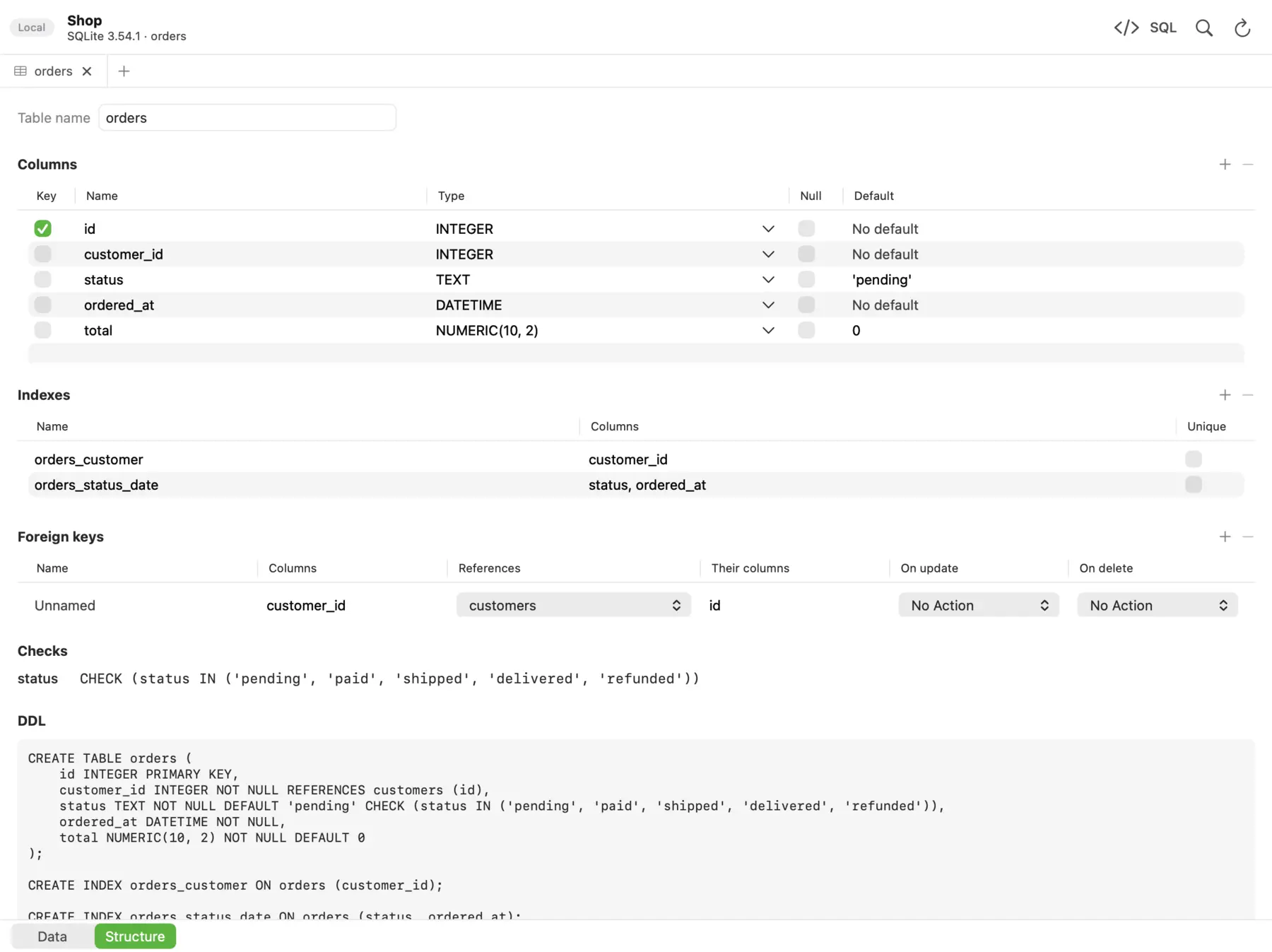 The Structure view in dbPlus shows a table's columns, indexes, foreign keys, checks and CREATE statement.
It's built around editing data safely. Edits are staged and color-coded, you can preview the exact SQL and commit it in one transaction or discard it, a connection marked Production asks before any write, and an UPDATE or DELETE without a WHERE asks first. After sleep or a dropped connection it reconnects by itself and tells you if an open transaction was lost. Saved queries are plain .sql files in a folder you choose, which suits a git workflow. It's free with two connections and three tabs open at a time, and dbPlus Premium costs USD 19 a year. It collects no data.
It doesn't replace the Azure Data Studio extras: there are no notebooks, no schema compare, no profiler, no Agent support, and no dashboards. It's Mac only and supports five engines. It also can't import Azure Data Studio connections (it imports from TablePlus), so you'd re-enter them.
Comparison
| App | SQL Server | PostgreSQL | MySQL and MariaDB | Native Mac app | Price |
|---|---|---|---|---|---|
| VS Code with Microsoft extensions | Yes | Yes (PostgreSQL extension) | No Microsoft extension yet | No (Electron) | Free |
| DataGrip | Yes | Yes | Yes | No (Java IDE) | Free non-commercial, USD 109 a year individual |
| DBeaver | Yes | Yes | Yes | No (Java, Eclipse) | Free, PRO from USD 113 a year |
| TablePlus | Yes | Yes | Yes | Yes | USD 99 one-time per device |
| Beekeeper Studio | Yes, free edition | Yes | Yes | No (Electron) | Free, paid from USD 9 a month billed yearly |
| dbPlus | 2017 and newer, Azure SQL Database | 12 and newer | MySQL 8.0+, MariaDB 10.6+ | Yes | Free, Premium USD 19 a year |
Migration tips
- Run the migration toolkit before you uninstall anything. Since version 1.40.0, the MSSQL extension includes an Azure Data Studio migration flow that brings over saved connections, connection groups, supported settings and keybindings, and lets you choose which to import. Microsoft walks through it in its move to VS Code guide.
- Install the MSSQL Database Management Keymap extension if your fingers expect Azure Data Studio shortcuts, such as F5 to run a query.
- Open your SQL Database Projects as they are. Microsoft says they work in VS Code without conversion; install the SQL Database Projects extension, and the .NET 8 SDK if you build and publish projects.
- Move notebooks by opening the
.ipynbfiles in VS Code and choosing the MSSQL kernel. Each notebook connects to one server at a time, so a runbook that hopped between servers needs splitting. Python cells need the Jupyter extension. - Find a home for Agent jobs. If you manage SQL Server Agent, you need SSMS, which means a Windows virtual machine or a Windows machine you can reach over Remote Desktop.
- Plan for MySQL separately. Until Microsoft ships a MySQL extension, use a dedicated client; our best MySQL and MariaDB clients for Mac lists the options. PostgreSQL users can switch to Microsoft's PostgreSQL extension or a standalone app from our PostgreSQL GUI clients for Mac roundup.
- Remove Azure Data Studio once you've moved. It no longer gets security fixes, and leaving saved production credentials in an unmaintained app is an avoidable risk.
Which one should you pick?
If Azure Data Studio was your SQL Server tool and you were happy with it, move to VS Code with the MSSQL extension. It's free, it's the supported path, and it's the only option on a Mac that brings over notebooks, schema compare, the profiler and SQL projects together.
If you relied on the PostgreSQL or MySQL extensions, a multi-engine client is the cleaner answer. DataGrip is the strongest for heavy SQL work, DBeaver is the most capable free one, TablePlus is the most polished of the established apps, and Beekeeper Studio is a simple free choice if you use SQL logins.
dbPlus fits a narrower but common case: you mostly read and edit data across SQL Server and other engines, you want every change previewed before it runs, and you'd like a native Mac app at a low yearly price that collects no data. If you need notebooks or admin tools, it isn't the one, and it isn't out yet.
Prices and features were checked on the vendors' sites in October 2026.
FAQ
When was Azure Data Studio retired?
Microsoft announced the retirement in February 2025, and Azure Data Studio was retired on 28 February 2026. It no longer receives updates, security patches or support, and Microsoft recommends VS Code with the MSSQL extension instead.
Can I still use Azure Data Studio on my Mac?
An installed copy may still open, but it's unsupported and unpatched. That's a poor fit for a tool that holds database credentials and connects to production servers, so plan to move.
Does VS Code support Azure Data Studio notebooks?
Yes. Azure Data Studio saved notebooks as .ipynb files, and the MSSQL extension's SQL notebooks use the same Jupyter format. Open the file, choose the MSSQL kernel and connect to a server. Each notebook works with one server connection at a time.
What replaces the PostgreSQL and MySQL extensions from Azure Data Studio?
For PostgreSQL, Microsoft offers a PostgreSQL extension for VS Code. For MySQL, Microsoft lists its replacement as pending, so use a dedicated client such as Sequel Ace, TablePlus, DBeaver or MySQL Workbench.
Is there a standalone Mac app like Azure Data Studio?
Not from Microsoft. The closest standalone options are DataGrip and DBeaver for breadth, TablePlus and Beekeeper Studio for a simpler interface, and dbPlus once it's released if careful data editing matters most to you.