The 10 best SQL clients for Mac in 2026
We compared ten SQL clients for Mac, including TablePlus, DBeaver, DataGrip and Sequel Ace, on price, supported databases and how safely they edit data.
For most Mac developers, TablePlus is the best all-round SQL client: a native app that feels quick and connects to more than a dozen database engines. DBeaver Community is the best free choice when you need many databases, and DataGrip is the best when you write SQL all day and want a full IDE. If you edit production data and want to see every change before it runs, dbPlus is worth a look when it reaches the Mac App Store.
We make dbPlus, one of the ten apps below, so keep that in mind as you read. We have tried to give every app a fair hearing, including the ones that beat ours.
The 10 best SQL clients for Mac at a glance
| App | Best for | Price | Platforms |
|---|---|---|---|
| TablePlus | A fast native client for many engines | Free version, licenses from USD 99 one-time | Mac, Windows, Linux, iOS |
| DBeaver | Free use with the widest database support | Community free, PRO from USD 113 a year | Mac, Windows, Linux |
| DataGrip | Writing a lot of SQL with IDE help | Free for non-commercial use, USD 109 first year for individuals | Mac, Windows, Linux |
| dbPlus | Careful edits on live and production data | Free, Premium USD 19 a year | Mac (coming to the Mac App Store) |
| Postico 2 | PostgreSQL only | From USD 69 one-time | Mac |
| Sequel Ace | Free MySQL and MariaDB work | Free | Mac |
| Beekeeper Studio | Open source on every desktop OS | Community free, paid from USD 9 a month billed yearly | Mac, Windows, Linux |
| Navicat Premium | Modeling, sync and admin tools in one suite | Lite free, Standard USD 1,499 perpetual | Mac, Windows, Linux |
| DbVisualizer | Many JDBC databases from one tool | Free edition, Pro USD 199 first year | Mac, Windows, Linux |
| SQLPro Studio | Mac plus iPhone and iPad | From USD 15.99 a month, or USD 219.99 lifetime | Mac, iPhone, iPad |
How we picked
Every app here handles the daily basics: connecting, browsing and editing tables, and running queries. We compared which databases each app supports, how the price works, whether it is a native, Java or Electron app, how it guards against mistakes, and whether it was still maintained in October 2026. Discontinued and retired tools are listed near the end, with the reason.
The 10 best SQL clients for Mac
1. TablePlus
TablePlus is a native client that gives you one consistent window for many databases. The list includes PostgreSQL, MySQL, MariaDB, SQLite, SQL Server, Redshift, CockroachDB, Redis, MongoDB, Oracle, Cassandra, BigQuery and ClickHouse. It suits developers who move between several engines in a day and want one quick, tidy app for all of them.
You can use TablePlus for free with no time limit, but the free version allows only two open tabs, two windows and two filters at a time. A Basic license costs USD 99 one-time for one device and includes a year of updates. A Standard license covers two devices and was listed at USD 129 in October 2026. After the first year you can renew for updates or keep the last build you received. It runs on macOS 12 or later, Windows and Linux, and a license also covers the iOS app. Details are on the TablePlus pricing page.
Strengths:
- It is a native Mac app and feels like one: quick to open, quick to switch tables.
- Edits made in the grid stay pending until you commit them, and you can preview the SQL first.
- Safe Mode can warn you, or ask for the database password, before queries run, and connections can carry tags such as production with a colored status bar.
Drawbacks:
- Two tabs in the free version is tight for real work, so plan to buy a license.
- A license covers one or two devices, and updates after the first year need a renewal.
- Its JavaScript plugin system was still labeled beta in October 2026.
2. DBeaver
DBeaver Community is a free, open-source database tool (Apache 2.0 license) written in Java on the Eclipse platform. It ships with drivers for more than 100 databases and can connect to almost anything that has a JDBC driver, which no other app here matches.
It is the right pick for anyone who touches many databases, including uncommon ones, and does not want to pay, since Community is free for any use. The commercial DBeaver PRO editions add NoSQL databases and more tools: Lite costs USD 113 a year (or USD 12 a month), Enterprise USD 255 a year and Ultimate USD 510 a year, according to the DBeaver edition comparison. It runs on Mac, Windows and Linux, and the download includes its own Java runtime, so you do not install Java separately.
Strengths:
- Free, with the widest database coverage of any client here.
- Community already includes ER diagrams, data import and export, execution plans, SSH tunnels and an AI chat.
- A connection marked as Production turns off auto-commit and asks before running data changes.
Drawbacks:
- It does not look or behave like a Mac app. The Eclipse-style interface is dense and takes time to learn.
- It feels heavier than the native apps on this list, especially on startup.
- NoSQL databases such as MongoDB need a paid PRO edition.
3. DataGrip
DataGrip is the database IDE from JetBrains. It is built for people who write a lot of SQL, with code completion that knows your schema and foreign keys, Git and other version control integration, an AI assistant that can write and fix queries, and a query plan view that shows a plan as a tree or a diagram, and since version 2026.1 as a flame graph. DataGrip lists 26 databases on its site, from PostgreSQL and MySQL to Oracle, MongoDB and Snowflake.
DataGrip is free for non-commercial use, such as learning, hobby projects, open source work and content creation. The free license requires sending anonymous usage statistics, and you cannot opt out. For paid work, an individual license costs USD 109 for the first year, USD 87 for the second and USD 65 from the third year on, or USD 10.90 a month. An organization license costs USD 259 per user per year, per the DataGrip pricing page. It runs on Mac, Windows and Linux, with a 30-day trial.
Strengths:
- The deepest SQL editor of any app here, especially on large codebases full of
.sqlfiles. - Read-only data sources and a manual transaction mode help on sensitive connections.
- Free for students, hobbyists and open source work.
Drawbacks:
- It is a full IDE, with the memory use and learning curve that come with one, which is a lot for quick lookups and small row edits.
- Paid work requires a subscription, and the free license has mandatory telemetry.
4. dbPlus
dbPlus is our app: a native Mac database client for PostgreSQL 12 and newer, MySQL 8.0 and newer, MariaDB 10.6 and newer, SQLite files, and SQL Server 2017 and newer, including Azure SQL Database. It is coming to the Mac App Store and is not released yet. The dbPlus page has the details.
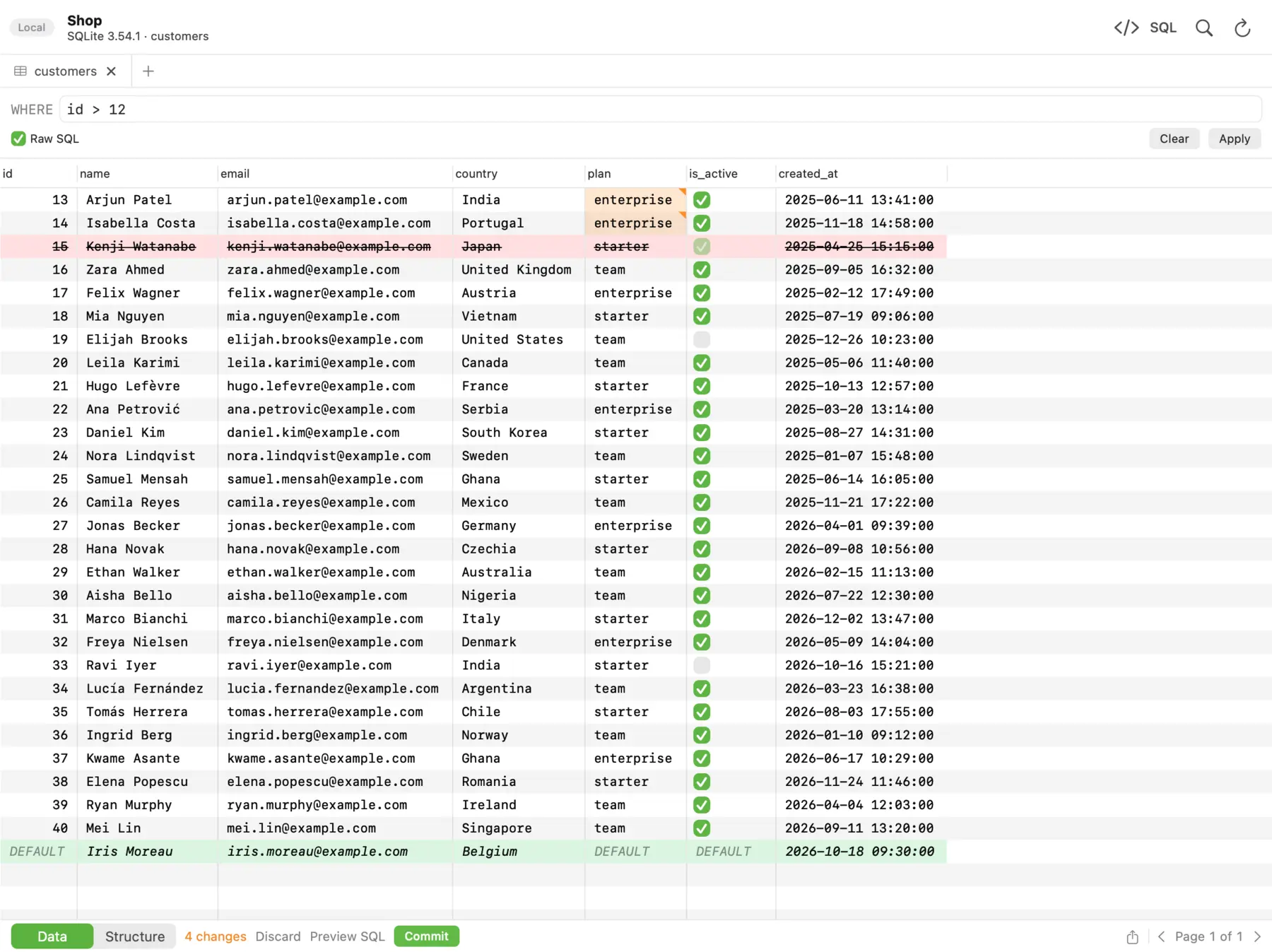 In dbPlus, changed cells turn amber, deleted rows red and new rows green, and nothing runs until you commit.
We built it for developers who edit live data and want guardrails. Edits in the grid are staged before anything runs: changed cells turn amber, new rows green and deleted rows red, and the footer counts the changes. You can preview the exact SQL, then commit everything in one transaction or discard it. If you mark a connection as Production, dbPlus asks before anything writes to it. An UPDATE or DELETE without a WHERE clause asks first. After sleep or a dropped connection, dbPlus reconnects by itself and tells you when an open transaction was lost, instead of carrying on without it. Our guide to editing production data safely explains why those details matter.
dbPlus is free for everyday work with every supported database, with two connections and three tabs open at a time. dbPlus Premium costs USD 19 a year through the Mac App Store, with a one-week free trial for new subscribers. Premium adds unlimited windows and tabs, SSH tunnels, structure editing, and import, export, dumps and copying tables between databases. It needs macOS 14 Sonoma or later, on Apple silicon or Intel.
Strengths:
- Safety by default: staged edits, Production marking, the
WHEREguard, and honest reconnect behavior. - Explain shows the query plan as a tree and points out the slow steps.
- It collects no data and sends nothing to us. Passwords stay in your Mac's Keychain.
- Premium costs USD 19 a year, less than any other subscription on this list.
Drawbacks:
- It is not released yet, so it has no track record.
- It supports five engines. There is no Oracle, MongoDB, Redis or Snowflake.
- It is Mac only, so it does not suit a team on mixed operating systems.
- The free version does not include SSH tunnels.
5. Postico 2
Postico 2 from Egger Apps is a native Mac client made for PostgreSQL, with official support for Amazon Redshift, Greenplum and CockroachDB too. It has a multi-file query editor with folders and autosave, a table structure editor, a function editor, and a data grid with a foreign key picker.
Postico 2 is for developers who work mostly or only on PostgreSQL and want a Mac app that feels at home on macOS. A personal license costs USD 69 one-time (one user, up to three devices), a commercial license USD 99 per device, and a student license USD 29, per the Postico 2 pricing page. The evaluation version has no time limit, but some features are disabled until you buy. It needs macOS 14 or later.
Strengths: it is focused, polished, and a one-time purchase. Drawbacks: it is PostgreSQL only, and the Mac App Store edition has no trial. Our PostgreSQL GUI roundup compares it with pgAdmin and others.
6. Sequel Ace
Sequel Ace is a free, open-source client for MySQL and MariaDB, forked from Sequel Pro in 2020 after Sequel Pro stopped getting updates. It supports MySQL 5.7 and newer and MariaDB 10.0 and newer, and it needs macOS 13.5 Ventura or later. You can install it from the Mac App Store.
It is the first app to try if you use MySQL and want a free Mac client. The project is active: version 6.0.3 came out in October 2026.
Strengths: free, native, and actively maintained. Drawbacks: it is MySQL and MariaDB only, and because the app is sandboxed, some advanced SSH setups (agents or ProxyCommand) may not work inside it; the Sequel Ace docs suggest opening the tunnel yourself in that case. See our MySQL and MariaDB clients guide for the full comparison.
7. Beekeeper Studio
Beekeeper Studio is a cross-platform SQL editor and database manager with a clean interface. The Community Edition is free and open source under GPLv3 and includes unlimited connections and tabs, SSH tunnels, an editable data grid, and schema editing for PostgreSQL, MySQL, MariaDB, SQLite, SQL Server, Redshift, BigQuery, Redis and a few others.
It suits teams on mixed operating systems. The paid editions add more databases (such as Oracle, MongoDB, DuckDB, Snowflake and ClickHouse), import and export, backup and restore, and editing query results directly. Indie costs USD 9 a month billed yearly (or USD 18 month to month) for one device, and Professional USD 14 a month billed yearly, per the Beekeeper pricing page. Paying for 12 months gives you a lifetime license to the versions released in that period.
Strengths: a generous free tier, a friendly interface, and the same app on Mac, Windows and Linux. Drawbacks: it is an Electron app, so it does not feel native on macOS, and import and export are paid features.
8. Navicat Premium
Navicat Premium 18 is a long-running commercial suite that connects to MySQL, PostgreSQL, SQL Server, Oracle, SQLite, MariaDB, MongoDB, Redis and Snowflake. It also includes data modeling, data and structure sync, data transfer, backup and restore, automation and AI assistants.
It fits companies and DBAs who want one licensed suite with modeling and sync tools. On Navicat's store in October 2026, a perpetual Standard license was listed at USD 1,499 and Enterprise at USD 1,999, with monthly and yearly subscriptions also offered; check the Navicat store for current prices and discounts. Navicat Premium Lite is a free edition with the core features, allowed for commercial use, for up to five users per organization. It runs on macOS 14 or later, Windows and Linux.
Strengths: the most complete toolset here for modeling, migration and sync. Drawbacks: by far the highest price on this list, and many of its features go unused by a developer who mainly browses and queries.
9. DbVisualizer
DbVisualizer is a Java-based tool that supports a long list of databases, from PostgreSQL and SQL Server to Db2, Teradata, Snowflake and Databricks. Any database with a JDBC driver can be used, and many get database-specific support.
It suits DBAs and developers who work across many enterprise databases. The Free edition has no time limit and includes connection management, SSH, SQL history and monitoring, but it leaves out the table data viewer and editor, import and export, explain plans and the query builder. Pro costs USD 199 per user for the first year, then USD 89 a year for updates, with a perpetual license for the version you have, per the DbVisualizer pricing page. It runs on Mac, Windows and Linux.
Strengths: wide database support and a perpetual Pro license. Drawbacks: the Free edition is too limited for daily editing work, and the interface feels like a cross-platform Java app.
10. SQLPro Studio
SQLPro Studio from Hankinsoft connects to MySQL and MariaDB, PostgreSQL, SQL Server 2005 and newer, Oracle 11g and newer, SQLite, Snowflake and MongoDB. Like TablePlus, it also has an app for iPhone and iPad.
The app is a free download from the Mac App Store, with SQLPro Premium sold inside the app as a subscription or a lifetime purchase. In the US store in October 2026, Premium was USD 15.99 a month or USD 99.99 a year, and a lifetime purchase was USD 219.99. It needs macOS 14 or later.
Strengths: broad engine support and iOS apps. Drawbacks: a year of the subscription costs about as much as a one-time TablePlus license, and the lifetime price is high.
A note on SQL Server and Azure Data Studio
If you used Azure Data Studio on your Mac, it is time to move. Microsoft retired it on 28 February 2026, and it no longer gets updates or security fixes. Microsoft's retirement notice points people to Visual Studio Code with the MSSQL extension. If you would rather use a dedicated database app, every client on this list except Postico 2 and Sequel Ace connects to SQL Server. Our guide to SQL Server clients for Mac covers that case in detail.
Apps we left out
- pgAdmin 4 and MySQL Workbench are free and official, but each covers a single engine. They appear in our PostgreSQL and MySQL guides.
- Querious is a paid Mac client for MySQL. Its newest release, 4.2.5, dates from October 2025.
- Arctype appears in older lists, but the app is no longer offered, and Homebrew marks its package as discontinued.
- Sequel Pro has not had a stable release since version 1.1.2 in 2016. Sequel Ace is its maintained successor.
Which one should you pick?
Pick TablePlus if you work with several engines and want a native app that stays fast. Pick DBeaver Community if you want the most databases for free and can live with a Java interface. Pick DataGrip if SQL is a large part of your job, or if your work is non-commercial and the free license fits. For a single engine, Postico 2 (PostgreSQL) and Sequel Ace (MySQL and MariaDB) are hard to beat on a Mac. Beekeeper Studio suits a team on mixed operating systems, and Navicat Premium suits companies that need modeling and sync tools and have the budget.
Consider dbPlus if your databases are among the five it supports, you often edit production data, and you want reviewed changes and an app that collects no data, at a low yearly price. It is Mac only and not released yet, so if you need a client today, or need Oracle or MongoDB, choose one of the others.
Prices and features were checked on the vendors' sites in October 2026. Prices change, so confirm them before you buy.
FAQ
What is the best free SQL client for Mac?
DBeaver Community is the best free SQL client for most people, because it is free for any use and supports more than 100 databases. If you use only MySQL or MariaDB, Sequel Ace is free and feels more at home on a Mac. Our list of free database clients for Mac covers every free tier and its limits.
What replaced Azure Data Studio on Mac?
Microsoft retired Azure Data Studio on 28 February 2026 and recommends Visual Studio Code with the MSSQL extension. If you prefer a dedicated client, TablePlus, DBeaver, DataGrip and dbPlus all connect to SQL Server.
Which SQL clients are native Mac apps?
TablePlus, Postico 2, Sequel Ace and dbPlus are native Mac apps. DBeaver and DbVisualizer run on Java, DataGrip runs on the JetBrains platform, and Beekeeper Studio is built with Electron. Native apps usually start faster and follow macOS conventions more closely.