Best free database clients for Mac
Here are ten free database GUIs for Mac, from DBeaver Community and Sequel Ace to pgAdmin and dbPlus, with the real limits of each free version.
The best free database GUI for Mac is DBeaver Community if you need many databases, and Beekeeper Studio Community if you want a simpler app. For a single engine, Sequel Ace (MySQL and MariaDB) and pgAdmin 4 (PostgreSQL) are free with no catches. Many other free clients are free tiers of paid apps, so this guide says exactly what each free version leaves out.
We make dbPlus, one of the apps below, and its free tier is listed with the same detail as everyone else's, limits included.
Free database clients for Mac at a glance
| App | Kind of free | Main limits of the free version | Databases |
|---|---|---|---|
| DBeaver Community | Open source, any use | NoSQL and cloud tools need PRO | More than 100 through JDBC |
| Beekeeper Studio Community | Open source, any use | No import and export, no editing query results, some databases paid | PostgreSQL, MySQL, MariaDB, SQLite, SQL Server, Redshift, BigQuery, Redis and more |
| Sequel Ace | Open source, any use | MySQL and MariaDB only | MySQL, MariaDB |
| pgAdmin 4 | Open source, any use | PostgreSQL only | PostgreSQL |
| dbPlus | Free tier | Two connections and three tabs at a time, no SSH tunnels, no structure editing or import and export | PostgreSQL, MySQL, MariaDB, SQLite, SQL Server |
| Navicat Premium Lite | Free edition, commercial use allowed | Up to five users per organization, fewer tools | MySQL, PostgreSQL, SQL Server, Oracle, SQLite, MariaDB, MongoDB, Redis, Snowflake |
| TablePlus | Free version with no time limit | Two tabs, two windows and two filters at a time | Many, including PostgreSQL, MySQL, SQL Server, Redis, MongoDB |
| DataGrip | Free non-commercial license | No paid work, usage statistics required | 26 listed and more |
| MySQL Workbench | Open source Community Edition | MySQL only, version 26.7 needs MySQL 8.4 or newer | MySQL |
| DbVisualizer Free | Free edition | No table data editor, import and export, or explain plans | Many through JDBC |
Free, free tier, or free for some people?
"Free" covers several different deals, and it helps to know which one you are getting.
Open-source apps such as DBeaver Community, Beekeeper Studio Community, Sequel Ace, pgAdmin 4 and the MySQL Workbench Community Edition are free for any use, including paid client work. Their code is public, and you never have to upgrade to keep working.
Free tiers of paid apps, such as the free versions of TablePlus and dbPlus, cost nothing but cap how much you can open at once or hold back some features. They suit light use and give you a long look before you pay.
Some free licenses depend on who you are. DataGrip's free license covers only non-commercial work, and Navicat Premium Lite allows commercial use but only up to five users per organization. Read the terms before using them for client projects.
The best free database clients for Mac
1. DBeaver Community
DBeaver Community is the most capable free database client on the Mac. It is open source under the Apache 2.0 license, free for any use, and ships with drivers for more than 100 databases, from PostgreSQL, MySQL and SQL Server to DuckDB, ClickHouse, Snowflake and Oracle. Anything with a JDBC driver can usually be added.
The free edition is complete enough for daily work. It includes the data editor, SQL editor, ER diagrams, data import and export, execution plans, SSH tunnels, database maintenance tools and an AI chat. What you do not get without paying is mainly NoSQL support (such as MongoDB), cloud-specific features and vendor support; the PRO editions start at USD 113 a year, per the DBeaver edition comparison.
The trade-off is the interface. DBeaver is a Java app built on Eclipse, with its own Java runtime included, and it does not look or feel like a Mac app. Expect a dense layout and a slower start than native apps. If you are deciding between it and our app, our dbPlus vs DBeaver comparison goes into detail.
2. Beekeeper Studio Community
Beekeeper Studio Community is a free, open-source (GPLv3) client with a clean, approachable interface. It runs on Mac, Windows and Linux, which makes it a good shared choice for a team on mixed systems.
The free edition includes unlimited connections, queries and tabs, query and connection folders, an editable table grid, schema editing (tables, relations, triggers and indexes), an SQL editor with autocomplete, transaction control and SSH tunnels. It supports PostgreSQL, MySQL, MariaDB, SQLite, SQL Server, Redshift, TiDB, BigQuery, Redis, LibSQL and Turso, ScyllaDB and GreengageDB.
The limits, per the Beekeeper Community page: import and export, backup and restore, editing SQL query results directly, the JSON sidebar and the AI shell are paid features. So are several databases, including Oracle, MongoDB, CockroachDB, DuckDB, ClickHouse and Snowflake. It is also an Electron app, so it feels less native than Sequel Ace or TablePlus.
3. Sequel Ace
Sequel Ace is the best free client for MySQL and MariaDB on a Mac. It is open source (MIT), available on the Mac App Store, and fully free, with no paid tier. It supports MySQL 5.7 and newer and MariaDB 10.0 and newer, needs macOS 13.5 or later, and had a new release (6.0.3) in October 2026.
It is a native app, forked from Sequel Pro in 2020, and it covers what most MySQL users need daily: SSH connections, table browsing and editing, a query editor and structure views. Its main limits are scope (no PostgreSQL or other engines) and some advanced SSH setups that the macOS sandbox blocks; the Sequel Ace docs describe a workaround. For more MySQL options, see our MySQL and MariaDB clients guide.
4. pgAdmin 4
pgAdmin 4 is the free, open-source administration tool from the PostgreSQL community. It is fully free for any use and has the deepest PostgreSQL feature set of any client here: object management for roles, tablespaces and extensions, a query tool with a graphical EXPLAIN viewer, Schema Diff, and backup and restore dialogs built on pg_dump and pg_restore.
On a Mac it runs as a desktop app for Apple silicon and Intel and needs macOS 14 or later. Recent releases list PostgreSQL 14 to 18 as supported servers. Its limits are that it covers only PostgreSQL (and EDB Postgres Advanced Server), and that its web-based interface feels busier and slower than a native client for quick browsing. Our PostgreSQL GUI roundup compares it with Postico 2 and others.
5. dbPlus (free version)
dbPlus is our native Mac client for PostgreSQL 12 and newer, MySQL 8.0 and newer, MariaDB 10.6 and newer, SQLite files, and SQL Server 2017 and newer, including Azure SQL Database. It is coming to the Mac App Store and is not released yet, so you cannot use it today. The dbPlus page has the details.
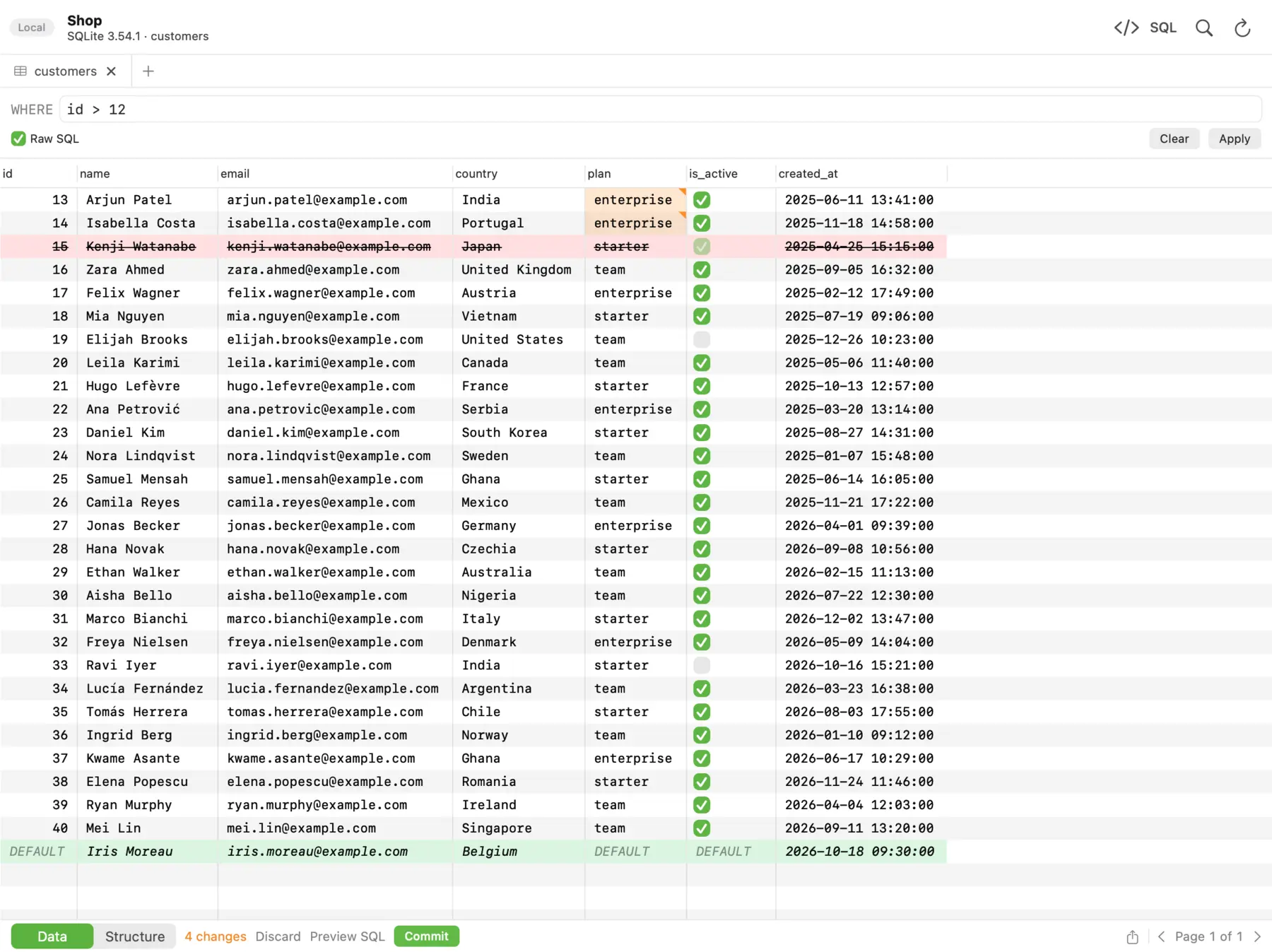 In dbPlus, changed cells turn amber, deleted rows red and new rows green, and nothing runs until you commit.
The free version works with every supported database. It includes browsing tables a page at a time, filtering, editing rows, the full SQL editor, saved queries and importing connections from TablePlus. Its limits are real, so here they are plainly:
- two connections and three tabs open at a time
- no SSH tunnels, so a database behind a bastion host needs Premium
- no structure editing (creating tables or changing columns, types, indexes and foreign keys)
- no import, export, database dumps or copying tables between databases
dbPlus Premium removes those limits for USD 19 a year through the Mac App Store, with a one-week free trial for new subscribers. dbPlus collects no data and sends nothing to us, and passwords stay in your Mac's Keychain.
Compared with DBeaver Community or Beekeeper Studio Community, the free dbPlus is more limited. Its case is that it is a native Mac app with staged edits you review before they run, a prompt before anything writes to a connection marked as Production, and a check on UPDATE or DELETE without WHERE. It suits someone who works with a couple of databases at a time and values those checks, and it needs macOS 14 Sonoma or later.
6. Navicat Premium Lite
Navicat Premium Lite is the free edition of Navicat's commercial suite. It connects to MySQL, PostgreSQL, SQL Server, Oracle, SQLite, MariaDB, MongoDB, Redis and Snowflake, and runs on Mac, Windows and Linux. Unusually for a free edition, Navicat allows commercial use, with up to five complimentary Lite users per organization, per the Navicat Premium Lite page.
Lite includes data viewing and editing and a query editor with code completion and snippets. It leaves out the visual query builder, SQL beautifier, backup and restore, and import and export for formats beyond text, CSV, XML and JSON, which are reserved for paid editions. The paid editions cost far more (Navicat Premium Standard was listed at USD 1,499 perpetual in October 2026), so treat Lite as a capable free tool rather than a trial.
7. TablePlus (free version)
TablePlus has a free version with no time limit. It is the same native app as the paid one, with the same wide engine support, but it allows only two open tabs, two open windows and two filters at a time, plus one metrics board. Turning off crash reports also needs a license, per the TablePlus licensing docs.
That is enough to inspect a database or make a quick fix, but if you use it every day you will likely hit the tab limit fast. A license costs USD 99 one-time for one device with a year of updates. If you like TablePlus but want to compare other options, see our TablePlus alternatives for Mac.
8. DataGrip (non-commercial license)
DataGrip, the database IDE from JetBrains, is free for non-commercial use: learning, hobby projects, open source work without commercial benefit, and content creation. The free license includes the full feature set, but it requires sending anonymous usage statistics, with no opt-out, per the JetBrains announcement.
If you are a student or building a side project, this is the most powerful free SQL editor on the Mac. If you are paid for the work, even at a non-profit, JetBrains expects a commercial license, which costs USD 109 for the first year for individuals.
9. MySQL Workbench Community Edition
MySQL Workbench is Oracle's official MySQL tool, and the Community Edition is free and open source under the GPL. In 2026 Oracle replaced the old 8.0 line with Workbench 26.7, a rebuild on MySQL Shell and Electron that supports MySQL 8.4 LTS and newer. Oracle says not every feature from Workbench 8 is available yet.
It is a good free choice if you run a recent MySQL server and want Oracle's own tools for server status, user management, performance reports and Visual Explain. It does not cover other engines, MariaDB is not an official target, and servers older than 8.4 need the unmaintained 8.0.47 release.
10. DbVisualizer Free
DbVisualizer Free has no time limit and works with a long list of databases through JDBC. It includes connection management, SSH, SQL history, monitoring and reference graphs. However, the free edition leaves out the table data viewer and editor, table management, import and export, the query builder and explain plans, per the DbVisualizer pricing page.
That makes it a free SQL runner more than a full client. It is useful if you mainly write queries against several enterprise databases, but for browsing and editing data, the clients above give you more for free.
Other free options worth knowing
- Postico 2 has an evaluation version with no time limit for PostgreSQL. Some features are disabled until you buy a license (USD 69 personal), and Egger Apps does not list which ones on its site.
- For SQL Server, Microsoft retired Azure Data Studio on 28 February 2026 and recommends the free MSSQL extension for Visual Studio Code.
- Command-line clients cost nothing:
psql(install withbrew install libpq),mysql(brew install mysql-client) andsqlite3, which comes with macOS. For SQLite files, our list of SQLite browsers for Mac covers GUI options.
What free clients cost you in other ways
A free client is not always free of trade-offs. Open-source tools give you no support contract, so problems go to a public issue tracker. Free tiers push you to upgrade once you need more tabs, SSH tunnels or exports. Some free licenses ask for data: DataGrip's free license requires usage statistics, and the free TablePlus does not let you turn off crash reports. dbPlus collects no data in either version.
Which one should you pick?
Pick DBeaver Community if you want one free app for many databases and accept a Java interface. Pick Beekeeper Studio Community if you want a friendlier free app on Mac, Windows and Linux and can live without import and export. Pick Sequel Ace for MySQL and MariaDB, and pgAdmin 4 for PostgreSQL; both are free with no limits.
For non-commercial work, DataGrip's free license gives you the strongest editor available. Navicat Premium Lite is worth a look if you need MongoDB, Redis or Oracle alongside the usual SQL databases and want commercial use allowed.
Consider the free dbPlus if you work with one or two databases at a time on the five engines it supports, you do not need SSH tunnels, and you want a native app that collects no data. It is not released yet, and its free tier is narrower than the open-source options, so if you need a free client today, start with DBeaver Community or Sequel Ace.
Prices, free-tier limits and features were checked on the vendors' sites in October 2026. Free tiers change, so confirm the current terms before you rely on them.
FAQ
Is there a completely free database GUI for Mac?
Yes. DBeaver Community, Beekeeper Studio Community, Sequel Ace, pgAdmin 4 and MySQL Workbench Community Edition are open source and free for any use, including commercial work. DBeaver Community covers the most databases.
Is TablePlus free on Mac?
TablePlus has a free version with no time limit, but it allows only two tabs, two windows and two filters at a time. Most regular users buy a license, which starts at USD 99 one-time for one device.
Can I use DataGrip for free at work?
Not for commercial work. DataGrip's free license covers learning, hobby projects, open source work without commercial benefit and content creation. If you are paid for the work, JetBrains expects a commercial license.
What is the best free SQL client for MySQL on Mac?
Sequel Ace is the best free MySQL and MariaDB client for most Mac users. It is native, open source, on the Mac App Store, and actively maintained. DBeaver Community is the better free choice if you also need other databases.
Does the free version of dbPlus include SSH tunnels?
No. SSH tunnels are part of dbPlus Premium, which costs USD 19 a year through the Mac App Store with a one-week free trial. The free version connects directly, with two connections and three tabs open at a time.