Best PostgreSQL GUI clients for Mac
We compare Postico 2, pgAdmin 4, TablePlus, DataGrip, DBeaver and more for PostgreSQL on a Mac, by price, Postgres features and EXPLAIN plans.
If you use only PostgreSQL on a Mac, Postico 2 is the most pleasant app for everyday work, and pgAdmin 4 is the free, official tool with the most administration features. If Postgres is one of several databases you use, TablePlus or DataGrip will serve you better, and DBeaver Community is the strongest free option. Every app below connects to Postgres; the differences are in how they handle Postgres-specific work such as schemas, functions, JSONB columns and query plans.
A note before you read on: we make dbPlus, one of the clients in this list. We have tried to judge it by the same standard as the others.
PostgreSQL GUI clients for Mac at a glance
| App | Best for | Price | Platforms |
|---|---|---|---|
| Postico 2 | Daily Postgres work in a native Mac app | From USD 69 one-time | Mac |
| pgAdmin 4 | Free, full Postgres administration | Free, open source | Mac, Windows, Linux, browser |
| TablePlus | Postgres alongside other engines | Free version, licenses from USD 99 one-time | Mac, Windows, Linux, iOS |
| DataGrip | Writing complex SQL and studying plans | Free for non-commercial use, USD 109 first year for individuals | Mac, Windows, Linux |
| DBeaver | Free, with many other databases too | Community free, PRO from USD 113 a year | Mac, Windows, Linux |
| dbPlus | Reviewed edits and readable EXPLAIN plans | Free, Premium USD 19 a year | Mac (coming to the Mac App Store) |
| Beekeeper Studio | A simple open-source client | Community free | Mac, Windows, Linux |
| Navicat for PostgreSQL | Sync, backup and design tools in one license | Standard USD 419 perpetual | Mac, Windows, Linux |
| psql | Scripts, automation and exact control | Free | Everywhere PostgreSQL runs |
What a Postgres client needs to do well
Postgres has features that generic clients sometimes handle poorly. When you compare apps, check that each one:
- makes it easy to switch between schemas, since real databases often use several
- displays and edits JSONB, arrays,
uuid,intervaland enum columns cleanly, not as blobs of text - shows the definitions of functions, triggers and extensions without digging through catalog tables
- turns
EXPLAIN ANALYZEoutput into a readable tree, because raw plan text is hard to follow for big queries - connects through SSH tunnels, since production databases often sit behind a bastion host (our guide to connecting through an SSH tunnel on Mac covers the setup)
- supports your server version, especially if you still run an older one
The best PostgreSQL GUI clients for Mac
1. Postico 2
Postico 2 from Egger Apps is a native Mac app built for PostgreSQL. It also officially supports Amazon Redshift, Greenplum and CockroachDB, and other Postgres-compatible databases work to varying degrees. It is the app to choose if Postgres is your main database and you want a client that looks and behaves like a Mac app.
The query editor handles multiple files in folders, saves automatically and formats SQL with the built-in pgFormatter. The table view has a foreign key picker and a row detail sidebar, and the structure editor shows columns, indexes and constraints in one place, with the generated DDL available. Postico 2 also has a function editor for functions and stored procedures. Connections can be organized in nested groups and synced through iCloud or Dropbox, and startup queries let you, for example, make a connection read-only.
A personal license costs USD 69 one-time for one user on up to three devices, a commercial license USD 99 per device, and a student license USD 29, per the Postico 2 pricing page. The evaluation version has no time limit, but some features stay disabled until you buy, and the Mac App Store edition has no trial. It needs macOS 14 or later.
Strengths: a focused, native Postgres client with a one-time price. Drawbacks: Postgres only, and less suited to server administration than pgAdmin.
2. pgAdmin 4
pgAdmin is the open-source administration tool from the PostgreSQL community, released under the PostgreSQL licence and free for any use. On a Mac it runs as a desktop app (a signed, notarized disk image for Apple silicon and Intel, macOS 14 or later), and it can also run in server mode for access from a browser. New versions arrive roughly every six weeks; 9.18 came out in September 2026.
pgAdmin covers more of Postgres than any other client here. You can manage roles, tablespaces, extensions and most other object types through dialogs that show the generated SQL. The query tool has autocomplete, history and a graphical EXPLAIN viewer. There is a Schema Diff tool, backup and restore dialogs that wrap pg_dump and pg_restore, and a PSQL Tool for a terminal inside the app. Recent releases list PostgreSQL 14 to 18 as the supported servers, according to the pgAdmin release notes.
Strengths: free, official, and the most complete for admin work. Drawbacks: the interface is a web app inside a desktop window, so it feels slower and busier than a native client for quick browsing and editing. If you still run PostgreSQL 12 or 13, check compatibility first.
3. TablePlus
TablePlus is a native client that supports Postgres alongside MySQL, SQLite, SQL Server, Redis, MongoDB and many others. It is quick, and its tidy interface makes it a good everyday client if you switch between engines.
For Postgres, it handles schemas, a structure editor, and SQL dump export and import. Changes made in the grid stay pending until you commit, with a preview of the SQL, and Safe Mode can ask for confirmation or a password before queries run. Connections can carry a production tag and a colored status bar.
The free version has no time limit but allows only two tabs, two windows and two filters at a time. A Basic license costs USD 99 one-time for one device with a year of updates, per the TablePlus pricing page. It runs on macOS 12 or later, Windows, Linux and iOS.
Strengths: speed and wide engine support. Drawbacks: the free version is tight, and it has fewer Postgres-only tools than pgAdmin.
4. DataGrip
DataGrip is JetBrains' database IDE, and it is the best choice here for writing and refactoring large amounts of Postgres SQL. Completion understands your schema, and the editor catches errors before you run a query. For performance work, its plan viewer shows EXPLAIN output as a tree or diagram, and since version 2026.1 as flame graphs for total and startup cost, as described in the DataGrip query plan docs.
DataGrip is free for non-commercial use, with anonymous usage statistics you cannot turn off. For paid work, an individual license costs USD 109 for the first year, falling to USD 65 from the third year, and an organization license USD 259 per user per year. It runs on Mac, Windows and Linux.
Strengths: the strongest SQL editor and plan analysis. Drawbacks: a heavy IDE for simple table edits, and a subscription for commercial use.
5. DBeaver
DBeaver Community is free and open source, and it handles Postgres well along with more than 100 other databases. For Postgres users it offers ER diagrams, an execution plan viewer, data import and export, and SSH tunnels at no cost. A Production connection type turns off auto-commit and asks before data changes.
DBeaver Community is free for any use. The PRO editions start at USD 113 a year and mainly add NoSQL and cloud features, which Postgres users may not need. It is a Java app built on Eclipse and runs on Mac, Windows and Linux, with its own Java runtime included.
Strengths: free, capable, and good for mixed environments. Drawbacks: the interface is dense and not Mac-like, and it feels heavy next to Postico or TablePlus.
6. dbPlus
dbPlus is our native Mac client, and it supports PostgreSQL 12 and newer, along with MySQL, MariaDB, SQLite and SQL Server. It is coming to the Mac App Store and is not released yet. Details are on the dbPlus page.
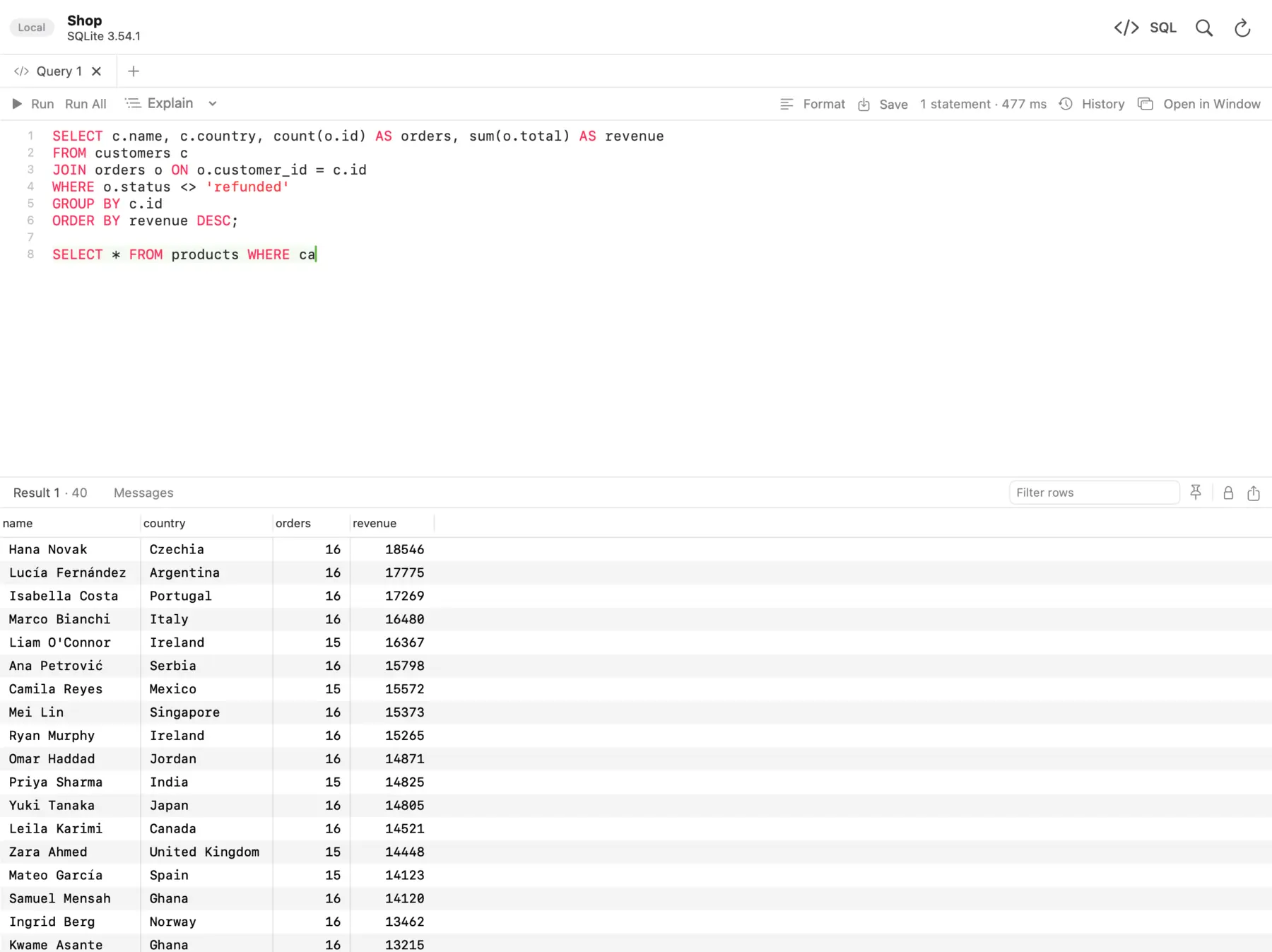 The dbPlus SQL editor, with the query's results below it.
For Postgres users, two features stand out. Explain shows the query plan as a tree and points out the slow steps, which is a quicker read than raw EXPLAIN text. And edits are staged: changed cells turn amber, new rows green and deleted rows red, and you can preview the exact SQL before committing everything in one transaction or discarding it. A connection marked as Production asks before anything writes to it, read-only connections are enforced by the database itself where the database allows it, and an UPDATE or DELETE without WHERE asks first. If your Mac sleeps or the connection drops, dbPlus reconnects and tells you if an open transaction was lost.
The SQL editor has autocomplete for tables, columns and aliases, several cursors, Format SQL, and parameters such as :customer_id that ask for a value when you run the query. Saved queries are plain .sql files in a folder you choose, so they can live in git. dbPlus collects no data.
dbPlus is free with two connections and three tabs open at a time. dbPlus Premium, USD 19 a year through the Mac App Store with a one-week free trial, adds SSH tunnels, unlimited windows and tabs, structure editing, and import, export, dumps and copying between databases. It needs macOS 14 Sonoma or later.
Strengths: careful editing, a readable plan view, privacy, and a low price. Drawbacks: not released yet, Mac only, no admin tools for roles or server settings, and SSH tunnels need Premium.
7. Beekeeper Studio
Beekeeper Studio Community is a free, open-source (GPLv3) client with a clean interface. For Postgres it includes unlimited connections and tabs, SSH tunnels, an editable data grid, schema editing, and an SQL editor with autocomplete. It runs on Mac, Windows and Linux.
Paid plans start at USD 9 a month billed yearly, per the Beekeeper pricing page, and add import and export, backup and restore, a JSON sidebar and editing query results directly. Strengths: simple and free. Drawbacks: it is an Electron app, and import and export need a paid plan.
8. Navicat for PostgreSQL
Navicat for PostgreSQL is the Postgres-only member of the Navicat family. It includes an object designer for tables, views, functions and triggers, a visual SQL builder, data and structure synchronization, backup and restore, and SSH and HTTP tunnels. It lists support for managed services such as Amazon RDS and Aurora, Azure Database for PostgreSQL and Google Cloud SQL.
On Navicat's store in October 2026, a perpetual Navicat 18 for PostgreSQL Standard license was listed at USD 419; check the Navicat store before you buy. The free Navicat Premium Lite also connects to Postgres with core features. It runs on macOS 14 or later, Windows and Linux.
Strengths: sync and backup tools in a supported commercial product. Drawbacks: expensive for a single-engine tool.
9. psql, the baseline
psql is the command-line client that ships with PostgreSQL, and it is worth having even if you prefer a GUI. It is exact, scriptable and usually already installed on servers. On a Mac, Homebrew installs it with the client library:
brew install libpq
echo 'export PATH="/opt/homebrew/opt/libpq/bin:$PATH"' >> ~/.zshrc
psql "postgresql://app_user@localhost:5432/app_db"
The libpq package is keg-only, which is why the second line adds it to your PATH (that path is for Apple silicon Macs). A few commands cover most daily needs:
-- list schemas, then the tables in the app schema
\dn
\dt app.*
-- columns, indexes and constraints of one table
\d+ app.orders
-- expanded output for wide rows, and timing for every query
\x auto
\timing on
-- the plan, with real row counts and buffer use
EXPLAIN (ANALYZE, BUFFERS) SELECT * FROM app.orders WHERE customer_id = 42;
Remember that EXPLAIN ANALYZE actually runs the statement. For an UPDATE or DELETE, wrap it in BEGIN; and ROLLBACK; so nothing changes. Our guide on how to read a PostgreSQL EXPLAIN plan walks through the output line by line.
How the plan viewers compare
Query plans are where Postgres GUIs differ most. pgAdmin's graphical EXPLAIN draws the plan as a diagram with icons for each node. DataGrip offers a tree, a diagram and flame graphs. DBeaver shows the plan as a tree with costs. dbPlus shows a tree and marks the slow steps. Postico 2 and TablePlus focus on browsing and editing; check their current documentation if plan analysis matters to you, or run EXPLAIN there and read the text output.
For learning, the text output in psql is still the reference: every GUI viewer is built from the same data, and knowing the raw format helps when a viewer hides a detail.
Which one should you pick?
Pick Postico 2 if Postgres is your main database and you want a native Mac app for daily work. Keep pgAdmin 4 installed for administration, roles, backups and Schema Diff; it is free. Choose TablePlus or DBeaver Community if Postgres is one of several databases you use, and DataGrip if you write complex SQL all day and want the best editor and plan analysis.
Consider dbPlus if you often edit data on shared or production Postgres servers and want staged changes, clear production warnings and a readable plan tree, at USD 19 a year for Premium. It is not released yet and it does not do server administration, so pair it with pgAdmin or psql for that.
If you also work with other engines, our list of the best SQL clients for Mac covers the general case.
Prices and features were checked on the vendors' sites in October 2026. Confirm current prices before you buy.
FAQ
What is the best free PostgreSQL GUI for Mac?
pgAdmin 4 is the best free option for Postgres-only work, especially administration. DBeaver Community is the best free option if you also use other databases. Beekeeper Studio Community is a simpler free alternative. Our roundup of free database clients for Mac lists every free tier and its limits.
Is Postico 2 free?
Postico 2 has an evaluation version with no time limit, but some features are disabled until you buy a license. A personal license costs USD 69 one-time, and the Mac App Store edition has no trial.
Does pgAdmin work on Apple silicon Macs?
Yes. pgAdmin 4 ships a signed and notarized macOS app for both Apple silicon and Intel, and it needs macOS 14 or later.
Which Postgres GUI shows EXPLAIN plans best?
DataGrip has the most options, with tree, diagram and flame graph views. pgAdmin 4 has a free graphical EXPLAIN viewer. dbPlus shows the plan as a tree and points out the slow steps, but it is not released yet.
Do I still need psql if I use a GUI?
It helps. psql is available on almost every server, it runs scripts and migrations reliably, and its output is the reference that GUI plan viewers are built from.