Best MySQL and MariaDB clients for Mac
We compare Sequel Ace, MySQL Workbench, TablePlus, DBeaver, DataGrip, Querious and more for MySQL and MariaDB on a Mac, by price and versions.
For most people, the best MySQL client for Mac to start with is Sequel Ace: it is free, native, actively maintained, and it handles both MySQL and MariaDB. If you also use other databases, TablePlus is the best paid upgrade, and DBeaver Community is the best free one. MySQL Workbench, Oracle's official tool, was rebuilt from scratch in 2026 and now targets MySQL 8.4 and newer. Sequel Pro, which older guides still recommend, is no longer maintained.
We make dbPlus, which appears in this list, so read our take on it with that in mind. We have tried to be as fair to the other apps as to our own.
MySQL and MariaDB clients for Mac at a glance
| App | Best for | Price | Platforms |
|---|---|---|---|
| Sequel Ace | Free, native MySQL and MariaDB work | Free, open source | Mac |
| MySQL Workbench | Oracle's official tool for MySQL 8.4 and newer | Free Community Edition | Mac, Windows, Linux |
| TablePlus | MySQL plus other engines in a fast native app | Free version, licenses from USD 99 one-time | Mac, Windows, Linux, iOS |
| DBeaver | Free, many databases | Community free, PRO from USD 113 a year | Mac, Windows, Linux |
| DataGrip | Heavy SQL development | Free for non-commercial use, USD 109 first year for individuals | Mac, Windows, Linux |
| Querious | A paid Mac-only MySQL client | One-time purchase, see vendor | Mac |
| Navicat for MySQL | Sync, backup and modeling tools | Standard USD 419 perpetual | Mac, Windows, Linux |
| Beekeeper Studio | Open source on every desktop OS | Community free | Mac, Windows, Linux |
| dbPlus | Reviewed edits on production data | Free, Premium USD 19 a year | Mac (coming to the Mac App Store) |
Sequel Pro is no longer maintained
Sequel Pro was the default free MySQL client on the Mac for years. Its last stable release, 1.1.2, came out in April 2016, and its GitHub repository has had no commits since July 2020. In 2020 the community forked it as Sequel Ace, which carries the same idea forward and still gets regular updates. Sequel Ace's documentation explains how to move saved connections across, though passwords are not carried over automatically. Our guide to Sequel Pro alternatives covers the other options.
Check your server version first
Client support depends on the server version, and the MySQL world moved a lot in 2026. MySQL 5.7 went out of support in 2023, and community support for MySQL 8.0 ended in April 2026, with MySQL 8.4 LTS as the usual upgrade target. Managed services set their own dates, so check with your provider.
| Client | MySQL versions | MariaDB |
|---|---|---|
| Sequel Ace | 5.7 and newer | 10.0 and newer |
| MySQL Workbench 26.7 | 8.4 LTS and newer | Not an official target |
| MySQL Workbench 8.0.47 (last of the old line) | 8.0 | Not an official target |
| dbPlus | 8.0 and newer | 10.6 and newer |
| TablePlus, DBeaver, DataGrip, Navicat, Beekeeper, Querious | Check the vendor's docs for your exact version | Supported |
If you still run MySQL 5.7, Sequel Ace supports it and broad clients such as TablePlus and DBeaver generally connect to it, but the new Workbench and dbPlus do not cover it.
The best MySQL and MariaDB clients for Mac
1. Sequel Ace
Sequel Ace is a free, open-source (MIT license) Mac client for MySQL and MariaDB, forked from Sequel Pro. It supports MySQL 5.7 and newer and MariaDB 10.0 and newer, and it needs macOS 13.5 Ventura or later. You can install it from the Mac App Store or through an unofficial Homebrew cask. Version 6.0.3 came out in October 2026, so the project is clearly active.
It is the right first choice for anyone who works mainly in MySQL or MariaDB and wants a free app that feels at home on a Mac. It connects directly, over SSH, or with AWS IAM authentication for Amazon RDS and Aurora, and it covers browsing, editing, queries and table structure.
Strengths:
- Free, native and maintained, with a familiar interface for former Sequel Pro users.
- Light and quick for everyday browsing and edits.
Drawbacks:
- MySQL and MariaDB only.
- Because the app is sandboxed, some advanced SSH setups (agents,
ProxyCommand) may not work inside it. The Sequel Ace docs suggest opening the tunnel in Terminal and connecting to127.0.0.1instead.
2. MySQL Workbench
MySQL Workbench is Oracle's official GUI for MySQL, and the Community Edition is free under the GPL. In 2026 Oracle released MySQL Workbench 26.7, a ground-up rebuild on top of MySQL Shell, made with web technology and Electron. Oracle says it supports MySQL 8.4 LTS and newer, that users of the old 8.0.47 release should plan to move to it, and that not every feature of the old Workbench is available yet.
The new version offers a script editor and SQL notebooks (which also run JavaScript and TypeScript), server status and user management, performance reports, and Visual Explain, according to the MySQL Workbench product page. The old 8.0 line, whose last release was 8.0.47 in April 2026, is known for its visual data modeling and migration wizard; if you depend on those, check whether 26.7 covers them yet before you upgrade.
Strengths: free, official, and built around MySQL features such as performance reports and Visual Explain. Drawbacks: the new version is still filling gaps, it does not target servers older than 8.4, and MariaDB is not an official target (older versions warn when they detect a server they do not recognize). The new version is an Electron app rather than a native Mac app.
3. TablePlus
TablePlus is a native client for MySQL, MariaDB, PostgreSQL, SQLite, SQL Server, Redis, MongoDB and many more. It is the best paid choice when MySQL is one of several engines you use, because it is fast and works the same way for all of them.
Edits in the grid stay pending until you commit, with a preview of the SQL, and Safe Mode can ask for confirmation or a password before queries run. Connections can be tagged as production with a colored status bar. The free version has no time limit but allows two tabs, two windows and two filters at a time. A Basic license costs USD 99 one-time for one device with a year of updates, per the TablePlus pricing page. It runs on macOS 12 or later, Windows, Linux and iOS.
Strengths: speed, a clean interface and wide engine support. Drawbacks: the free version is restrictive, and renewals are needed for updates after the first year.
4. DBeaver
DBeaver Community is a free, open-source tool that supports MySQL and MariaDB along with more than 100 other databases. It includes ER diagrams, data import and export, execution plans and SSH tunnels at no cost, and a Production connection type turns off auto-commit and asks before data changes.
It is a Java app on the Eclipse platform, with its own Java runtime included, and runs on Mac, Windows and Linux. The PRO editions start at USD 113 a year, per the DBeaver edition comparison.
Strengths: free and very capable. Drawbacks: a dense, non-Mac interface that feels heavier than Sequel Ace or TablePlus.
5. DataGrip
DataGrip from JetBrains supports MySQL and MariaDB with the same deep SQL editor it offers for every database: schema-aware completion, error checking as you type, version control integration and a query plan viewer. It is the best fit for developers who write large amounts of SQL, such as stored procedures or long reporting queries.
DataGrip is free for non-commercial use, with anonymous usage statistics you cannot turn off. Commercial use costs USD 109 for the first year for individuals, falling to USD 65 from the third year, or USD 259 per user per year for organizations, per the DataGrip pricing page. It runs on Mac, Windows and Linux.
Strengths: the best SQL editor here. Drawbacks: heavy for quick table edits, and a subscription for commercial work.
6. Querious
Querious from Araelium is a Mac-only client for MySQL and compatible databases. It is a one-time purchase, not a subscription, and includes a year of updates; Araelium's renewal page listed another year of updates at USD 29. Check Araelium's Querious pricing for the current price of a new license. Querious 4 needs macOS 12 or later.
It suits Mac users who want a paid, MySQL-focused app with a one-time price. The newest release in its update feed is 4.2.5, from October 2025, which is worth knowing if you want a client that tracks the newest MySQL releases closely.
Strengths: a Mac-only MySQL tool with a one-time license. Drawbacks: slower update pace than Sequel Ace, and no support for engines outside the MySQL family.
7. Navicat for MySQL
Navicat for MySQL is the MySQL member of the Navicat family. It includes an object designer, a visual query builder, data and structure synchronization, backup and restore, data modeling and SSH tunnels. It connects to both MySQL and MariaDB, and it lists managed services such as Amazon RDS and Aurora, Azure Database for MySQL and Google Cloud SQL. There is also a cheaper Navicat for MariaDB, and Navicat Premium covers both along with other engines.
On Navicat's store in October 2026, a perpetual Navicat 18 for MySQL Standard license was listed at USD 419 and Navicat 18 for MariaDB Standard at USD 289; confirm on the Navicat store. The free Navicat Premium Lite also connects to MySQL and MariaDB with core features. It runs on macOS 14 or later, Windows and Linux.
Strengths: sync, backup and modeling tools in one supported product. Drawbacks: a high price for a single-engine client.
8. Beekeeper Studio
Beekeeper Studio Community is free and open source (GPLv3), and it supports MySQL, MariaDB and TiDB, plus PostgreSQL, SQLite, SQL Server and others. It includes unlimited connections and tabs, SSH tunnels, an editable data grid and schema editing. It runs on Mac, Windows and Linux.
Paid plans start at USD 9 a month billed yearly and add import and export, backup and restore, and editing query results directly, per the Beekeeper pricing page. Strengths: a friendly, free cross-platform client. Drawbacks: Electron, so less Mac-like, and import and export are paid.
9. dbPlus
dbPlus is our native Mac client. It supports MySQL 8.0 and newer and MariaDB 10.6 and newer, as well as PostgreSQL, SQLite and SQL Server. It is coming to the Mac App Store and is not released yet; the dbPlus page has the details.
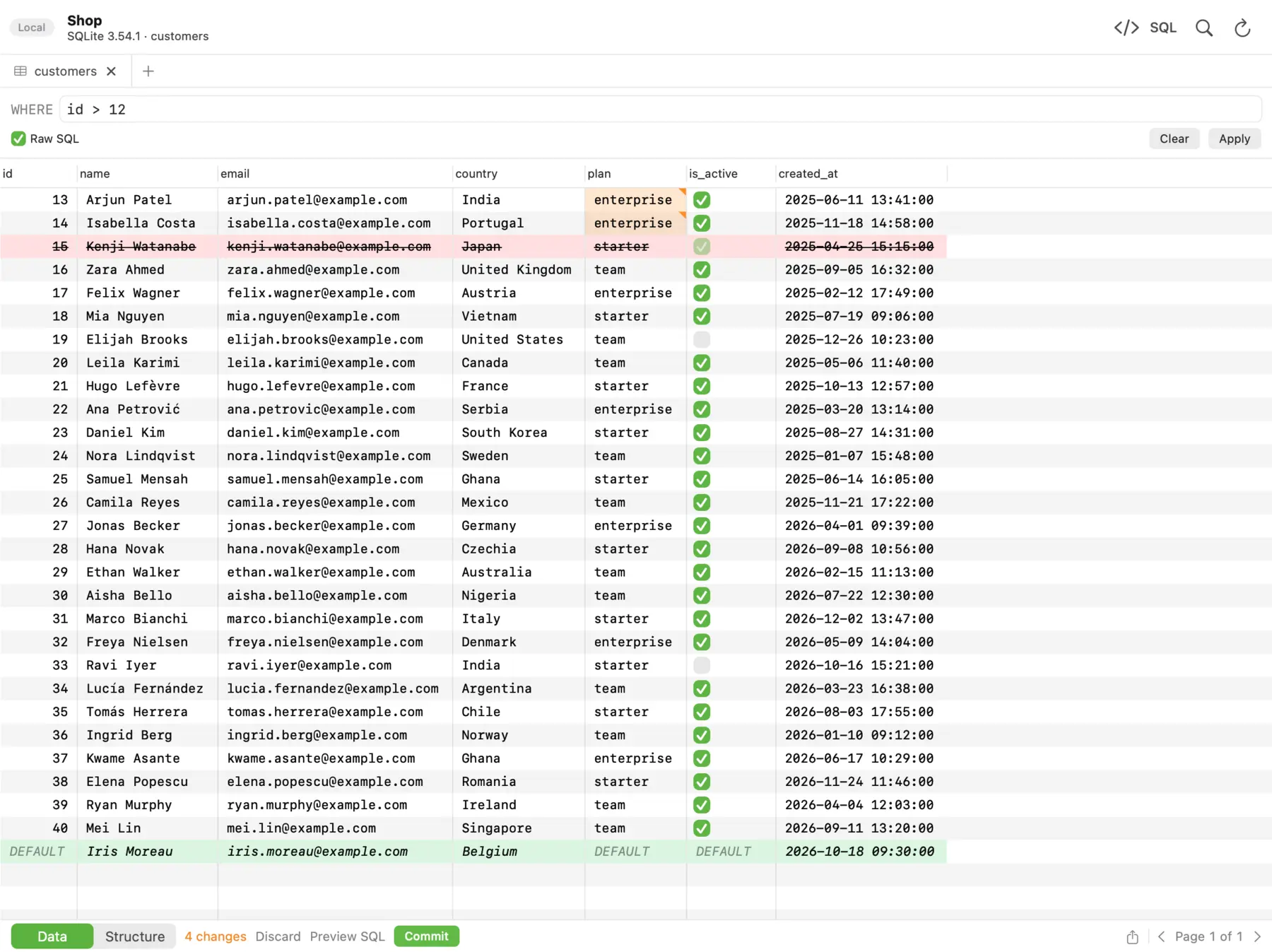 In dbPlus, changed cells turn amber, deleted rows red and new rows green, and nothing runs until you commit.
It is built for people who edit live MySQL data and want a check before anything runs. Edits are staged: changed cells turn amber, new rows green and deleted rows red, and you can preview the exact SQL, then commit everything in one transaction or discard it. A connection marked as Production asks before anything writes to it, and an UPDATE or DELETE without a WHERE clause asks first. If your Mac sleeps or the connection drops, dbPlus reconnects by itself and tells you when an open transaction was lost. Our guide to editing production data safely explains why those details matter.
dbPlus is free with two connections and three tabs open at a time, without SSH tunnels. dbPlus Premium costs USD 19 a year through the Mac App Store, with a one-week free trial, and adds SSH tunnels, unlimited windows and tabs, structure editing, and import, export, dumps and copying tables between databases, even from MySQL to PostgreSQL. Our guide on copying a table from MySQL to PostgreSQL covers that job. dbPlus collects no data, and passwords stay in your Mac's Keychain.
Strengths: careful editing, production warnings, privacy, and a low yearly price. Drawbacks: not released yet, Mac only, no MySQL 5.7 or MariaDB before 10.6, and SSH tunnels need Premium.
The mysql command-line client
The mysql command-line client is still useful next to any GUI, for scripts, imports and quick checks on a server. Homebrew installs it without the server:
brew install mysql-client
echo 'export PATH="/opt/homebrew/opt/mysql-client/bin:$PATH"' >> ~/.zshrc
mysql --safe-updates -h 127.0.0.1 -P 3306 -u app_user -p app_db
The package is keg-only, so the second line adds it to your PATH (that path is for Apple silicon Macs). The --safe-updates option is worth a habit on shared servers: it rejects an UPDATE or DELETE that does not use a key in its WHERE clause or a LIMIT, and it caps SELECT results at 1,000 rows, as the MySQL manual describes. Two statements that help with slow queries:
EXPLAIN FORMAT=TREE SELECT * FROM orders WHERE customer_id = 42;
EXPLAIN ANALYZE SELECT * FROM orders WHERE customer_id = 42;
On MariaDB, use ANALYZE SELECT ... or ANALYZE FORMAT=JSON SELECT ... instead of EXPLAIN ANALYZE.
Which one should you pick?
Start with Sequel Ace if you work in MySQL or MariaDB and want a free Mac app; it is the closest thing to Sequel Pro today, and it is maintained. Choose TablePlus if you also use other engines and want a native app with pending edits and Safe Mode. Choose DBeaver Community if you need many databases for free, and DataGrip if you write a lot of SQL.
Use MySQL Workbench if you are on MySQL 8.4 or newer and want Oracle's own tooling for performance reports and server management, but check that the features you need have reached version 26.7. Navicat for MySQL suits companies that want sync and backup tools under a commercial license.
Consider dbPlus if you run MySQL 8.0 or newer or MariaDB 10.6 or newer, you edit production data, and you want staged changes and clear warnings at USD 19 a year for Premium. It is not released yet and is Mac only, so for a client today, Sequel Ace or TablePlus is the safer choice. For other engines too, see our list of the best SQL clients for Mac.
Prices and features were checked on the vendors' sites in October 2026. Confirm current prices before you buy.
FAQ
Is Sequel Pro still available for Mac?
Sequel Pro can still be found, but it is not maintained: its last stable release was 1.1.2 in 2016, and the repository has had no commits since 2020. Sequel Ace is the maintained, free fork, available on the Mac App Store.
Is MySQL Workbench free on Mac?
Yes. The MySQL Workbench Community Edition is free under the GPL and runs on macOS. The current version, 26.7, supports MySQL 8.4 LTS and newer, and Oracle says some features from the old 8.0 version are not there yet.
What is the best free MySQL client for Mac?
Sequel Ace is the best free MySQL and MariaDB client for most Mac users, because it is native, maintained and free. DBeaver Community and Beekeeper Studio Community are good free options if you also use other databases.
Does MySQL Workbench work with MariaDB?
MariaDB is not an official target for MySQL Workbench. It can often connect, but older versions warn that the server is not recognized and some features may not work. Sequel Ace, TablePlus, DBeaver, DataGrip, Beekeeper Studio and dbPlus all list MariaDB support.
Which MySQL clients support MySQL 5.7?
Sequel Ace supports MySQL 5.7 and newer, and broad clients like TablePlus and DBeaver generally connect to it too. MySQL Workbench 26.7 starts at 8.4 and dbPlus at 8.0. Since MySQL 5.7 went out of support in 2023, plan an upgrade.