TablePlus alternatives for Mac in 2026
Eight TablePlus alternatives for Mac, free and paid, with current prices, supported databases and a plain verdict on who each app suits.
The best TablePlus alternative on a Mac depends on why you are leaving. DBeaver Community is the obvious free and open source pick, DataGrip suits developers who want a full SQL IDE, and Postico 2 or Sequel Ace are better if you only use PostgreSQL or MySQL. Beekeeper Studio, Navicat, DbVisualizer and our own dbPlus cover the cases in between.
We make dbPlus, one of the apps on this list, so keep that in mind as you read. We have tried to give every app a fair entry, TablePlus included.
Quick comparison
| App | Best for | Price (October 2026) | Platforms |
|---|---|---|---|
| DBeaver Community | Free use with many databases | Free; PRO from USD 113 a year | Mac, Windows, Linux |
| dbPlus | Native Mac client with staged edits, five engines | Free; Premium USD 19 a year (not released yet) | Mac |
| DataGrip | A full SQL IDE with refactoring | USD 109 first year for individuals; free for non-commercial use | Mac, Windows, Linux |
| Beekeeper Studio | Open source, simple, cross-platform | Free Community; paid from USD 9 per user a month, billed yearly | Mac, Windows, Linux |
| Postico 2 | PostgreSQL only | From USD 69, one-time | Mac |
| Sequel Ace | MySQL and MariaDB only | Free, open source | Mac |
| Navicat Premium | Many engines in one paid suite | Free Lite edition; Premium is the priciest single-user option | Mac, Windows, Linux |
| DbVisualizer | Broad JDBC coverage | Free; Pro USD 199 first year | Mac, Windows, Linux |
Why people look for a TablePlus alternative
TablePlus is a good app. It is native on the Mac and covers a long list of databases, with Redis, Cassandra and Snowflake alongside the usual SQL engines. The reasons to look elsewhere tend to be the license, the free version's limits, or a missing feature.
The license model and price
TablePlus sells perpetual licenses, checked on its pricing page in October 2026. Basic costs USD 99 for one device, Standard costs USD 129 for two devices, and Team costs USD 79 per seat with a three-seat minimum. Each license includes one year of updates. After that you can keep using the last version you received, or renew updates for USD 59 per device. VAT is added depending on your country.
For one Mac and occasional upgrades, that is fair value. It adds up across several machines, yearly renewals or a team.
The free version's limits
The free download works indefinitely, but it allows only two open tabs, two open windows and two advanced filters at a time, and the free Windows version has no filters at all. If you keep production, staging and local databases open while you work, two tabs runs out quickly.
Other reasons
Some developers want open source code. Others need IDE features such as rename refactoring, or use one engine and prefer a specialist tool. Switching platforms is not a reason to leave, since TablePlus also runs on Windows, Linux and iOS. And if you already pay for Setapp, the full TablePlus is included there.
The alternatives
1. DBeaver Community
DBeaver Community is a free, open source database tool under the Apache 2.0 license. It is written mostly in Java on the Eclipse RCP platform and ships with its own Java runtime, and its README says it supports more than 100 database drivers out of the box. It suits anyone who wants no license cost, uses several database engines, or moves between macOS, Windows and Linux.
The Community edition has no tab or connection limits. It includes ER diagrams, a graphical query plan view, many export formats (CSV, JSON, SQL, XLSX, Markdown, HTML and more) and connection types. The built-in Production type turns auto-commit off and asks before data-changing SQL runs or edits are saved.
The paid PRO editions add NoSQL sources such as MongoDB, Redis and Cassandra, plus cloud features. On the DBeaver comparison page, Lite costs USD 113 a year (or USD 12 a month), Enterprise USD 255 a year, Ultimate USD 510 a year, and Team Edition starts at USD 1,630 a year. There is a 14-day trial.
The drawback is feel: DBeaver behaves like a cross-platform IDE, with deep menus and many settings, not like a Mac app. Our TablePlus vs DBeaver comparison goes into the trade-off in detail.
2. dbPlus
dbPlus is our native Mac database client for PostgreSQL 12 and newer, MySQL 8.0 and newer, MariaDB 10.6 and newer, SQLite, and SQL Server 2017 and newer (including Azure SQL Database). It is coming to the Mac App Store and is not released yet. It suits Mac users who like the native feel of TablePlus, work in those five engines, and want more guard rails around edits.
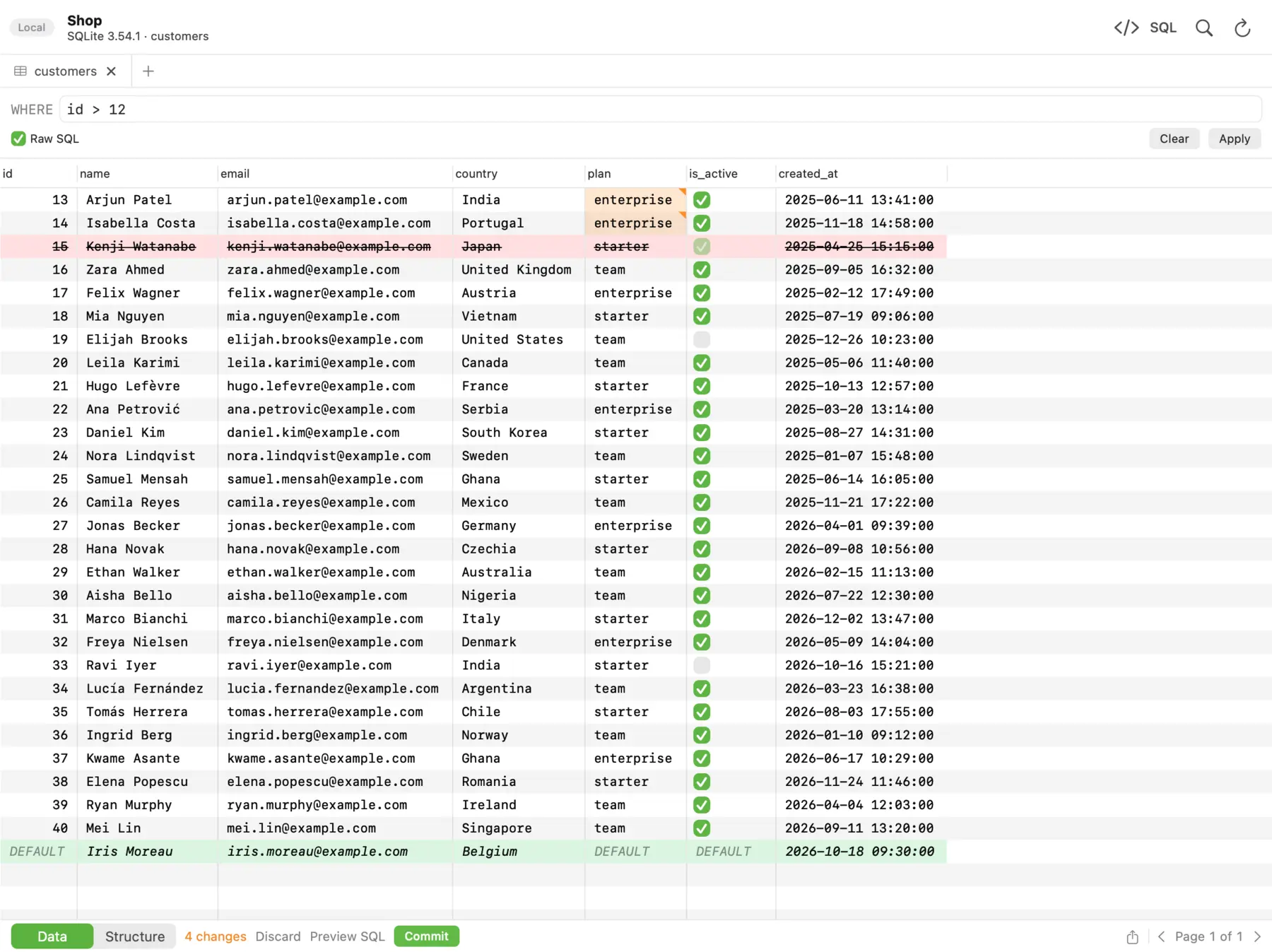 In dbPlus, changed cells turn amber, deleted rows red and new rows green, and nothing runs until you commit.
Moving is straightforward because dbPlus can import your TablePlus connections, and that import is part of the free version. Edits are staged before anything runs: changed cells turn amber, new rows green and deleted rows red, and you can preview the exact SQL before you commit everything in one transaction or discard it. A connection marked Production asks before anything writes to it, and an UPDATE or DELETE without a WHERE clause asks first. After sleep or a dropped connection, dbPlus reconnects and tells you if an open transaction was lost. Saved queries are plain .sql files you can keep in git, and dbPlus collects no data.
The free version allows two connections and three tabs open at a time. dbPlus Premium costs USD 19 a year through the Mac App Store, with a one-week free trial, and adds unlimited windows and tabs, SSH tunnels, structure editing, and import, export, dumps and copying between databases.
The drawbacks: you cannot download it yet, and it covers five engines, so there is no Oracle, Redis, MongoDB or Redshift. It is Mac only, with no iPhone app. And the free version has no SSH tunnels, which the free TablePlus does include. Details are on the dbPlus page, and we compare the two apps directly in dbPlus vs TablePlus.
3. DataGrip
DataGrip is the JetBrains IDE for databases and SQL. Its documentation lists 51 databases across complete and basic support levels, including Oracle, Snowflake, BigQuery, MongoDB and Redis. It suits developers who want refactoring, schema-aware completion and version control, especially if they already use other JetBrains tools.
For individuals, DataGrip costs USD 109 for the first year, USD 87 for the second and USD 65 from the third, or USD 10.90 a month. Organizations pay USD 259 per user a year. Since October 2025 it has been free for non-commercial use, such as learning, hobby projects and open source, but paid client work counts as commercial use.
Renaming a table or column in DataGrip updates its usages, and query plans can be shown as a tree, a diagram or a flame graph. The cost is weight: JetBrains lists 8 GB of RAM in the system requirements, and the interface takes time to learn. See dbPlus vs DataGrip for a closer look.
4. Beekeeper Studio
Beekeeper Studio is an open source SQL editor and database manager. The Community edition is licensed under GPLv3, and the app is built on Electron for Mac, Windows and Linux. It suits people who want a clean interface, open source code and the same app on every platform.
The free Community edition has unlimited connections and tabs, SSH tunnels and schema editing, and covers common engines such as PostgreSQL, MySQL, MariaDB, SQLite and SQL Server. It leaves out import and export, backup and restore, and editing query results directly. On the pricing page, paid plans start with Indie at USD 9 per user a month billed yearly, then Professional at USD 14 and Business at USD 18. Paid plans add engines such as Oracle, MongoDB, Snowflake and DuckDB. A year of payment lets you keep using the versions released during it.
As an Electron app, it does not behave quite like a native Mac app, and import and export need a paid plan.
5. Postico 2
Postico 2 is a Mac-native PostgreSQL client from Egger Apps. It works with PostgreSQL and closely related systems such as Amazon Redshift, CockroachDB and Greenplum, and needs macOS 14 or later. It suits developers who only use Postgres and want a focused Mac app.
According to the Postico buy page, a Personal license costs USD 69 for up to three devices, a Commercial license costs USD 99 per device, and a Team license costs USD 799 for up to ten. Licenses are perpetual for Postico 2.x. You can evaluate it with no time limit, with some features disabled.
If you also touch MySQL or SQL Server, you will need a second app. We cover more Postgres options in the best PostgreSQL GUI clients for Mac.
6. Sequel Ace
Sequel Ace is the free, open source successor to Sequel Pro, licensed under MIT. It connects to MySQL 5.7 and newer and MariaDB 10.0 and newer, runs on macOS 13.5 or later on Intel and Apple silicon, and is available on the Mac App Store. It suits MySQL and MariaDB users who want a native app that costs nothing.
It will feel familiar to Sequel Pro users, but it has no support for PostgreSQL, SQLite or SQL Server.
7. Navicat Premium
Navicat Premium is a commercial database suite from PremiumSoft, now at version 18. It supports MySQL, PostgreSQL, MariaDB, SQL Server, Oracle, SQLite, Snowflake, MongoDB and Redis, and a license key works on Windows, macOS and Linux. It suits teams that want many engines, including NoSQL, in one paid product.
It is the most expensive single-user option on this list. Its Mac App Store listing shows a subscription at USD 99.99 a month or USD 999.99 a year, and Navicat also sells licenses on its own store; check there for current direct prices. The free Navicat Premium Lite covers the core features for the same engines and may be used commercially. It is a good way to test Navicat before you pay.
8. DbVisualizer
DbVisualizer is a cross-platform client that connects through JDBC. Its installers bundle Java and are available for Windows, macOS (Apple silicon and Intel) and Linux. It suits people who work with many JDBC databases across operating systems.
There is a free edition. On the DbVisualizer pricing page, Pro costs USD 199 for the first year and USD 89 a year after that with basic support. Each subscription includes a perpetual license for the versions released during its term. Like DBeaver, it looks like a Java application rather than a Mac app.
Moving your connections out of TablePlus
TablePlus can export connections to a password-protected .tableplusconnection file, with or without their passwords. dbPlus can import TablePlus connections directly. For most other apps you will recreate each connection by hand, so note the host, port, user, database and SSH settings first, and paste favorite queries into .sql files.
Which one should you pick?
If TablePlus works for you and the free limits are the only problem, a Basic license at USD 99 may still be the simplest answer. Otherwise, DBeaver Community is the strongest free alternative. DataGrip is the pick for heavy SQL work and refactoring, and it costs nothing for non-commercial projects. Postico 2 and Sequel Ace are the best single-engine choices on the Mac. Navicat makes sense when a team needs many engines and the budget is there.
dbPlus fits a narrower reader: a Mac developer who works in PostgreSQL, MySQL, MariaDB, SQLite or SQL Server, wants staged edits and production guards, and prefers USD 19 a year to a larger license. It is not released yet, so if you need a new client today, pick from the others. For more options, see the best free database clients for Mac.
Prices and features were checked on the vendors' sites in October 2026.
FAQ
Is TablePlus free?
TablePlus is free to use with no time limit, but only two open tabs, two windows and two advanced filters at a time. A paid license, from USD 99 for one device with a year of updates, removes the limits.
What is the best free alternative to TablePlus on Mac?
DBeaver Community is the most complete free option: open source, no tab limits, and support for more than 100 database drivers. If you only use MySQL or MariaDB, Sequel Ace is free and native.
What is the cheapest paid TablePlus alternative?
Among the paid apps here, dbPlus Premium is the lowest at USD 19 a year once it is released. Beekeeper Studio Indie costs USD 9 per user a month billed yearly. For PostgreSQL only, Postico 2 Personal is a one-time USD 69.
Can I import my TablePlus connections into another app?
dbPlus can import TablePlus connections, and that is included in its free version. Most other clients need you to recreate connections by hand from the details in TablePlus.