The best SQLite browsers for Mac in 2026
Ten SQLite browsers for Mac compared, from free DB Browser for SQLite and the built-in sqlite3 to Base, TablePlus and dbPlus, with prices and trade-offs.
If you need to open a .db or .sqlite file on a Mac, look inside and fix a few rows, start with DB Browser for SQLite. It's free, it does only SQLite, and it covers the basics well. The sqlite3 command line is already installed on every Mac and is enough for quick checks. If you want an app that looks and behaves like a Mac app, Base is the strongest SQLite-only choice, and if SQLite is one of several databases you use, a multi-engine client such as TablePlus, DBeaver or DataGrip makes more sense.
We make dbPlus, which is one of the ten apps below, so weigh what we say about it with that in mind. We've tried to give every app a fair hearing.
Quick comparison
| App | Best for | Price | Platforms |
|---|---|---|---|
| DB Browser for SQLite | Free, SQLite-only editing, including SQLCipher files | Free, open source | macOS, Windows, Linux |
| Base | A native Mac app that does only SQLite | £29.99 one-time, limited free version | macOS 15 or later |
| Letos (formerly SQLiteStudio) | A free, portable SQLite tool that's actively updated | Free, open source | macOS, Windows, Linux |
| TablePlus | SQLite next to other databases in a polished app | USD 99 one-time for one device, free trial with limits | macOS, Windows, Linux, iOS |
| dbPlus | Editing app databases with every change previewed | Free, Premium USD 19 a year | macOS 14 or later (coming to the Mac App Store) |
| SQLPro for SQLite | A one-time Mac App Store purchase | USD 49.99 one-time | macOS 14 or later |
| Beekeeper Studio | A free, modern-looking multi-engine client | Free Community edition, paid plans from USD 9 a month billed yearly | macOS, Windows, Linux |
| DBeaver | One free tool for almost any database | Free Community edition, PRO from USD 113 a year | macOS, Windows, Linux |
| DataGrip | Writing and refactoring a lot of SQL | Free for non-commercial use, USD 109 a year for individuals | macOS, Windows, Linux |
| sqlite3 command line | Scripts, quick looks and recovery | Included with macOS | Everywhere SQLite runs |
What matters in a SQLite browser
SQLite is a file, not a server, and that changes what you want from a GUI. Usually the file belongs to something else, such as an app you're building or the iOS Simulator, so editing needs care: a careless UPDATE can leave that app in a state it doesn't expect.
Schema changes are the other trap. SQLite's ALTER TABLE can rename a table, rename a column, add a column and drop a column, and SQLite 3.53.0 (April 2026) added SET NOT NULL and DROP NOT NULL. Anything else, such as changing a column's type, means building a new table, copying the rows across and renaming it into place, which the SQLite documentation describes as a 12-step procedure. A good GUI does this for you and shows the SQL first.
CSV import and export matter more than with server databases, and SQLCipher support matters only if you work with encrypted files.
The 10 best SQLite browsers for Mac
1. DB Browser for SQLite
DB Browser for SQLite (often shortened to DB4S) is the open-source tool most people find first, and it earns the spot. It opens a database file, shows each table in a spreadsheet-style grid, runs SQL, and imports and exports CSV files and SQL dumps. It can also open SQLCipher-encrypted databases and add, change or remove their encryption, which is rare among free tools, and it can plot simple charts from a table or a query.
It suits anyone who has been handed a .db file and needs to see what's in it. It's free under the MPL 2.0 and GPL 3 licenses, the Mac download is a universal build for Apple silicon and Intel, and Homebrew users can run brew install --cask db-browser-for-sqlite. It also runs on Windows and Linux.
Its best habit is that changes are held until you click Write Changes, so you can revert a mistake before it reaches the file. A log shows every statement the app itself ran.
The drawbacks are age and feel. The last stable release, 3.13.1, came out in October 2024. Nightly builds continue on GitHub, but if you only run stable releases, you're on a two-year-old version. It's built with Qt, so menus, dialogs and keyboard behavior don't quite match a native Mac app.
2. Base
Base is a SQLite editor from Menial, a UK developer, and it's made only for the Mac. It has a schema inspector, a visual table editor for changing tables without writing SQL, a data browser with filtering and editing, and an SQL editor with autocomplete and reusable snippets. It imports CSV and SQL files and exports to SQL, delimited text, JSON and Excel.
It's the pick for Mac users who work with SQLite often and want an app that follows macOS conventions. Base 3 costs £29.99 as a one-off purchase, either directly or through the Mac App Store, and it's also part of the Setapp subscription. There's a free version with limits. Base 3 needs macOS 15 Sequoia or newer.
On the downside, it does SQLite and nothing else, and it runs only on the Mac. Menial's site doesn't spell out which features the free version leaves out, and we didn't find SQLCipher support listed. If you're still on macOS 14, Base 3 won't install.
3. Letos (formerly SQLiteStudio)
SQLiteStudio was renamed Letos in May 2026. The developer says nothing else changed: it's still free, open source under the GPL, with no paid edition and no telemetry. Version 4.0, released in June 2026, added a universal macOS build for Apple silicon and Intel, and version 4.0.4 (15 October 2026) updated the bundled SQLite to 3.54.0.
It's portable, so you download it, extract it and run it without an installer. It's for people who want a free SQLite-only tool with more frequent stable releases than DB Browser for SQLite.
Like DB4S, it uses Qt, so it doesn't feel like a Mac app. The rename also means most tutorials and search results still use the old name, which can make help harder to find for a while.
4. TablePlus
TablePlus is a multi-engine client with a clean, Mac-like interface. It handles SQLite alongside PostgreSQL, MySQL, MariaDB, SQL Server, Redis and many others. Changes you make in the grid are held for review before they're committed. It also has a safe mode for production connections.
It's for developers who use SQLite next to other databases and want one tool for all of them. The free trial is limited to two open tabs, two windows and two advanced filters at a time. A Basic license costs USD 99 for one device and includes a year of updates; you keep the version you have after that. On the Mac it needs macOS 12 or later and runs natively on Apple silicon and Intel.
The main drawback for SQLite users is cost: USD 99 is a lot if SQLite is all you open. Our TablePlus alternatives for Mac goes into more detail.
5. dbPlus
dbPlus is our native Mac database client, and it's coming to the Mac App Store. It's not released yet, so you can't download it today. For SQLite it works with local database files, and it also connects to PostgreSQL, MySQL, MariaDB and SQL Server.
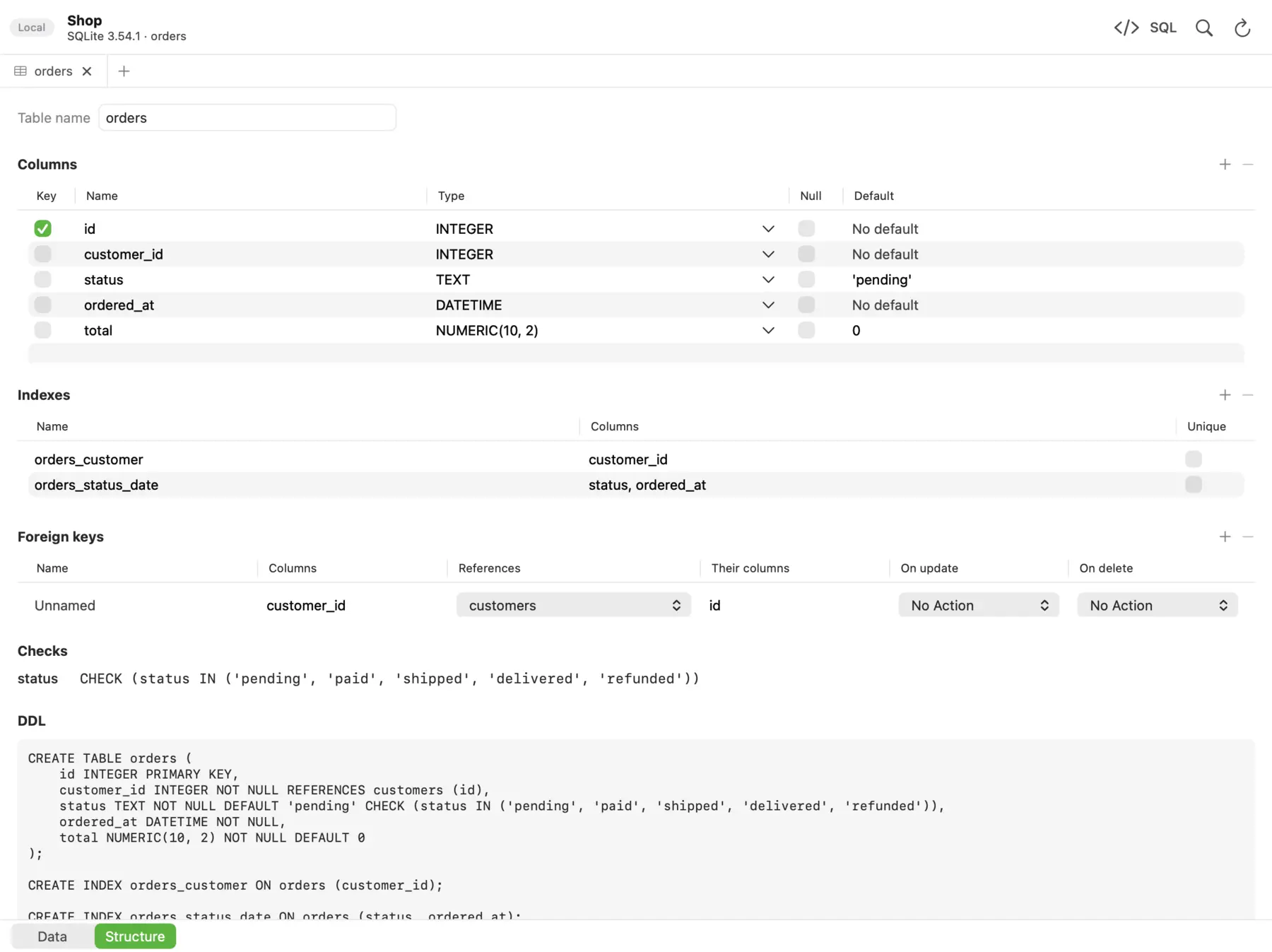 The Structure view in dbPlus shows a table's columns, indexes, foreign keys, checks and CREATE statement.
Tables open a page at a time, even with millions of rows, in a grid that filters, sorts and edits like a spreadsheet. Edits are staged before anything runs: changed cells turn amber, new rows green and deleted rows red, and the footer counts the changes. You can preview the exact SQL and then commit everything in one transaction or discard it. An UPDATE or DELETE without a WHERE clause asks before it runs. That's useful when the file belongs to an app you're building and a stray statement would break your test data.
You can see each table's columns, indexes, foreign keys, checks, triggers and CREATE statement. Structure changes show the SQL first, which matters with SQLite because a column change may mean a table rebuild. dbPlus can also copy a table from SQLite into another database, even a different engine, such as moving test data into PostgreSQL.
dbPlus is free for everyday work, with two connections and three tabs open at a time. dbPlus Premium costs USD 19 a year through the Mac App Store, with a one-week free trial, and adds unlimited windows and tabs, structure editing, import and export, dumps, and copying between databases. It needs macOS 14 Sonoma or later on Apple silicon or Intel. It collects no data and sends nothing to us.
The drawbacks are real. It's Mac only, it supports five engines, and its SQLite support covers local files only. We don't list SQLCipher support. CSV import and structure editing are part of Premium, so the free tier is mainly for browsing, editing rows and writing SQL. And until it ships, every other app on this list has the advantage of being available.
6. SQLPro for SQLite
SQLPro for SQLite, from Hankinsoft, is listed in the Mac App Store as SQLite Client by SQLPro. It has syntax highlighting and autocomplete, runs several queries at once, reloads automatically when the file changes outside the app, and exports to formats including CSV, JSON and XML. The latest version shipped in September 2026.
It suits people who want a one-time Mac App Store purchase. It costs USD 49.99 in the US store (other countries differ) and needs macOS 14 or later. It's Mac only.
The case against it is price. For SQLite alone, DB Browser for SQLite and Letos cover much of the same ground for free, and Base costs less.
7. Beekeeper Studio
Beekeeper Studio is a cross-platform client with a clean, modern interface. The Community edition is free and open source (GPL 3) and includes SQLite, PostgreSQL, MySQL, MariaDB and SQL Server, with unlimited connections and tabs, SSH tunnels, a table editor and an SQL editor.
It's for people who want a good-looking free tool that handles more than SQLite. Paid plans add editing query results directly, import and export, backup and restore, a JSON sidebar and AI features. Indie costs USD 9 a month billed yearly for one device, and Professional costs USD 14 a month billed yearly. A 14-day trial needs no account. It runs on macOS, Windows and Linux with the same features.
For SQLite work, the paywall on import and export is the sticking point, because moving data in and out of CSV is a common SQLite task. It's also an Electron app, so it doesn't behave quite like a native Mac app.
8. DBeaver
DBeaver Community is free, open source (Apache 2.0) and supports almost every database through JDBC drivers, SQLite included. It has ER diagrams, data transfer between databases, and a full SQL editor. Version 26.2.3 shipped on 18 October 2026, with separate downloads for Apple silicon and Intel and a bundled Java runtime. It needs macOS 11 or later.
It's for people who want one free tool for many databases and don't mind complexity. The paid PRO editions add more drivers, tools and support: Lite costs USD 113 a year, Enterprise USD 255 and Ultimate USD 510, according to DBeaver's edition comparison.
For opening a single SQLite file, DBeaver is heavy. It's a large Java application built on Eclipse, and its interface has many panels and settings that don't follow Mac conventions.
9. DataGrip
DataGrip is JetBrains' database IDE. Its strength is the SQL editor: context-aware completion, refactoring, inspections that catch mistakes as you type, and navigation across large schemas. It supports SQLite and most other popular databases.
It's free for non-commercial use such as learning and hobby projects, and JetBrains states that this license requires sending anonymous usage statistics, with no opt-out. Paid work, including freelance client work, needs a commercial license: USD 109 for an individual's first year, falling to USD 87 and then USD 65, or USD 259 per user a year for organizations. It runs on macOS, Windows and Linux.
DataGrip is the best tool here for someone who writes a lot of SQL across several engines. For browsing one SQLite file, it's more IDE than you need, and the subscription adds up if SQLite is all you use.
10. The sqlite3 command line
Every Mac already has sqlite3 at /usr/bin/sqlite3; on macOS Tahoe 26.6 it reports version 3.51.0. It's scriptable and always there, which makes it the fastest way to answer a quick question about a file.
Open a file read-only when you only want to look:
sqlite3 -readonly ~/Downloads/app.db
Then, inside the shell:
.tables
.schema orders
.mode box
SELECT id, status, total FROM orders ORDER BY id DESC LIMIT 10;
.mode box draws a neat grid, and .mode markdown prints a table you can paste into a pull request. Importing a CSV takes one line:
sqlite3 scratch.db ".import --csv people.csv people"
If the table doesn't exist yet, every column it creates is TEXT, so create the table first when types matter. Other useful commands are .dump for a full SQL export, .backup for a safe copy, .recover for salvaging a damaged file, and .expert, which suggests indexes for a query. The sqlite3 documentation covers them all. If you need a newer SQLite than the one Apple ships, Homebrew's sqlite formula installs the current release alongside it.
There's no grid editing or visual schema, so for most people it's a companion to a GUI rather than a replacement.
Before you edit a SQLite file
A few habits prevent most SQLite accidents, whichever app you use.
- Quit the app that owns the file, or work on a copy.
- Look for
-waland-shmfiles next to the database. In WAL mode, recent changes can live in the-walfile, so copy all three files together or you'll lose them. - Make a backup before any schema change.
sqlite3 app.db ".backup app-before.db"gives you a consistent copy even while the database is open. - Open read-only when you're only investigating. DB Browser for SQLite has a read-only open option, and
sqlite3 -readonlydoes the same on the command line. - Read the SQL a tool generates for a structure change. A rebuild drops the old table and renames a new copy into place, and you want to know that before it happens.
The same habits matter even more on server databases, as our guide on how to edit production data safely explains.
Which one should you pick?
If you want something free and SQLite-only, install DB Browser for SQLite, or Letos if you prefer a tool that's updated more often. If you live on the Mac and SQLite is a regular part of your work, Base is the most Mac-like dedicated option, provided you're on macOS 15.
If SQLite sits next to PostgreSQL, MySQL or SQL Server in your week, pick a multi-engine client. TablePlus is the polished paid choice, DBeaver and Beekeeper Studio are the free ones, and DataGrip is for heavy SQL work. Our list of the best SQL clients for Mac compares them across engines, and the best free database clients for Mac covers the no-cost options.
dbPlus fits if you edit app databases and want every change staged and previewed before it touches the file, and if a low yearly price and an app that collects no data matter to you. It isn't out yet, so keep one of the others installed in the meantime.
Prices and features were checked on the vendors' sites in October 2026.
FAQ
Does macOS come with SQLite?
Yes. macOS includes the SQLite library and the sqlite3 command-line tool at /usr/bin/sqlite3. On macOS Tahoe 26.6 it's version 3.51.0. It has no graphical interface, so most people add a GUI app for browsing and editing.
What is the best free SQLite browser for Mac?
DB Browser for SQLite is the best-known free option, and it supports SQLCipher-encrypted files. Letos (formerly SQLiteStudio) is a good free alternative with more frequent releases. If you also need other databases, DBeaver Community and Beekeeper Studio Community are free multi-engine choices.
How do I open a .db or .sqlite file on a Mac?
Open it in any SQLite browser above, usually with File, then Open Database, or by dragging the file onto the app. From Terminal, run sqlite3 -readonly path/to/file.db and type .tables to list the tables. If the file came from a running app, quit that app or copy the file first.
Can I open an encrypted SQLite database on a Mac?
If it's encrypted with SQLCipher, DB Browser for SQLite can open it once you enter the key, and it can also add, change or remove encryption. Support varies across the other apps on this list, so check the vendor's documentation before you buy one for that purpose.
Is it safe to edit a SQLite database while an app is using it?
It's risky. SQLite handles locking, but the app may cache data or rely on rows you change. Quit the app or work on a copy, back up the file with any -wal file, and review changes before they're written.