dbPlus vs DBeaver
dbPlus or DBeaver on a Mac? We compare databases, price, free versions, safety features and how each app feels to use, with a plain verdict.
DBeaver is the better choice if you want a free, open source tool that connects to almost any database and runs on every desktop system. dbPlus is a native Mac client for five SQL engines, with staged edits and production guards, free for light use and USD 19 a year for Premium. DBeaver Community 26.2.3 shipped on 18 October 2026; dbPlus is coming to the Mac App Store and is not released yet.
We make dbPlus, which is a bias worth knowing about. We have kept DBeaver's facts to what its own site and documentation say.
At a glance
| DBeaver | dbPlus | |
|---|---|---|
| Status | Released (Community 26.2.3, October 2026) | Coming to the Mac App Store, not released yet |
| Price | Community free; PRO from USD 113 a year | Free; Premium USD 19 a year |
| Source code | Community is open source (Apache 2.0) | Not open source |
| Databases | More than 100 drivers in Community; NoSQL sources in PRO | PostgreSQL, MySQL, MariaDB, SQLite, SQL Server |
| Platforms | macOS (Apple silicon and Intel), Windows, Linux | macOS 14 Sonoma or later |
| Built with | Java on Eclipse RCP, with a bundled Java runtime | Native Mac app |
| Free version limits | None in Community | 2 connections and 3 tabs at a time |
| Pending edits | Save or Cancel, with a script preview | Color-coded staging, SQL preview, one-transaction commit |
| Production guard | Production connection type with confirmations and manual commit | Production marking, WHERE check, lost-transaction warning |
| Query plans | Graph and table views | Tree that points out slow steps |
| ER diagrams | Yes | No |
| AI assistant | AI Chat in Community | None |
Two different kinds of tool
DBeaver calls itself a multi-platform database tool for developers, SQL programmers, administrators and analysts. Its README says it is written mostly in Java, uses the Eclipse RCP platform for its interface, and supports more than 100 database drivers out of the box. Around the SQL editor and data grid it adds ER diagrams, data transfer, task management and maintenance tools. It is closer to a database workbench than to a quick query tool.
dbPlus is a smaller app with a narrower aim: a Mac client for five widely used SQL databases, with a grid that works like a spreadsheet and safety checks around writes. It browses large tables a page at a time, even with millions of rows, and it does fewer things than DBeaver.
Databases
DBeaver Community works with any database that has a JDBC driver. Its README names MySQL, MariaDB, PostgreSQL, Oracle, SQL Server, SQLite, H2 and Teradata among the databases with extra support. NoSQL sources such as MongoDB, Redis, Cassandra and DynamoDB need a PRO edition.
dbPlus supports PostgreSQL 12 and newer, MySQL 8.0 and newer, MariaDB 10.6 and newer, SQLite files, and SQL Server 2017 and newer, plus Azure SQL Database. Nothing else. If you need Oracle, ClickHouse, Snowflake or any NoSQL database, DBeaver covers it and dbPlus does not.
Price
DBeaver Community is free under the Apache 2.0 license, including for commercial work. The paid PRO editions, listed on DBeaver's comparison page in October 2026, are:
| Edition | Price | What it adds |
|---|---|---|
| Lite | USD 113 a year or USD 12 a month | NoSQL support, visual query builder |
| Enterprise | USD 255 a year or USD 26 a month | Development and DBA tools, ERD editing, schema compare, Git sync |
| Ultimate | USD 510 a year | AWS, Google Cloud and Azure support, cloud explorer |
| Team Edition | From USD 1,630 a year | Shared scripts and connections, role management |
DBeaver offers a 14-day trial of PRO and free academic licenses for students.
dbPlus is free for everyday work. dbPlus Premium costs USD 19 a year through the Mac App Store, with a one-week free trial for new subscribers, and the App Store shows the price in your own currency.
If cost is your main concern, DBeaver Community wins: it costs nothing and has no connection or tab limits. Against DBeaver PRO, dbPlus Premium is cheaper, but PRO Lite includes NoSQL support and a visual query builder that dbPlus does not have.
How each one feels on a Mac
DBeaver runs the same way on every operating system. Its download page offers builds for Apple silicon and Intel Macs, and every build includes an OpenJDK runtime, so you do not install Java yourself. The trade-off is that DBeaver follows its own conventions rather than the Mac's. Expect an Eclipse-style window with panels, toolbars and many preference pages. If you already know Eclipse or another IDE, the layout will feel familiar. If you mostly use Mac apps, it can feel busy at first.
dbPlus is built only for the Mac and needs macOS 14 Sonoma or later. Passwords go into the Keychain, purchases go through Apple, and the app collects no data. It will not run on Windows or Linux, so a team on mixed systems cannot standardize on it.
Editing data safely
Both apps hold your edits until you confirm them.
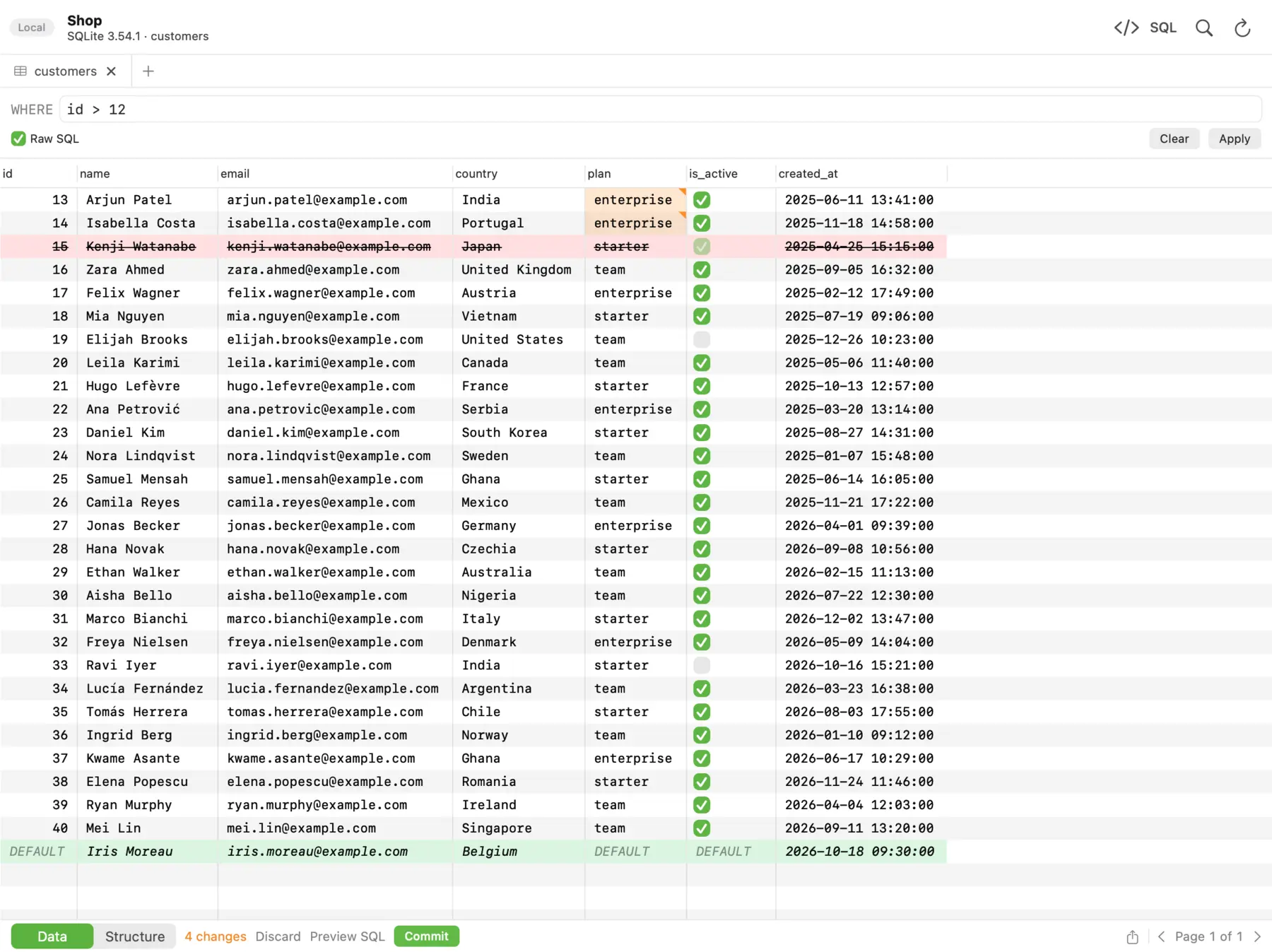 In dbPlus, changed cells turn amber, deleted rows red and new rows green, and nothing runs until you commit.
In DBeaver's data editor, changes stay pending until you click Save, and Cancel discards them. The Script button opens a preview of the SQL that will run. DBeaver also has connection types. The built-in Production type turns auto-commit off, asks before running INSERT, UPDATE or DELETE statements, asks before saving data changes, and colors the connection brick red. A separate security setting makes a connection read-only. This is a well-designed safety net, and it is free.
In dbPlus, changed cells turn amber, new rows green and deleted rows red, and the footer counts the changes. You preview the exact SQL, then commit everything in one transaction or discard it. A connection marked Production asks before anything writes to it. Read-only connections are enforced by the database itself where the database allows it. An UPDATE or DELETE without a WHERE clause asks first. After sleep or a dropped connection, dbPlus reconnects and tells you when an open transaction was lost, instead of carrying on as if nothing happened.
DBeaver's Production type and manual commit mode give you comparable protection, and you can tune each type. dbPlus adds the missing-WHERE check and the lost-transaction warning. Either way, the habits in our guide to editing production data safely still apply.
SQL editing and other tools
DBeaver has a full SQL editor, an AI Chat with an @ai command in the Community edition, and execution plans shown as a graph of nodes or as a table. For some databases, including SQL Server, execution plans are only in the PRO editions. It draws ER diagrams, exports to many formats (CSV, JSON, SQL, XML, XLSX, Markdown, HTML and more), transfers data between databases, and has task management. Some advanced tools, such as schema compare and ERD editing, are listed under the PRO editions.
dbPlus has highlighting for each database, autocomplete for tables, columns and aliases, snippets, Format SQL, several cursors, and find and replace. Parameters such as :customer_id ask for a value and remember it. Explain shows the plan as a tree and points out the slow steps. Saved queries are plain .sql files in a folder you choose, ready for git. With Premium, it exports to CSV, Excel, JSON, Markdown, HTML or SQL, imports CSV, Excel and JSON, dumps and restores databases, and copies tables between databases, including across engines. If that last job is why you are here, see how to copy a table from MySQL to PostgreSQL.
dbPlus has no ER diagrams, no visual query builder and no AI assistant.
Pick DBeaver if
- You want a capable client that costs nothing and has no usage limits.
- You work with many databases, or with NoSQL through PRO.
- You use Windows or Linux as well as a Mac, or your team does.
- You want ER diagrams or an AI assistant.
- You want open source code.
- You need a client today.
Pick dbPlus if
- Your databases are PostgreSQL, MySQL, MariaDB, SQLite or SQL Server, and you work on a Mac.
- You prefer a native Mac app to a cross-platform workbench.
- You want staged edits, production prompts and a check on
UPDATEorDELETEwithoutWHERE. - You keep saved queries in git.
- You want a client that collects no data.
- You can wait for the release.
Which one should you pick?
For most readers, especially anyone who needs a client now or works outside the Mac, DBeaver Community is the sensible default. It is free and covers a huge range of databases, and its Production connection type is a good safety feature. dbPlus is for Mac developers who spend their day in the five engines it supports and want a lighter, native client with safety checks built in, at USD 19 a year for Premium. You can follow its release on the dbPlus page.
If you are also weighing TablePlus, our TablePlus vs DBeaver comparison and the list of the best free database clients for Mac may help.
Prices and features were checked on the vendors' sites in October 2026.
FAQ
Is DBeaver Community free for commercial use?
Yes. DBeaver Community is open source under the Apache 2.0 license, which allows commercial use. The paid PRO editions add NoSQL support, cloud tools and team features, but you do not need them to use DBeaver at work.
Does DBeaver run natively on Apple silicon Macs?
Yes. DBeaver publishes separate macOS builds for Apple silicon and Intel, and each includes its own OpenJDK runtime. It is still a Java application, so it does not use the Mac's own interface conventions the way a native app does.
Does dbPlus support MongoDB, Redis or Oracle?
No. dbPlus supports PostgreSQL, MySQL, MariaDB, SQLite and SQL Server, including Azure SQL Database. For MongoDB or Redis you need DBeaver PRO or another client; DBeaver Community supports Oracle.
Which is safer for editing a production database?
Both stage edits and can ask before writes. DBeaver's Production connection type turns off auto-commit and asks before data-changing statements. dbPlus asks before writes to a connection marked Production, checks for UPDATE or DELETE without WHERE, and warns when a reconnect lost an open transaction.