Essential apps for freelance software developers in 2026
A practical 2026 toolkit for freelance developers, by job, covering time tracking, databases, invoicing, passwords, contracts, backups, calls and USD payments.
A freelance developer needs fewer apps than the app stores suggest: one tool for each job, chosen so the pieces don't overlap. The jobs are tracking time and focus, working with client databases, invoicing, keeping passwords and SSH keys safe, signing contracts, backing up, talking to clients, and getting paid in US dollars. Below is a pick for each, with an alternative where a different tool would suit you better.
Two of the picks, Mindset and dbPlus, are made by us, and neither is released yet. We have tried to be fair about them and say plainly when a third-party tool is the better choice.
The toolkit at a glance
| Job | Pick | Price | Also consider |
|---|---|---|---|
| Time and focus | Mindset (not released yet) | Free on one device; USD 39.99 a year for sync | Toggl, Clockify |
| Database client | dbPlus (not released yet) | Free; Premium USD 19 a year | TablePlus, DBeaver Community |
| Invoicing | Invoice Ninja | Free for up to 5 clients; Pro USD 140 a year | FreshBooks, Harvest |
| Passwords and SSH keys | Bitwarden | Free; Premium USD 19.80 a year | 1Password |
| Contracts and proposals | Bonsai | Essentials from USD 19 a month, billed yearly | Docusign Personal |
| Backups | Time Machine plus Backblaze | Time Machine is part of macOS; Backblaze USD 99 a year per computer | A remote Git host for code |
| Communication | Slack and Zoom | Free tiers | Whatever your client already uses |
| Getting paid | Wise or Payoneer | Fees per transaction | Your platform's own withdrawal options |
Time and focus: Mindset
Mindset is our Pomodoro timer with stretch breaks for Mac and iPhone, and it tracks time and money per project as a side effect of the timer. It is made for freelance software engineers and is coming to the App Store.
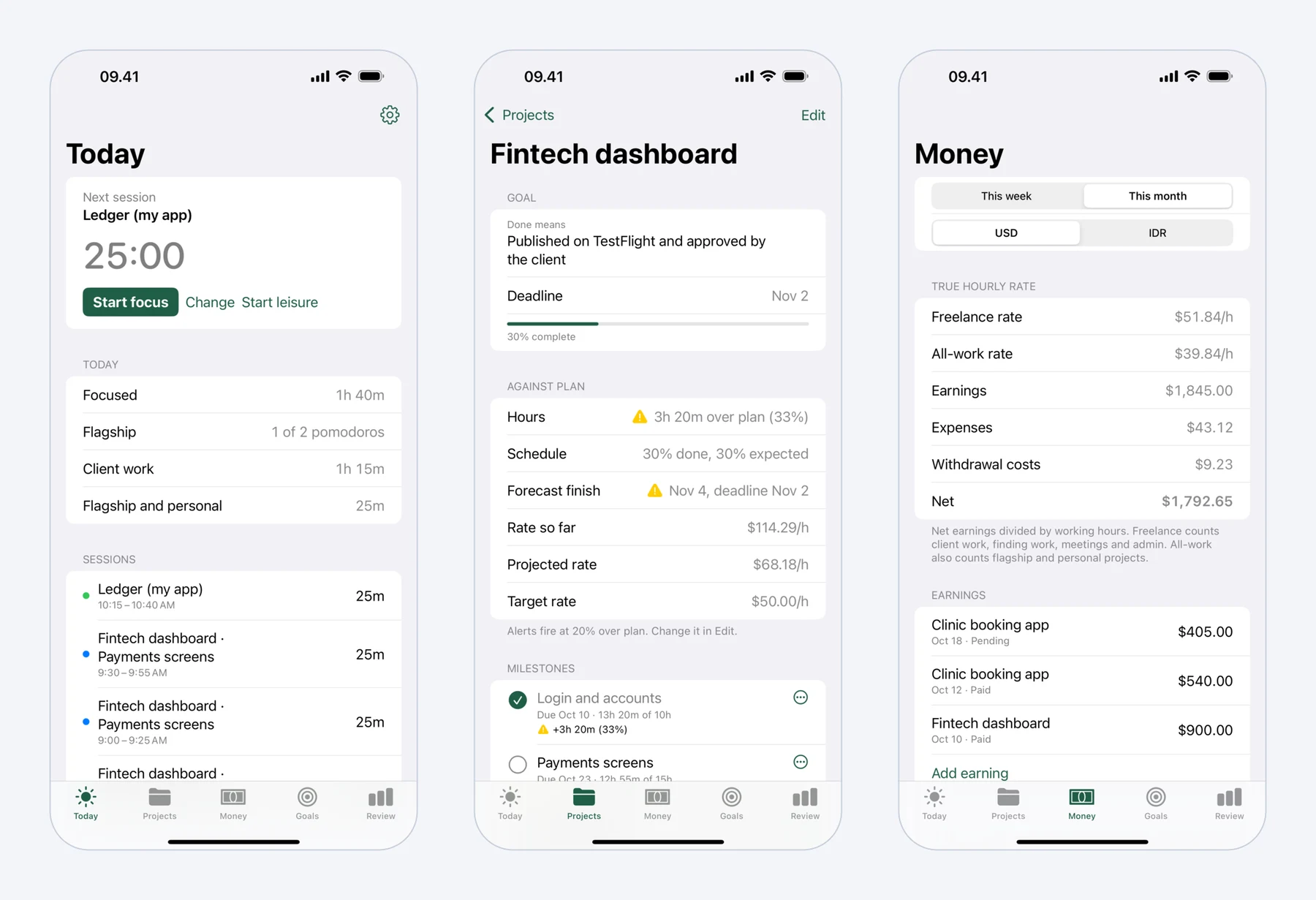 Mindset on iPhone: today's pomodoros, a fixed-price project against its plan, and what the work really paid per hour.
For a developer the useful parts are these. Starting a round is one tap and continues with your last project and milestone, so client hours, proposals and your own product all get counted without a timesheet. You can work 25 and 5 minutes, 50 and 10 for deep coding, or your own lengths. Breaks come with guided routines for the neck and shoulders, wrists, lower back and eyes (general exercises, not medical advice). You record earnings, expenses such as Upwork Connects and hosting, and withdrawals in US dollars and your local currency, and Mindset shows what your work really paid per hour after fees and the exchange rate spread. Projects get milestones with planned hours and an alert when one runs 20% over plan.
It is free on one device without an account. The subscription, USD 4.99 a month or USD 39.99 a year with a two-week trial, adds sync between Mac and iPhone and longer reports. It needs macOS 15 or iOS 18.
When to pick something else: Mindset does not offer invoicing, billable-rate reports, integrations, a web app, or Windows and Android apps (Android is planned). If you bill direct clients by the hour or work on Windows, Toggl or Clockify is the better tool, and our list of the best time tracking apps for freelancers compares ten options. For hourly Upwork contracts you also need Upwork's Desktop App, because Hourly Payment Protection covers only time logged with it.
Database client: dbPlus
Freelancers often work inside a client's database, sometimes on production, which makes a careful client worth having. dbPlus is our native Mac database client for PostgreSQL, MySQL, MariaDB, SQLite and SQL Server (including Azure SQL Database). It is coming to the Mac App Store.
The features that matter on client work are about safety. Edits are staged before anything runs: changed cells turn amber, new rows green and deleted rows red, and you can preview the exact SQL, then commit everything in one transaction or discard it. A connection marked Production asks before anything writes to it, and an UPDATE or DELETE without a WHERE clause asks first. After sleep or a dropped connection, dbPlus reconnects and tells you if an open transaction was lost. Saved queries are plain .sql files in a folder you choose, so they can live in the client's Git repository, and connections from TablePlus can be imported.
dbPlus is free for everyday work with two connections and three tabs open at a time. dbPlus Premium costs USD 19 a year with a one-week trial and adds unlimited windows and tabs, SSH tunnels, structure editing, and import, export, dumps and copying between databases. It needs macOS 14 Sonoma or later, collects no data, and keeps passwords in the Mac's Keychain. Our guide to editing production data safely covers the habits that go with it.
When to pick something else: dbPlus supports only the five databases above and runs only on the Mac. DBeaver Community is free, open source and runs on Windows, Linux and macOS, and DBeaver's commercial editions add MongoDB, Redis and other NoSQL databases. TablePlus has a free tier and a perpetual licence at USD 99 for one device. We compare the field in the best SQL clients for Mac.
Invoicing and accounting
If every client pays through Upwork, Upwork handles the billing for those contracts and you may not need an invoicing tool at all. Once you have direct clients, you do.
Invoice Ninja is our pick for a freelancer starting out. The free plan allows up to five clients with unlimited invoices, and clients can pay online through gateways such as Stripe and PayPal. Pro costs USD 14 a month or USD 140 a year for unlimited clients. There are apps for macOS, Windows, Linux, iPhone and Android, and you can self-host it if you prefer to keep invoices on your own server. The main catch is the five-client limit on the free plan; a freelancer with a steady list of direct clients will end up on Pro.
FreshBooks combines invoicing with accounting. Its Lite plan lists at USD 23 a month for up to five clients in the US, and it was running an introductory discount when we checked, so confirm the price and availability for your country. If you would rather invoice from your time tracker, Harvest and Clockify's Standard plan both build invoices from tracked hours.
Tax and bookkeeping rules differ by country, so a local accountant is worth an hour of your time before your first tax year.
Passwords and SSH keys: Bitwarden
Client work brings a pile of secrets: hosting logins, API keys, database passwords and SSH keys. A password manager keeps them out of notes files and chat history.
Bitwarden is free for unlimited passwords on unlimited devices, with apps for browsers, desktop and mobile. Premium costs USD 19.80 a year and adds an integrated authenticator, file attachments, emergency access and security reports. Its desktop app includes an SSH agent for server logins and signing Git commits; on the Mac it needs the .dmg download rather than the App Store build.
1Password is the paid alternative. Individual lists at USD 3.99 a month billed yearly, with a 14-day trial (a promotion was cutting the first year when we checked). It has apps for macOS, iOS, Windows, Android and Linux, and its SSH agent can set up Git commit signing for you.
For one person, Bitwarden's free plan is enough. Choose 1Password if you prefer its apps after the trial and don't mind paying.
Contracts and proposals: Bonsai
A written contract with scope, payment terms and ownership of the code saves arguments later. On Upwork, the platform's terms cover contracts made there; for direct clients you need your own.
Bonsai has contract templates with e-signatures, including a software development agreement, plus proposals, invoices and client payments. Contracts and proposals start on Essentials, at USD 19 a month billed yearly or USD 25 monthly, after a 7-day trial. It is the better fit if you want proposals, contracts and invoices in one account.
If you already have a contract written with a lawyer and only need signatures, Docusign Personal costs USD 11 a month billed yearly (USD 132 a year) for five envelopes a month. A template is a starting point, not legal advice, so have one reviewed for your country.
Backups: Time Machine and Backblaze
A dead laptop in the middle of a client project costs days. Two copies, one at home and one off-site, cover most failures.
Time Machine is built into macOS and backs up to an external drive, so the only cost is the drive. It covers a failed laptop, but a theft or a fire can take the drive along with the Mac, which is why an off-site copy matters.
Backblaze Computer Backup provides that copy. It costs USD 99 a year per computer for unlimited data, backs up the computer and connected external drives, and has native Mac and Windows clients. Longer version history is available for an extra fee. Monthly and two-year billing are also offered.
For code, push to a remote repository often, following each client's rules on where their code may live. Neither backup replaces that, and some clients forbid copying their code or data to third-party cloud services at all, so read your contract before you point Backblaze at a client folder.
Communication: Slack and Zoom
Most clients choose the tools, and you join their Slack workspace or their meeting links. When you pick, the free tiers usually suffice.
Slack's free plan keeps 90 days of message history, allows one-to-one huddles and up to 10 app integrations. Pro costs USD 7.25 per user per month billed yearly. Zoom's free Basic plan allows meetings of up to 40 minutes with up to 100 participants, which covers a short client call; longer calls need a paid plan from Zoom's pricing page.
Keep one calendar for all clients, so meetings and focus time don't collide. In Mindset, break reminders pause during meetings.
Getting paid in US dollars: Wise or Payoneer
If clients pay you in US dollars and you live on another currency, the payout route decides how much you keep. Compare these two for your own country and typical amounts.
Wise is free to open and gives account details in 22 currencies at no cost. When we checked its US pricing page in October 2026, receiving USD by domestic (non-wire) transfer was free, USD wire and Swift payments cost a fixed USD 6.11 each, and conversions used the mid-market rate with a fee that varies by currency, from 0.23%.
Payoneer is set up for payouts from marketplaces and other platforms. Its pricing page, checked in October 2026, lists receiving from marketplaces as varying by marketplace, withdrawals to a bank account at 1.2% to 4%, conversion between your own balances at 0.50%, and an annual account fee of USD 29.95 if the account receives less than USD 6,000 in any 12 consecutive months.
Fees change and differ by country, so confirm them in your account before each withdrawal. Our guides to USD income and local currency fees and Upwork fees and Connects go further into the numbers.
What to set up first
Start with the tools that protect you: a password manager and backups, on day one. Open a payout account before your first invoice, because verification can take time. Add a time tracker as soon as you have a client, so your first project gives you real numbers to price the next one. Invoicing and contracts follow with your first direct client, and the database client comes when the work needs it.
Prices and features were checked on the vendors' sites in October 2026. Prices are in US dollars unless noted, exclude tax, and may differ in your country.
FAQ
What apps does a new freelance developer need first?
A password manager, a backup, a way to receive payment, and a time tracker cover the essentials, and all four can start free or cheap. Add invoicing and contract tools once you have direct clients, since Upwork handles billing for work done through it.
Is Wise or Payoneer better for freelancers paid in USD?
It depends on how you are paid and where you live. Wise suits direct clients who can pay by US bank transfer, since receiving USD that way was free when we checked, while Payoneer is set up for marketplace payouts; both list their fees publicly. Compare the full cost, including conversion and withdrawal fees, for your own country and typical amount.
Do freelance developers need accounting software?
Not always. With a few clients, an invoicing tool plus a spreadsheet of expenses can be enough, and an accountant can handle the tax return. Accounting software such as FreshBooks earns its cost as the number of clients and expenses grows.
Which password manager is better for developers, Bitwarden or 1Password?
Both store SSH keys and can act as an SSH agent for server logins and Git commit signing. Bitwarden is free for unlimited passwords and costs USD 19.80 a year for Premium. 1Password's personal plans are paid, at USD 3.99 a month billed yearly for Individual. Try both: 1Password has a 14-day trial, and Bitwarden's free plan doesn't expire.