The 10 best time tracking apps for freelancers in 2026
Ten time trackers for freelance developers compared on October 2026 prices, free plans, invoicing and platforms, with a clear pick for each way of working.
For most freelancers, Toggl Track (now sold simply as Toggl) or Clockify is the safest place to start. Both have a free plan, apps for Mac, Windows, iPhone and Android, and billable rates on inexpensive paid tiers. Choose Harvest if you want invoices in the same app, Timing if you work on a Mac and keep forgetting to start a timer, and WakaTime if the only number you care about is time spent coding.
We make Mindset, one of the ten apps below, and it has not been released yet, so weigh our view of it with that in mind. We held it to the same questions as every other app.
If you bill hourly contracts on Upwork, those hours must be logged in Upwork's own Desktop App to qualify for its payment protection, whatever else you use. That has its own section after the list.
Quick comparison
| App | Best for | Price for one person | Platforms |
|---|---|---|---|
| Toggl Track (Toggl) | All-round tracking with a free plan | Free; billable rates from USD 9 a month, billed yearly | Web, Mac, Windows, iPhone, iPad, Android, Chrome, Firefox |
| Clockify | Cheap billable rates and invoices | Free; billable rates from USD 3.99 a month, billed yearly | Web, Mac, Windows, Linux, iPhone, Android, Chrome, Firefox, Edge |
| Harvest | Tracked hours straight to invoices | Free for 1 seat and 2 projects; Teams from USD 9 a month, billed yearly | Web, Mac, Windows, iPhone, Android, browser extensions |
| Mindset | Pomodoro focus and your real hourly rate | Free on one device; USD 39.99 a year for sync | Mac, iPhone (not released yet) |
| Timing | Automatic tracking on a Mac | From USD 108 a year | Mac |
| Timemator | Rule-based tracking, no subscription | USD 39 one-time for Mac | Mac, iPhone, iPad, Apple Watch |
| Tyme | Apple-only freelancers and small teams | USD 59.99 a year | Mac, iPhone, iPad, Apple Watch |
| WakaTime | Coding time by project and language | Free; Basic USD 99 a year | Editor and IDE plugins, web dashboard |
| RescueTime | Seeing where your attention goes | Free Lite; Solo USD 84 a year | Mac, Windows, iPhone, Android |
| Bonsai | Contracts, invoices and time in one account | From USD 9 a month, billed yearly | Web, Mac, iPhone, Android, Chrome |
How we chose
We judged each app as a solo freelance developer would use it: one person, a handful of clients, perhaps a side project. We looked at how time gets recorded (timer, automatic capture or editor plugin), what the free plan allows, what billable rates and invoicing cost, and which devices it runs on. Team features carry little weight here.
1. Toggl Track (now Toggl)
In 2026 Toggl made a rebuilt app, called simply Toggl, the default for new sign-ups. Its announcement says Toggl Track stays supported for existing users, with no forced migration and no shutdown date. The new app keeps the one-click timer and adds task boards, timelines and capacity reports aimed at teams.
Toggl suits freelancers who want a timer everywhere, including a browser extension that adds a start button inside web tools such as GitHub and Jira.
Price: the free plan covers up to three users, with timers, a Pomodoro-style focus mode, calendar integrations and personal reports. Billable rates start on Starter at USD 9 per user per month billed yearly, or USD 12 monthly. Premium costs USD 16 billed yearly (USD 24 monthly) and adds profitability reports. Paid plans have a 30-day trial (Toggl pricing).
Platforms: web, Mac, Windows, iPhone, iPad and Android, plus Chrome and Firefox extensions.
What it does well: quick timers on any device, a free plan that works for one person without rates, and an API, command-line tool and MCP server for developers. Toggl also states that it takes no screenshots and records no keystrokes.
Where it falls short: billable rates cost money, and Toggl's invoicing page describes exporting reports as CSV or PDF and building the invoice elsewhere. Its integrations page lists QuickBooks Online and Xero as legacy Toggl Track integrations that the new Toggl does not currently support.
2. Clockify
Clockify, made by CAKE.com, is the cheapest way to get billable rates and invoices from a well-known tracker. Its free plan shrank in April 2026: CAKE.com's announcement caps it at five users, limits report date filters to one month, and moves billable rates and CSV or Excel exports to paid plans. Free still includes unlimited tracking and projects, a Pomodoro timer, and an auto tracker that records which apps and sites you used.
Clockify suits freelancers who want invoices and hourly rates for a few dollars a month, and anyone who needs a Linux app.
Price: Basic costs USD 3.99 per seat per month billed yearly (USD 4.99 monthly) and adds billable rates. Standard, at USD 5.49 (USD 6.99 monthly), adds invoices. Pro, at USD 7.99 (USD 9.99 monthly), adds expenses and a currency per client (Clockify pricing).
Platforms: web, Mac, Windows, Linux, iPhone and Android, plus Chrome, Firefox and Edge extensions.
What it does well: low prices, invoices on a cheap tier, and tracking buttons inside more than 80 web apps.
Where it falls short: the free plan is now thin for anyone who bills by the hour, and many settings exist for employers (kiosks, GPS tracking, activity monitoring).
3. Harvest
Harvest keeps timesheets, expenses and invoices in one app, and clients can pay its invoices online through the Stripe and PayPal integrations. It suits freelancers who bill direct clients by the hour and want to send the invoice from the same place they track time.
Price: the free plan gives one seat and two projects, with time tracking, invoicing and expense tracking. Teams starts at USD 9 per seat per month billed yearly (USD 108 a year) or USD 11 monthly. Harvest's pricing page says additional invoices, projects, clients and tasks are billed based on usage, so estimate your bill before upgrading. There is a 30-day trial.
Platforms: web, Mac, Windows, iPhone and Android, plus Chrome, Edge and Firefox extensions.
What it does well: a short path from tracked hours to a paid invoice, accounting sync with QuickBooks Online and Xero, and GitHub and Jira tracking through the extension.
Where it falls short: two projects on the free plan is tight for a freelancer with several clients, and usage charges on top of the seat price make the yearly cost harder to predict than a flat plan.
4. Mindset
Mindset is our app: a Pomodoro timer with stretch breaks that also tracks time and money per project, made for freelance software engineers on Mac and iPhone. It is coming to the App Store and is not released yet.
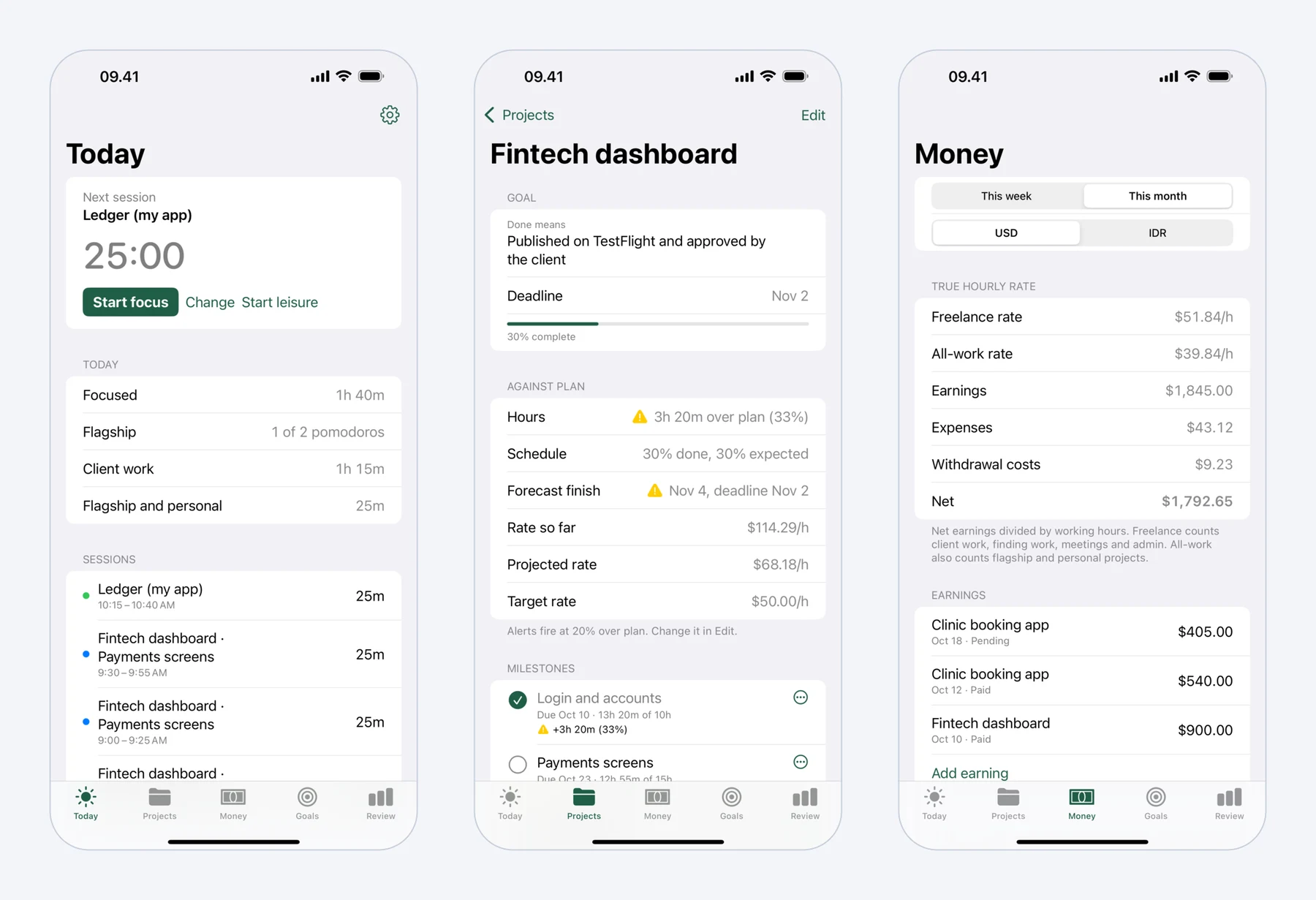 Mindset on iPhone: today's pomodoros, a fixed-price project against its plan, and what the work really paid per hour.
It suits a developer who works in focused rounds, earns in US dollars, spends in another currency, and wants to know what a week paid per hour once proposals, meetings, Upwork Connects and withdrawal fees are counted.
Time is recorded as a side effect of the timer: starting is one tap and continues with your last project and milestone. Rounds can be 25 and 5 minutes, 50 and 10, or your own lengths, and breaks come with guided stretches for the neck and shoulders, wrists, lower back and eyes (general exercises, not medical advice).
The money side is where Mindset differs most. You record earnings per project as pending or paid, and expenses such as Connects, tools and hosting, in US dollars and your local currency. A withdrawal records what actually reached your bank, so fees and the exchange rate spread count as a cost. Mindset then divides earnings minus expenses by hours. In its own example, $2,000 from 40 hours of client work looks like $50 an hour, but with 12 hours finding work, 6 hours of meetings and travel, and $60 of Connects and transport, the freelance rate is $1,940 over 58 hours, about $33 an hour. Our guide to your real hourly rate explains the method.
Projects get milestones with planned dates and hours, and an alert when a project runs 20% over plan (adjustable per project).
Price: free on one device without an account, with the timer, stretch breaks, projects, milestones, earnings, expenses, and this week's and this month's rates. The subscription costs USD 4.99 a month or USD 39.99 a year with a two-week free trial, and adds sync between Mac and iPhone plus longer reports.
Platforms: Mac (macOS 15 or later) and iPhone (iOS 18 or later). Android is planned.
Where it falls short: it is not out yet. Mindset does not offer invoicing, billable-rate reports for clients, integrations, a web app, team features, or Windows and Android apps. It never blocks apps or websites, so it is not a distraction blocker.
5. Timing
Timing records what you do on your Mac automatically, by app, website and document, and you turn that record into time entries afterwards. Rules and AI-grouped suggestions speed up the review. It suits Mac freelancers who forget timers or switch clients often.
Price (US prices from Timing's checkout): Professional costs USD 108 a year or USD 11 a month for one Mac. Expert costs USD 132 a year or USD 14 a month for two Macs. Connect costs USD 192 a year or USD 20 a month and adds team features, an API and AI integration through MCP. There is a 30-day free trial, and Timing is also on Setapp (Timing pricing).
Platforms: Mac only, sold outside the Mac App Store. It can import iPhone and iPad Screen Time data into the Mac app.
What it does well: there is nothing to remember to start, and the detailed history turns into reports you can send to clients.
Where it falls short: it runs only on the Mac, it costs more than a simple timer, and invoices need another app (it integrates with GrandTotal).
6. Timemator
Timemator is a Mac tracker that keeps an activity timeline and can start the right timer by itself, based on rules you set for the apps, project files and websites you use. It suits Mac developers who want automatic tracking without a subscription.
Price: USD 39 one-time for the Mac app, which you can activate on two devices. The iPhone and iPad app is a separate one-time purchase of USD 7.99. There is a 30-day trial, and Timemator is also on Setapp (Timemator's site).
Platforms: Mac, iPhone, iPad and Apple Watch, synced through iCloud.
What it does well: no subscription, data stays on your devices, and hourly rates per task give you revenue totals per day, week or month.
Where it falls short: it is Apple-only (Windows is on its roadmap), and its site describes exporting a report for the client rather than building invoices.
7. Tyme
Tyme is a time tracker for Apple devices, used by individuals and small teams, with an Apple Watch app and reminders to start and stop timers.
Price: USD 6.99 per user per month or USD 59.99 a year (US prices at checkout), with a 14-day free trial. See Tyme pricing.
Platforms: Mac, iPhone, iPad and Apple Watch. A web login is in beta.
What it does well: native apps for each Apple device, a Watch app for starting timers away from the desk, and invoices through GrandTotal or German accounting tools such as Lexware Office and sevdesk.
Where it falls short: there are no Windows or Android apps, and most of its invoicing partners are aimed at the German market.
8. WakaTime
WakaTime measures coding time automatically through plugins for VS Code, JetBrains IDEs, Xcode, Vim and Neovim, Cursor, Zed, Sublime Text and the terminal, and breaks it down by project, language and file. It suits developers who want an honest number for time spent in the editor.
Price: free with one week of dashboard history. Basic costs USD 9 a month or USD 99 a year and keeps two weeks of history. Premium costs USD 14 a month or USD 153.96 a year and adds your full history, exports, AI usage stats and invoices generated from code stats. See WakaTime pricing.
Platforms: plugins for editors on any operating system, plus a web dashboard.
What it does well: zero effort once installed, and fine detail.
Where it falls short: it sees only editor time. Calls, proposals and admin are invisible, so on its own it understates your working week.
9. RescueTime
RescueTime runs in the background and reports which apps and websites took your time. Paid plans add Focus Sessions that block distractions, and the Solo+ plan adds timesheets.
Price: the free Lite plan covers automatic tracking, activity reports, two weeks of history and one goal. Solo costs USD 84 a year (USD 9 monthly) for the focus features. Solo+ costs USD 144 a year (USD 15 monthly) and adds timesheets with clients, projects, billable rates and exports. Paid plans have a 14-day trial. See RescueTime pricing.
Platforms: Mac, Windows, iPhone and Android. The iPhone app needs a paid plan.
What it does well: it shows where attention really goes, which a timer cannot.
Where it falls short: Lite is for awareness, not billing, and billing features sit on the most expensive solo plan.
10. Bonsai
Bonsai is a business suite for freelancers, with proposals, contracts, invoices, payments and time tracking in one account. It suits freelancers who want client paperwork and hours in the same place.
Price: there is no free plan, only a 7-day trial. Basic costs USD 9 per user per month billed yearly (USD 15 monthly) and covers time tracking, tasks, projects and a client list. Invoices, payments, proposals, contracts and expense tracking start on Essentials at USD 19 billed yearly (USD 25 monthly). See Bonsai pricing.
Platforms: web, iPhone and Android, plus a Mac app and a Chrome extension.
What it does well: contract templates with e-signatures (including a software development agreement), invoices and time tracking without switching apps.
Where it falls short: time tracking is one feature among many, and invoicing on Essentials costs more than Clockify's invoicing tier.
If you work hourly on Upwork
For hourly contracts on Upwork, the Upwork Desktop App is not optional. Upwork's Hourly Payment Protection covers only hours logged with the time tracker in that app, and only when, among other conditions, your memos describe the work and you stay within the weekly limit. Manually added time is not covered.
The tracker takes a screenshot at a random moment in each 10-minute block and records keyboard and mouse activity levels and the active app or window name (Upwork's time tracker guide). It runs on Windows, Mac and Linux.
It knows only about Upwork contracts, so freelancers with direct clients or their own product usually run a second tracker and log some hours twice. Our article on Upwork fees and Connects covers the platform's costs.
Also considered
Everhour has strong integrations with Asana, Jira, GitHub, Linear and others, and its free plan covers up to five seats. Integrations and invoicing are on the Team plan, at USD 8.50 per seat per month billed yearly, but with a minimum of five seats, so a solo freelancer pays for five people.
Kimai is open source (AGPL) and free to self-host, which some developers prefer. Its hosted Standard plan, which includes invoicing, starts at EUR 2.99 per user per month.
Which one should you pick?
- A free tracker on every device, no hourly rates needed: Toggl.
- Rates and invoices for the lowest price: Clockify Basic or Standard.
- Invoices sent straight from your tracker to direct clients: Harvest.
- Automatic tracking on a Mac: Timing, or Timemator for a one-time price.
- An all-Apple setup with a Watch app: Tyme.
- Coding time without effort: WakaTime, next to another tracker.
- Pomodoros plus your real hourly rate in USD and local currency: Mindset once it launches, paired with an invoicing tool.
- Contracts, proposals and invoices in one account: Bonsai, at a higher price.
- Hourly Upwork contracts: the Upwork Desktop App, whatever else you use.
Prices and features were checked on the vendors' sites in October 2026. Prices are in US dollars unless noted, exclude tax, and may differ in your country.
For more detail, see our Toggl Track alternatives and our comparisons of Mindset vs Toggl Track and Mindset vs Clockify.
FAQ
What is the best free time tracking app for freelancers?
In our view Toggl's free plan is the most complete for one person: timers in all its apps, a focus mode and personal reports, but no billable rates. Clockify's free plan still offers unlimited tracking, though since April 2026 reports are limited to a one-month range and billable rates need a paid plan. Harvest's free plan includes invoicing but allows only two projects.
Do I need Upwork's time tracker if I already use another app?
Yes, for hourly Upwork contracts. Hourly Payment Protection covers only time logged with the tracker in the Upwork Desktop App, and manual time is excluded. Your other tracker can still record the rest of your week.
Which time tracking apps can create invoices?
Harvest, Clockify (Standard and up), Bonsai (Essentials and up), Everhour (Team) and Kimai build invoices from tracked time. Toggl and Timemator export reports for you to invoice elsewhere, Timing and Tyme hand off to GrandTotal, and Mindset does not offer invoicing.
Is automatic time tracking better than a timer?
Automatic trackers such as Timing, Timemator and RescueTime catch time you would forget to log, but you still review and assign it afterwards. A timer gives cleaner entries with less review, as long as you remember to start it. You can also combine both, for example WakaTime for coding plus a timer for everything else.