dbPlus vs TablePlus
A fair comparison of dbPlus and TablePlus on the Mac, covering databases, platforms, pricing, free versions, safe editing, SSH and privacy.
For most people today, TablePlus is the better choice. It is released, it supports far more databases, and it runs on Mac, Windows, Linux and iOS. dbPlus is a narrower Mac-only client for five SQL engines that costs USD 19 a year and adds a few more checks between you and an accidental write. It is coming to the Mac App Store and is not released yet.
dbPlus is our app, so we have an obvious interest in this comparison. We have described TablePlus from its own documentation and pricing page, and we say plainly where it wins.
At a glance
| TablePlus | dbPlus | |
|---|---|---|
| Status | Released | Coming to the Mac App Store, not released yet |
| Databases | PostgreSQL, MySQL, MariaDB, SQLite, SQL Server, Redshift, Oracle (macOS only), CockroachDB, Snowflake, Cassandra, Redis, Vertica, MongoDB (beta) and others | PostgreSQL 12+, MySQL 8.0+, MariaDB 10.6+, SQLite, SQL Server 2017+ and Azure SQL Database |
| Platforms | macOS 12 or later, Windows, Linux, iOS 15 or later | macOS 14 Sonoma or later, Apple silicon or Intel |
| Pricing model | Perpetual license with one year of updates | Free, with a yearly Premium subscription |
| Price | Basic USD 99 (one device), Standard USD 129 (two devices), Team USD 79 per seat | Premium USD 19 a year through the Mac App Store |
| Free version | 2 tabs, 2 windows and 2 advanced filters at a time, no time limit | 2 connections and 3 tabs at a time |
| Staged edits | GUI edits wait for Commit, with a Code Preview of the SQL | Edits are color-coded and staged, with an SQL preview and one-transaction commit |
| Production safeguards | Connection tags and colors, five Safe Mode levels | Production marking, read-only enforced by the database where possible, a prompt for UPDATE or DELETE without WHERE |
| SSH tunnels | Built in, also in the free version | Premium only |
| Query plans | No visual plan view described in its docs | Explain tree that points out slow steps |
| AI and plugins | JavaScript plugins (beta) and an LLM plugin | None |
| Data collection | No database data sent; license email stored; optional crash reports | Collects no data |
Databases
This is the clearest difference. TablePlus lists thirteen engines in its documentation and more on its homepage, including Redis, MongoDB, Cassandra, Snowflake, BigQuery and ClickHouse. A few have platform caveats: Oracle works only on macOS, and Snowflake works on macOS and Windows.
dbPlus supports five: PostgreSQL 12 and newer, MySQL 8.0 and newer, MariaDB 10.6 and newer, SQLite files, and SQL Server 2017 and newer along with Azure SQL Database. If any part of your work touches Redis, Oracle, Redshift or a NoSQL store, TablePlus is the only one of the two that will cover it. If you still maintain a MySQL 5.7 server, note that dbPlus lists 8.0 as its minimum.
Platforms
TablePlus runs on macOS 12 or later (Intel and Apple silicon), Windows, Linux and iOS 15 or later. The iOS app is included with a desktop license: a Basic license covers two iOS devices while it is active. If you switch between a Mac at home and a Windows laptop at work, or want to check a table from your phone, TablePlus handles that and dbPlus does not.
dbPlus is a native Mac app only, and it needs macOS 14 Sonoma or later. There is no Windows, Linux or iPhone version.
Price and licensing
TablePlus sells perpetual licenses. Basic is USD 99 for one device, Standard is USD 129 for two, and Team is USD 79 per seat with a three-seat minimum. Each includes one year of updates. After that you can keep using the version you have, or renew updates at USD 59 per device. VAT depends on your country. TablePlus is also part of the Setapp subscription.
dbPlus is free to use, and dbPlus Premium costs USD 19 a year through the Mac App Store, with a one-week free trial for new subscribers. The App Store shows the price in your local currency.
Here is a worked example for one Mac over three years, before tax. With TablePlus Basic and an update renewal each year, you would pay USD 99 + 59 + 59 = USD 217. If you skip the renewals, you pay USD 99 once and stay on the version you bought. dbPlus Premium over the same three years is 3 × USD 19 = USD 57.
The cheaper total is not the whole story. Some developers prefer to pay once and own a version outright, and TablePlus's model suits them better than any subscription.
Free versions compared
The TablePlus free version has no time limit and its pricing page says the limits are two open tabs, two open windows and two advanced filters at a time. It names no other restrictions, so features such as SSH are available in the free version. On Windows the free version has no filters.
The dbPlus free version covers browsing, filtering, editing rows, the full SQL editor, saved queries and importing from TablePlus, with two connections and three tabs open at a time. SSH tunnels, structure editing, and import, export, dumps and copying between databases are Premium features.
So the free TablePlus does more, especially if you need SSH to reach your database. The free dbPlus gives you one more tab.
Editing data and production safety
Both apps stage edits instead of writing each cell change immediately.
In TablePlus, changes you make in the grid stay pending until you commit them with the Commit button or ⌘S, and you can discard them instead. Code Preview (⌘⇧P) shows the SQL that TablePlus generated for those uncommitted changes. Each connection gets a tag (Local, Testing, Development, Staging or Production) and a color. Safe Mode has five levels: Silent sends queries with no prompt, two Alert modes warn before queries (one skips SELECT and EXPLAIN), and two Safe modes ask for a password before queries (again with one that skips reads). A password prompt is a firmer barrier than a confirmation dialog, and that is a real strength.
In dbPlus, changed cells turn amber, new rows green and deleted rows red, and the footer counts the changes. You preview the exact SQL, then commit everything in one transaction or discard it. Marking a connection as Production makes dbPlus ask before anything writes to it. Read-only connections are enforced by the database itself where the database allows it, rather than by the app alone. An UPDATE or DELETE without a WHERE clause asks before it runs. After sleep or a dropped connection, dbPlus reconnects by itself and tells you when an open transaction was lost.
Both apps take production seriously. TablePlus gives you more control over how strict the prompts are. dbPlus adds the missing-WHERE check, the single-transaction commit and the lost-transaction warning. Our guide to editing production data safely covers habits that matter in either app.
Writing SQL
TablePlus has a capable query editor: several cursors (⌘-click, or ⌘D for the next match), SQL beautify and minify, a split editor, run all or run current statement, query history, and favorite queries you can call up with a keyword.
dbPlus has highlighting for each database, autocomplete for tables, columns and aliases, snippets, Format SQL, several cursors, and commands to move, duplicate and indent lines. You can run the statement at the cursor, a selection or everything, and cancel a long query. Parameters such as :customer_id ask for a value and remember it. Explain shows the query plan as a tree and points out the slow steps; if plans are new to you, see how to read a PostgreSQL EXPLAIN plan. Saved queries are plain .sql files in a folder you choose, so they can live in a git repository beside your code.
SSH, import and export
TablePlus has built-in SSH. You can sign in with a password or a private key, and it reads ~/.ssh/config when you leave the key field empty. In dbPlus, SSH tunnels are part of Premium. Our guide to connecting through an SSH tunnel on Mac explains the setup for both.
TablePlus exports table data to CSV, JSON or SQL, imports CSV files and SQL dumps, and has backup and restore. dbPlus Premium exports tables and results to CSV, Excel, JSON, Markdown, HTML or SQL, imports CSV, Excel and JSON, dumps and restores whole databases, and copies tables between databases, including from one engine to another.
Privacy
TablePlus says it never sends or stores your database data on its servers, and it keeps credentials in the macOS Keychain. It stores your email address for license management, and crash reports go through Microsoft App Center unless you turn them off. Its LLM plugin is on by default: TablePlus says rows are never sent, but table structure may be shared with the AI provider you configure. You can switch it off in settings.
dbPlus collects no data and sends nothing to Nicecoder. Passwords stay in the Keychain and purchases go through Apple. dbPlus has no AI features, so there is nothing to switch off.
Pick TablePlus if
- You use any database beyond PostgreSQL, MySQL, MariaDB, SQLite and SQL Server.
- You work on Windows or Linux too, or want an iPhone app.
- You need a client today, not when dbPlus launches.
- You prefer a one-time license to a subscription.
- You need SSH tunnels without paying.
- Your Mac runs macOS 12 or 13.
Pick dbPlus if
- Your databases are among the five it supports, and you work on a Mac.
- You want edits committed in one transaction, a prompt before writes on production, and a check on
UPDATEorDELETEwithoutWHERE. - USD 19 a year suits you better than a larger license.
- You want saved queries as
.sqlfiles in git. - You want a client that collects no data.
dbPlus can import your TablePlus connections, so trying it later costs little effort. Details are on the dbPlus page. If neither app fits, our list of TablePlus alternatives for Mac covers seven more.
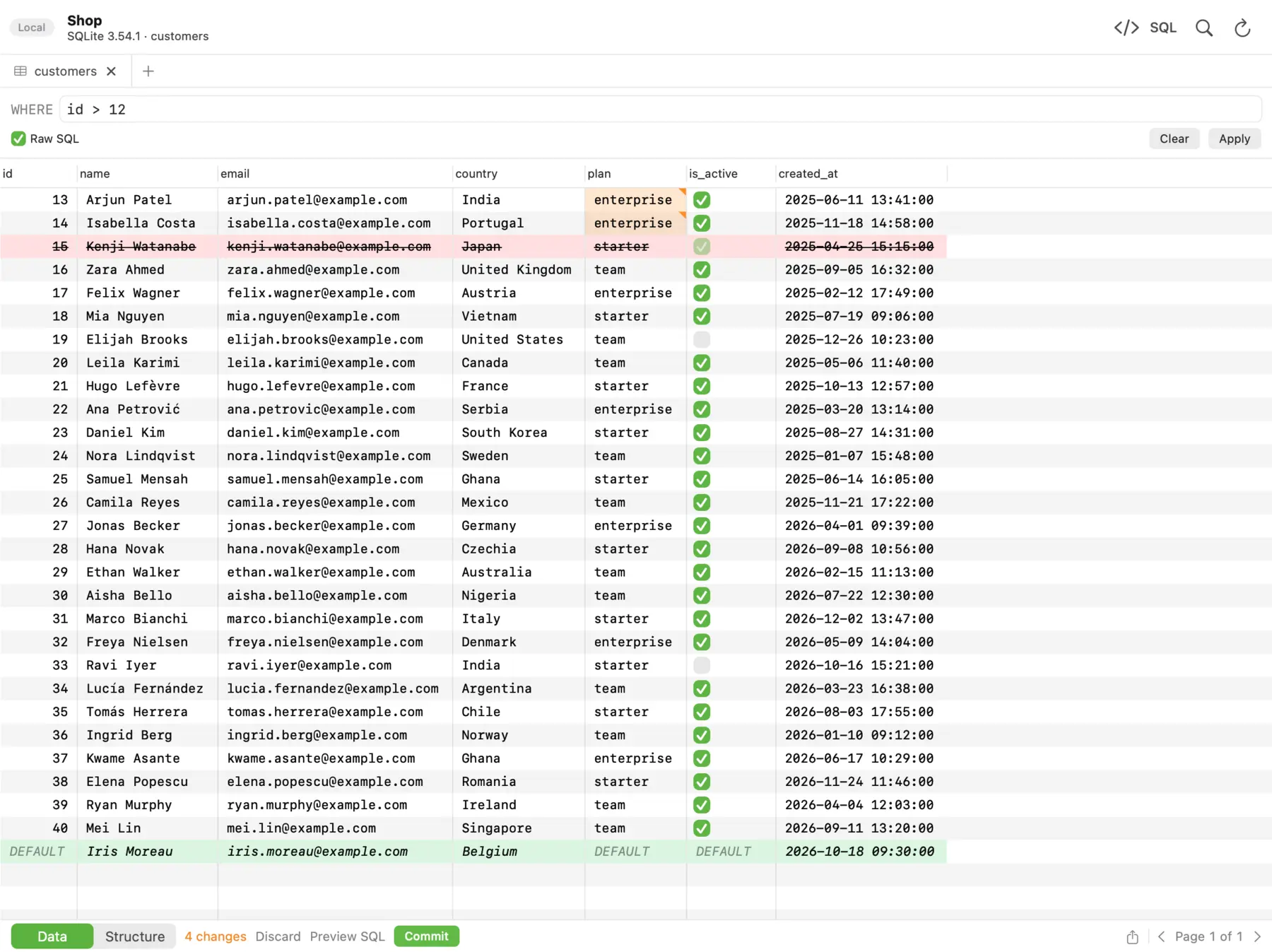 In dbPlus, changed cells turn amber, deleted rows red and new rows green, and nothing runs until you commit.
Prices and features were checked on the vendors' sites in October 2026.
FAQ
Is dbPlus available to download?
Not yet. dbPlus is coming to the Mac App Store, and the dbPlus page has the details. Until it is out, TablePlus or another client from our list is the practical choice.
Can dbPlus import connections from TablePlus?
Yes. dbPlus can import TablePlus connections, and the import is part of the free version. Passwords in dbPlus are kept in your Mac's Keychain.
Does TablePlus have a safe mode for production databases?
Yes. TablePlus has five Safe Mode levels, from no prompts to a password prompt before every query, and you can tag a connection as Production and give it a color. You change the level from the lock icon in the toolbar.
Is TablePlus a subscription?
No. TablePlus sells perpetual licenses that include one year of updates. After that year you can keep using your version, or renew updates for USD 59 per device.