Toggl Track alternatives for freelancers in 2026
Eight Toggl Track alternatives for freelancers, with what changed at Toggl in 2026, October prices, free plans, invoicing and who each app suits best.
If you are leaving Toggl Track because billable rates sit behind a paid plan, or because the new Toggl app leans toward team planning, Clockify is the closest replacement and costs less. Harvest is the better choice when you want invoices in the same app, and Timing is our pick for automatic tracking on a Mac. Six more alternatives follow, each with the reader it suits.
One of the eight, Mindset, is our own app, and it is not released yet. We have tried to judge it exactly as we judge the others.
What changed at Toggl in 2026
Toggl now sells a rebuilt app, called simply Toggl, and it is the default for everyone who signs up. Toggl's announcement says Toggl Track is still supported for existing users, with no forced migration and no sunset date. Track users can import their data into the new app and keep a live sync between the two while they test it, according to Toggl's page for Track users.
The new app keeps one-click timers and adds task boards, timelines, capacity planning, time off and an AI assistant. Pricing on toggl.com/pricing, checked in October 2026:
| Plan | Billed yearly | Billed monthly | Notes |
|---|---|---|---|
| Free | USD 0 | USD 0 | Up to 3 users, timers, focus mode, personal reports |
| Starter | USD 9 per user per month | USD 12 | Adds billable rates, tags, milestones |
| Premium | USD 16 per user per month | USD 24 | Adds profitability reports, fixed fees, approvals |
Paid plans have a 30-day trial. Toggl also states that it takes no screenshots and records no keystrokes.
Why freelancers look for an alternative
The first reason is money. A solo freelancer who bills by the hour needs billable rates, and those start on Starter, at USD 108 a year on yearly billing.
The second is invoicing. Toggl's invoicing page describes exporting reports as CSV or PDF and building the invoice elsewhere. Its integrations page marks QuickBooks Online and Xero as legacy Toggl Track integrations that the new Toggl does not currently support.
The third is direction. Capacity planning, team timelines and time-off policies are useful to agencies, but a one-person business may not need them, and the new app puts them up front.
Some freelancers also want a different kind of tracker: one that captures time automatically, works without an account, or puts earnings and costs next to the hours. Toggl's desktop apps do record app and website activity on Windows and macOS, so check whether that covers you before switching for this reason alone.
Comparison table
| App | Free plan or trial | Paid from, one person | Invoices | Platforms |
|---|---|---|---|---|
| Toggl (for reference) | Free, up to 3 users | USD 9 a month, billed yearly | Exports reports only | Web, Mac, Windows, iPhone, iPad, Android, Chrome, Firefox |
| Clockify | Free, up to 5 users | USD 3.99 a month, billed yearly | Standard plan and up | Web, Mac, Windows, Linux, iPhone, Android, extensions |
| Harvest | Free, 1 seat and 2 projects | USD 9 a month, billed yearly, plus usage | Yes, including free plan | Web, Mac, Windows, iPhone, Android, extensions |
| Mindset | Free on one device | USD 39.99 a year for sync | Not offered | Mac, iPhone (not released yet) |
| Timing | 30-day trial | USD 108 a year | Through GrandTotal | Mac |
| Timemator | 30-day trial | USD 39 one-time | Report export | Mac, iPhone, iPad, Apple Watch |
| Tyme | 14-day trial | USD 59.99 a year | Through GrandTotal and others | Mac, iPhone, iPad, Apple Watch |
| Kimai | Free to self-host | EUR 2.99 a month, hosted | Yes | Web, self-hosted or hosted |
| Bonsai | 7-day trial | USD 9 a month, billed yearly | Essentials plan and up | Web, Mac, iPhone, Android, Chrome |
1. Clockify: the closest replacement
Clockify works much like Toggl: a timer, a timesheet, a web app, desktop and mobile apps, and browser extensions that add tracking buttons inside more than 80 web tools. The difference is price. Billable rates start on Basic at USD 3.99 per seat per month billed yearly (USD 4.99 monthly), invoices on Standard at USD 5.49 (USD 6.99), and expenses with a currency per client on Pro at USD 7.99 (USD 9.99), according to Clockify's pricing page.
The free plan changed in April 2026. CAKE.com's announcement caps it at five users, limits report date filters to one month, and moves billable rates and CSV or Excel exports to paid plans. It still includes unlimited tracking, a Pomodoro timer and an auto tracker.
Clockify suits a Toggl user who wants the same workflow plus invoices, for less. It is also the only app here with a Linux desktop app. The drawback is that much of the product is built for employers, with kiosks, GPS tracking and activity monitoring on higher plans. We compare it with our own app in Mindset vs Clockify.
2. Harvest: best for invoicing
Harvest puts time, expenses and invoices in one account. Clients can pay invoices online through its Stripe and PayPal integrations, and invoices sync to QuickBooks Online or Xero. The free plan includes invoicing for one seat and two projects. Teams starts at USD 9 per seat per month billed yearly or USD 11 monthly, and Harvest's pricing page says additional invoices, projects, clients and tasks are billed based on usage.
Harvest suits freelancers who bill direct clients and want the invoice to come from the tracker. The two-project free limit is tight, and usage-based charges make the yearly cost harder to predict than Toggl's flat seat price.
3. Mindset: best for Pomodoros and your real hourly rate
Mindset is our app, and it is coming to the App Store, not released yet. It is a Pomodoro timer with stretch breaks for Mac and iPhone that tracks time per project as a side effect of the timer: one tap starts a round on your last project and milestone. It is built for freelance software engineers who earn in US dollars and may spend in another currency.
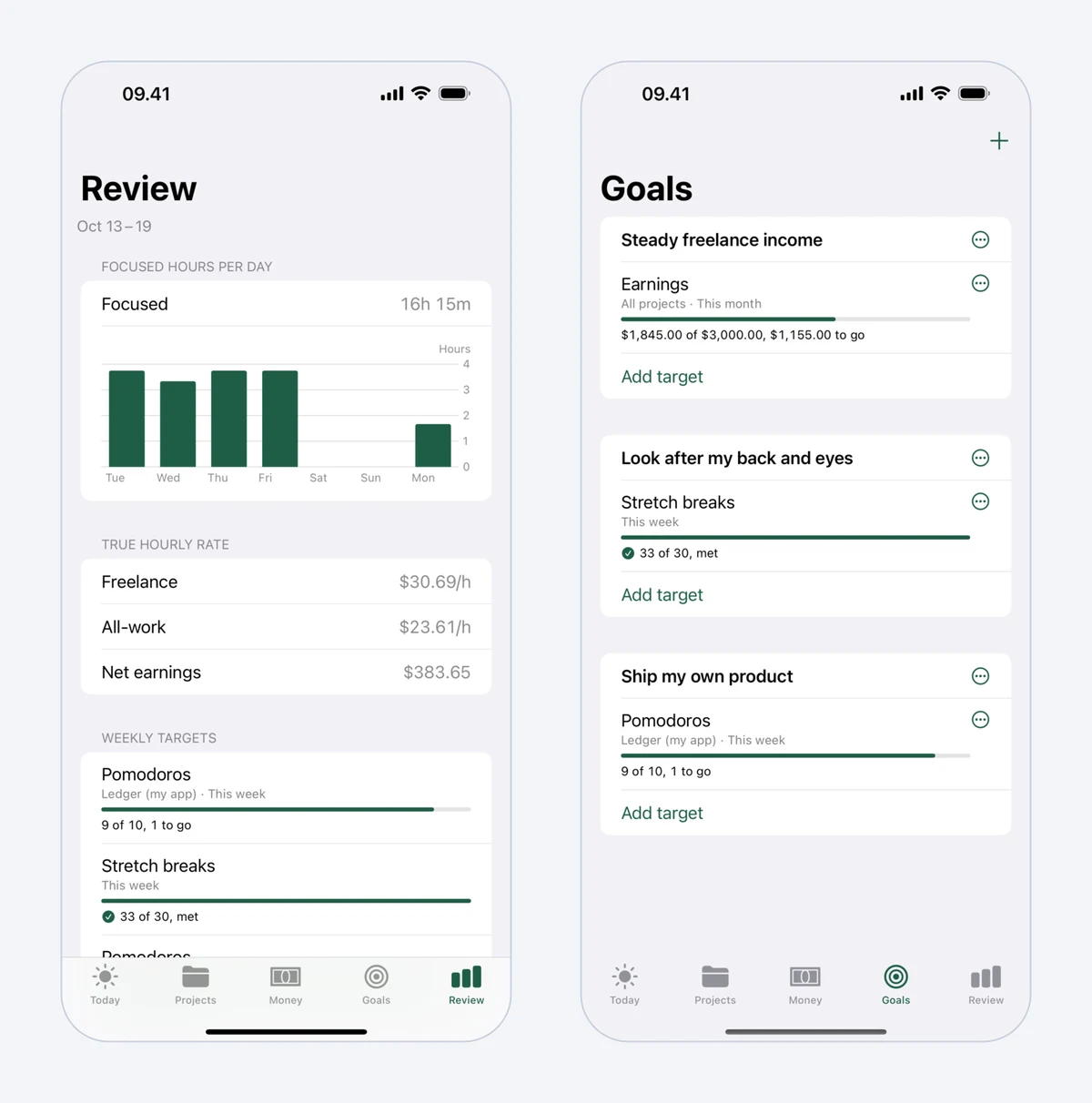 Mindset's weekly Review, with focused hours per day and time by category, beside Goals.
Where Toggl reports hours, Mindset puts money next to them. You record earnings per project as pending or paid, expenses such as Upwork Connects, tools and hosting, and withdrawals that record what actually reached your bank, so fees and the exchange rate spread count as a cost. It then shows a freelance hourly rate (earnings minus expenses, divided by hours on client work, meetings and travel, finding work and admin) and an all-work rate that also counts your own products. Projects get milestones with planned hours and dates, with an alert at 20% over plan.
It is free on one device without an account. Sync between Mac and iPhone and longer reports cost USD 4.99 a month or USD 39.99 a year, with a two-week trial.
Mindset does not offer invoicing, billable-rate reports for clients, integrations, a web app, team features, or Windows and Android apps (Android is planned). If you need any of those, it cannot replace Toggl. Our Mindset vs Toggl Track comparison goes through the differences row by row.
4. Timing: best automatic tracking on a Mac
Timing records your Mac activity by app, website and document, then helps you turn it into time entries with rules and AI-grouped suggestions. US prices at its checkout are USD 108 a year (or USD 11 monthly) for Professional on one Mac, USD 132 a year for Expert on two Macs, and USD 192 a year for Connect, which adds team features, an API and MCP. There is a 30-day trial, and it is also on Setapp. See Timing pricing.
Timing suits Mac users who forget timers. It runs only on the Mac (it can import iPhone Screen Time data), and invoices go through GrandTotal.
5. Timemator: no subscription
Timemator is a Mac tracker with an activity timeline and rules that start timers by themselves when you open certain apps, files or websites. The Mac app costs USD 39 one-time and activates on two devices, and the iPhone and iPad app is a separate USD 7.99 purchase (Timemator). Data stays on your devices and syncs through iCloud.
It suits Mac developers who dislike subscriptions. It has hourly rates per task but describes exporting reports for clients rather than building invoices, and it is Apple-only.
6. Tyme: for an all-Apple setup
Tyme runs on Mac, iPhone, iPad and Apple Watch, with team roles, budgets and hourly rates. It costs USD 6.99 per user per month or USD 59.99 a year at US checkout, with a 14-day trial (Tyme pricing). Invoices go through GrandTotal or German accounting tools such as Lexware Office and sevdesk. It suits freelancers who start timers from the Watch, but there is nothing for Windows or Android.
7. Kimai: open source and self-hosted
Kimai is an open-source time tracker under the AGPL licence that you can host yourself for free, on your own server. It includes billable hours, invoicing and data export. If you'd rather not run it, the hosted Standard plan starts at EUR 2.99 per user per month, with a 30-day trial (Kimai pricing).
It suits developers who want control of their data and are comfortable maintaining a web app. The trade-off is that you are now responsible for updates and backups, and it is a web app rather than a native desktop timer.
8. Bonsai: when you want contracts and proposals too
Bonsai combines proposals, contracts with e-signatures, invoices, payments and time tracking. There is no free plan, only a 7-day trial. Basic, at USD 9 per user per month billed yearly (USD 15 monthly), covers time tracking and projects; invoices and contracts start on Essentials at USD 19 billed yearly (USD 25 monthly), per Bonsai's pricing.
It suits freelancers who want client paperwork in one place. If you only need time tracking, its Basic plan costs the same as Toggl Starter and more than Clockify's Basic, Standard or Pro plan.
When to stay with Toggl
Toggl remains a good tracker. Stay if you work across Windows, Android and Mac, rely on the Chrome or Firefox extension, script against its API or MCP server, or are happy on the free plan without billable rates. Existing Toggl Track users can also keep using Track; nothing forces a move.
For developers, two apps work well next to Toggl rather than instead of it: WakaTime measures coding time from editor plugins, and RescueTime shows where attention goes. Both are covered in our list of the best time tracking apps for freelancers.
Which one should you pick?
Pick Clockify if you want Toggl's workflow with invoices for a few dollars a month. Pick Harvest if sending invoices from the tracker matters more than price. On a Mac, pick Timing for detailed automatic tracking, or Timemator to pay once. Tyme fits an all-Apple setup with a Watch, Kimai fits developers who want to self-host, and Bonsai fits freelancers who want contracts and invoices beside their hours.
Pick Mindset, once it launches, if you work in Pomodoros on Mac and iPhone and want to know what your hours really pay after Connects, fees and the exchange rate spread. You will still need a separate invoicing tool. Our guide to your real hourly rate shows the calculation it automates.
Prices and features were checked on the vendors' sites in October 2026. Prices are in US dollars unless noted, exclude tax, and may differ in your country.
FAQ
Is Toggl Track shutting down?
No. Toggl made its new app the default for new sign-ups in 2026, but says Toggl Track is supported for existing users with no forced migration or sunset date. Track users can move to the new app when they choose.
Is Toggl still free for freelancers?
Yes. The free plan covers up to three users and includes timers, focus mode, calendar integrations and personal reports. Billable rates, tags and milestones need Starter, from USD 9 per user per month on yearly billing.
What is the cheapest Toggl alternative with invoicing?
Kimai costs nothing if you self-host it. Among hosted apps, Harvest's free plan includes invoicing for two projects, and Clockify Standard adds invoices at USD 5.49 per seat per month on yearly billing.
Can I move my time entries out of Toggl?
Toggl exports its Summary and Time Logs reports as CSV or Excel files. Clockify can import time entries from a file on its Basic plan and up, so check that the columns match before you import a large history.