Mindset vs Clockify
Mindset and Clockify compared for freelance developers on free plans, invoicing, expenses, currencies, platforms and price, with a verdict for each reader.
Choose Clockify if you want a free or very cheap tracker on every platform, invoices built from tracked time, or tools for a team. Choose Mindset if you are a freelance developer on Mac and iPhone who works in Pomodoros and wants to see what your hours really pay after expenses, withdrawal fees and the exchange rate spread, in US dollars and your local currency. Mindset is coming to the App Store and is not released yet.
We make Mindset, so we have a stake in this comparison. Clockify does several things Mindset does not do at all, and we point those out first.
At a glance
| Mindset | Clockify | |
|---|---|---|
| Status | Coming to the App Store, not released | Available now |
| Made for | Freelance software engineers | Individuals, teams and employers |
| How time is recorded | Pomodoro timer; one tap continues your last project and milestone | Timer, timesheet, calendar, auto tracker, kiosk |
| Pomodoro timer | The core of the app | Included on the free plan |
| Guided stretch breaks | Yes | Not in its feature list |
| Billable rates | Not offered | Basic plan and up |
| Invoicing | Not offered | Standard plan and up |
| Expenses | Yes, on the free tier | Pro plan and up |
| Currencies | US dollars and your local currency; withdrawals count fees and spread | A currency per client on Pro |
| Hourly rate after costs | Freelance and all-work rates | Labor cost and profit reports on Pro |
| Plans and alerts | Milestones with planned dates and hours; alerts | Time estimates on Basic; budgets, forecasting and alerts on Pro |
| Integrations and API | Not offered | Tracking inside 80+ web apps, QuickBooks, API, webhooks |
| Team features | Not offered | Yes |
| Platforms | Mac and iPhone; Android planned | Web, Mac, Windows, Linux, iPhone, Android, Chrome, Firefox, Edge |
| Free tier | One device, no account needed | Up to 5 users, unlimited tracking |
| Paid price | USD 4.99 a month or USD 39.99 a year | From USD 3.99 per seat per month billed yearly |
Clockify's free plan after the April 2026 changes
Clockify's free plan is still generous on tracking, but it has new limits. In April 2026, CAKE.com announced a set of limits. The free plan now covers up to five users. Billable rates, shared reports, project time estimates and CSV or Excel report exports moved to paid plans. Report date filters are limited to one month, the API to 30 requests per hour per workspace, and webhooks to three. Projects default to public, because private projects became a paid feature. Existing paid subscribers were not affected.
What remains free, per Clockify's pricing page: unlimited tracking and projects, the timer and timesheet, calendar sync, the auto tracker, a Pomodoro timer, idle detection and reminders, and the desktop and mobile apps.
Where Clockify is stronger
It costs very little, or nothing. A solo freelancer can track unlimited hours on unlimited projects for free, and billable rates cost USD 3.99 per seat per month billed yearly, less than half of Toggl's Starter price.
It runs everywhere. Clockify has a web app, desktop apps for Mac, Windows and Linux, mobile apps for iPhone and Android, and extensions for Chrome, Firefox and Edge. The desktop and mobile apps keep working offline. Mindset runs only on Mac and iPhone.
It bills clients. Billable rates start on Basic. Standard adds invoices built from tracked time and expenses, downloadable as PDF, with status tracking and recurring invoices, plus a QuickBooks integration. Mindset does not offer invoicing.
It can record time for you. The auto tracker notes the apps and websites you use on Mac, Windows and Linux, visible only to you, and idle detection and reminders catch forgotten timers.
It connects to your tools. Clockify's extension adds tracking buttons inside more than 80 web apps, including Jira, Asana, Trello and ClickUp, and there is an API and webhooks for scripting.
It handles teams, from shared projects to approvals, time off and scheduling on higher plans. And it is available today.
Where Mindset is stronger
The timer is the tracker
Clockify includes a Pomodoro timer with break notifications in its Mac and Windows apps and Chrome extension. In Mindset, the Pomodoro is how time gets recorded. Starting is one tap and continues with your last project and milestone. You choose 25 minutes of focus and 5 of rest, 50 and 10 for deep coding, or your own lengths, with a long break after every fourth round. A soft chime marks the end of each phase, and a daily minimum for your own product, such as two pomodoros, sits at the top of the day.
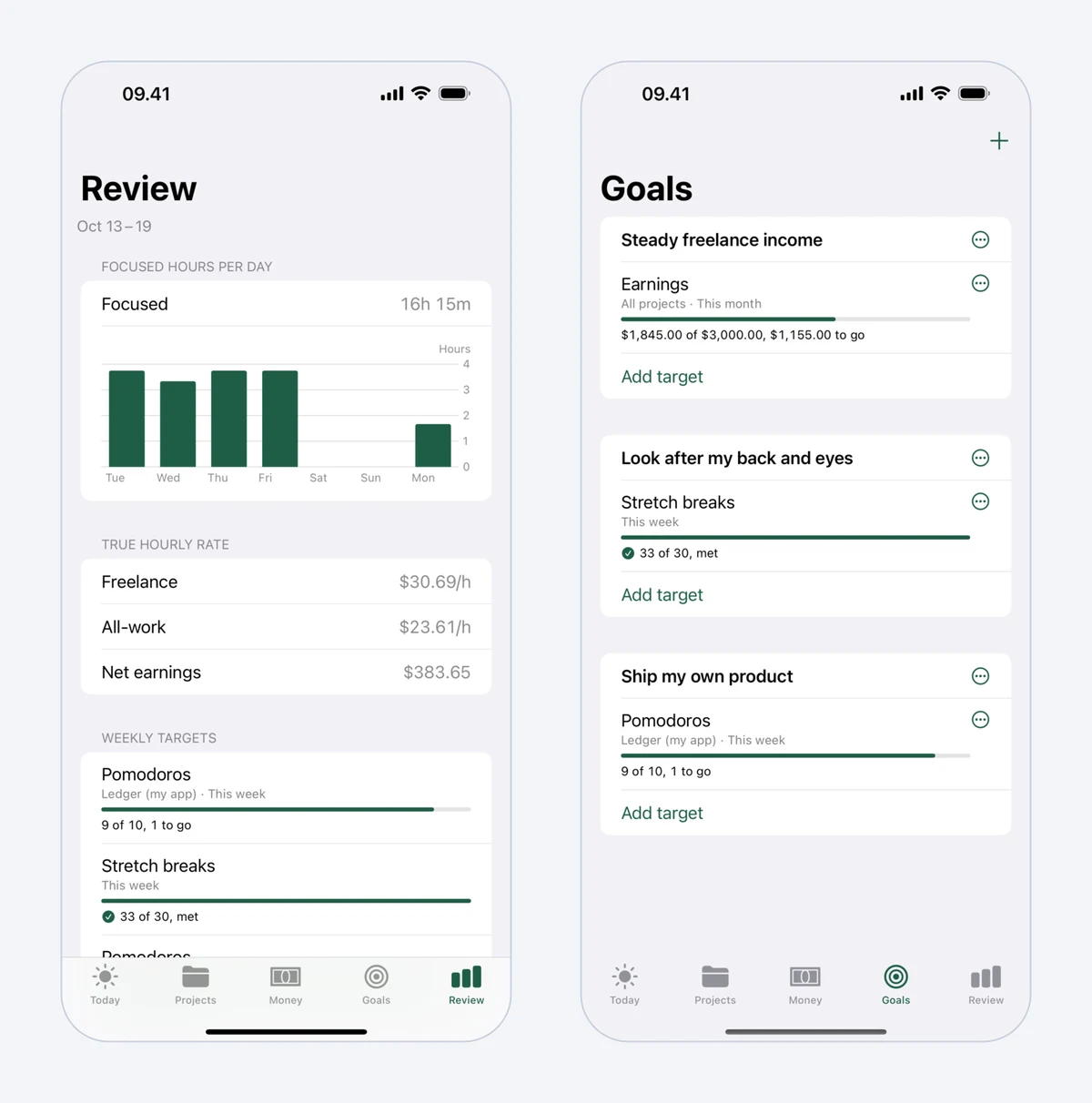 Mindset's weekly Review, with focused hours per day and time by category, beside Goals.
Breaks that come with stretches
Mindset's breaks include guided routines for the neck and shoulders, wrists, lower back, and eyes, with a short routine on short breaks and a longer one on long breaks. You mark each break Stretched or Skipped, and reminders pause during meetings and leisure. The routines are general exercises, not medical advice. For more on the topic, see our guide to desk stretches for programmers.
Money in the currency you live on
Clockify's multiple-currency feature, on Pro, lets you set a currency for each client so that reports and amounts appear in that client's currency. Mindset is aimed at a different question: what reached your bank. You record earnings per project as pending or paid, and expenses such as Upwork Connects, tools, hosting and travel to clients, in US dollars and your local currency. A withdrawal records what actually arrived in your bank account, so platform fees and the exchange rate spread count as a cost. Expense tracking is part of Mindset's free tier; in Clockify it starts on Pro.
An hourly rate that counts unpaid hours
Mindset shows two rates, each worked out as earnings minus expenses, divided by hours. The freelance rate counts client work, meetings and travel, finding work, and admin. The all-work rate also counts hours on your own products. Clockify's profit reports on Pro compare what you charge clients with labor costs you set, which suits a business with staff. Mindset's rates answer what one person's whole working week paid. Our guide on calculating your real hourly rate shows why your real rate can sit far below the rate you quote.
Projects against plan, on the free tier
Each Mindset project gets milestones with planned dates and hours. The project page compares hours against plan, progress against the schedule, the effective rate against your target, and this week's time against the weekly goal. A notification arrives when a project runs 20% over plan (you can change the threshold per project) or a milestone is forecast to miss its date. Clockify's budgets, forecasting and alerts are on Pro. That plan history is also what you need to price fixed-price projects from your own data.
No account to start
Without an account, Mindset is free on one device and your data stays there. Clockify is a cloud service with an account from the start.
What Mindset does not offer
To be plain about the gaps, Mindset does not offer:
- invoicing, or billable rates applied to tracked hours
- report exports for clients
- integrations, an API or webhooks
- team features
- a web app or browser extension
- apps for Windows, Linux or Android (Android is planned)
- automatic tracking of apps and websites
- blocking of apps or websites; Mindset tracks and reminds, but never blocks
Price compared
For one person on yearly billing, the options look like this. Clockify prices are per seat and come from its pricing page.
| Plan | Yearly cost | What it adds for a freelancer |
|---|---|---|
| Clockify Free | USD 0 | Unlimited tracking, Pomodoro timer, auto tracker; reports limited to a one-month range |
| Clockify Basic | USD 47.88 (USD 3.99 a month) | Billable rates, exports, time estimates |
| Clockify Standard | USD 65.88 (USD 5.49 a month) | Invoices, recurring invoices, QuickBooks |
| Clockify Pro | USD 95.88 (USD 7.99 a month) | Expenses, currency per client, profit reports, budgets |
| Mindset free | USD 0 | Everything on one device except sync and longer reports |
| Mindset subscription | USD 39.99 | Sync between Mac and iPhone, longer reports |
Monthly billing costs more: Clockify Basic is USD 4.99, Standard USD 6.99 and Pro USD 9.99 a month, and Mindset is USD 4.99 a month. Clockify offers a 7-day trial of Pro features, and Mindset's subscription has a two-week free trial. Mindset's App Store price is lower in some countries.
Can you use both?
Yes, though nothing connects them, so time you want in both apps has to be entered twice. A workable split is Clockify for client billing and invoices, and Mindset for focus, breaks and the money view. Using only one is simpler, so try that first.
If you bill hourly on Upwork, keep using Upwork's Desktop App for those contracts. Upwork's Hourly Payment Protection covers only time logged with its own tracker, whichever other app you use.
Which one should you pick?
Pick Clockify if you want to spend nothing or almost nothing, need invoices or billable rates for direct clients, work on Windows, Linux, Android or the web, use integrations, or have a team. It is the better choice for most people who simply need hours tracked and billed.
Pick Mindset if you work alone on a Mac and an iPhone, like to work in Pomodoros with real breaks, earn in US dollars and spend in another currency, and want an honest hourly rate that includes proposals, admin and withdrawal costs. Plan on a separate invoicing tool, and on waiting for the release.
We compare Mindset with the other big name in Mindset vs Toggl Track, and the wider field in our list of the best time tracking apps for freelancers.
Prices and features were checked on the vendors' sites in October 2026.
FAQ
Is Clockify still free in 2026?
Yes. The free plan covers up to five users with unlimited tracking and projects. Since April 2026, billable rates and CSV or Excel exports need a paid plan, and reports are limited to a one-month date range.
Does Clockify have a Pomodoro timer?
Yes. A Pomodoro timer with break notifications is part of the free plan, in the Mac and Windows apps and the Chrome extension.
Can Clockify track expenses in another currency?
Clockify Pro, from USD 7.99 per seat per month on yearly billing, adds expenses with receipts and lets you set a currency for each client. Expenses and the currency-per-client feature are not on the free, Basic or Standard plans.
Does Mindset work on Windows?
No. Mindset runs on Mac (macOS 15 or later) and iPhone (iOS 18 or later), and Android is planned. Clockify has apps for Windows, Linux and Android today, plus a web app.