The 10 best Pomodoro timer apps for Mac in 2026
Ten Pomodoro timers for the Mac compared on price, app blocking, stats and menu bar use, with free open-source picks and paid focus apps.
The best Pomodoro app for most Mac users in 2026 is Session, because it pairs a clean timer with app and website blocking and good stats. Flow is the better buy if you want a polished timer for less money, and TomatoBar is the pick if you want something free and open source that lives in the menu bar. If you freelance and want the timer to record hours and earnings per project, Mindset is built for that, but it is not released yet.
We make Mindset, so read its entry with that in mind. We have tried to give every app here a fair hearing, including the ones that beat ours.
Quick comparison
| App | Best for | Price (US) | Platforms |
|---|---|---|---|
| Session | Blocking distractions during focus | Free; Pro $4.99/month or $39.99/year | Mac, iPhone, iPad |
| Flow | A polished timer at a low price | Free; Pro $2.99/month, $17.99/year or $39.99 once | Mac, iPhone, iPad, Apple Watch |
| Mindset | Freelancers tracking time and money per project | Free on one device; $4.99/month or $39.99/year for sync | Mac, iPhone (coming soon) |
| Be Focused | A timer with a built-in task list | Free; Pro $2.99/month, $19.99/year or $39.99 once | Mac, iPhone, iPad, Apple Watch |
| Vitamin-R | One goal per session, no subscription | $29.95 once | Mac |
| Focus | A timer that fits deep into Apple's system features | Free to start; Focus Pro subscription | Mac, iPhone, iPad, Apple Watch |
| TomatoBar | A free, open-source menu bar timer | Free | Mac |
| Focus To-Do | Tasks and Pomodoros on Mac, Windows and Android | Free; Premium lifetime $11.99 | Mac, Windows, iPhone, iPad, Android, Apple Watch |
| Toggl Track | Pomodoros that land in a timesheet | Free plan; paid from $9 per user/month (annual) | Mac, Windows, iPhone, Android, web, browser extensions |
| Pomofocus | A timer in a browser tab | Free; Premium subscription | Web, plus desktop apps |
How we picked
Every app here runs natively on macOS (or, for Pomofocus, in any browser), lets you change focus and break lengths, and was still being sold and updated when we checked. We left out apps whose last update is years old, even good ones. We looked at what a working developer or freelancer cares about: how fast you can start a session, whether the timer stays out of the way, what the stats show, and whether you can block distractions.
If you are still deciding between 25-minute and 50-minute sessions, our guide to Pomodoro for programmers covers the trade-offs. Every app below lets you change the lengths.
1. Session
Session is a Pomodoro timer from Translucent LLC that asks you to state what you are working on before each session, then blocks the apps and websites you chose until the timer ends. At the end of the day it shows what you did and asks what you learned. It suits people whose main problem is drifting into a browser tab or chat app halfway through a task.
The free plan includes unlimited sessions and breaks, but its analytics only cover the past two days, and custom session lengths are a Pro feature. Pro costs $4.99 a month or $39.99 a year, and a new account gets seven days of Pro free. Students can ask for 30% off for one year. Session runs on Mac, iPhone and iPad and syncs between them through its own server.
Strengths:
- App and website blocking on the Mac, with the website blocker working in Safari, Chrome, Brave and Edge.
- Integrations that matter at work: it can mute Slack and update your Slack status, add sessions to Apple Calendar, and be scripted with AppleScript on the Mac or Shortcuts on iOS.
- Categories and intentions give the stats more meaning than a count of rounds.
Drawbacks:
- The free plan is limited enough that most regular users will end up paying.
- At $39.99 a year it is one of the more expensive timers here.
- No Windows or Android version, so it only works if you stay on Apple devices.
2. Flow
Flow from Yugen GmbH is a simple, good-looking interval timer for Mac, iPhone, iPad and Apple Watch. The basics are free with no ads or sign-up, which makes it an easy first Pomodoro app.
The free version gives you the focus timer, a choice of durations, statistics, break reminders and iCloud sync of your stats. Flow Pro adds fully custom durations and cycles, app and website blocking, Apple Calendar sync, timesheet export and a commitment mode. On the US App Store, Pro is $2.99 a month, $17.99 a year, or $39.99 as a one-time lifetime purchase. It needs macOS 15 or later.
Strengths:
- The lifetime option is rare among focus apps, and it costs about the same as two years and three months of the yearly plan.
- Runs on every Apple device you are likely to own, including the Watch.
- Live Activities, widgets and Shortcuts support on iPhone.
Drawbacks:
- Apple-only, with no Windows or Android app.
- Custom session titles and fully custom durations sit behind Pro, so the free tier is less flexible than it first looks.
3. Mindset
Mindset is our app: a Pomodoro timer in the Mac menu bar and on iPhone that tracks time and money per project as a side effect of the timer. It is written for freelance software engineers, and it is coming to the App Store but not released yet.
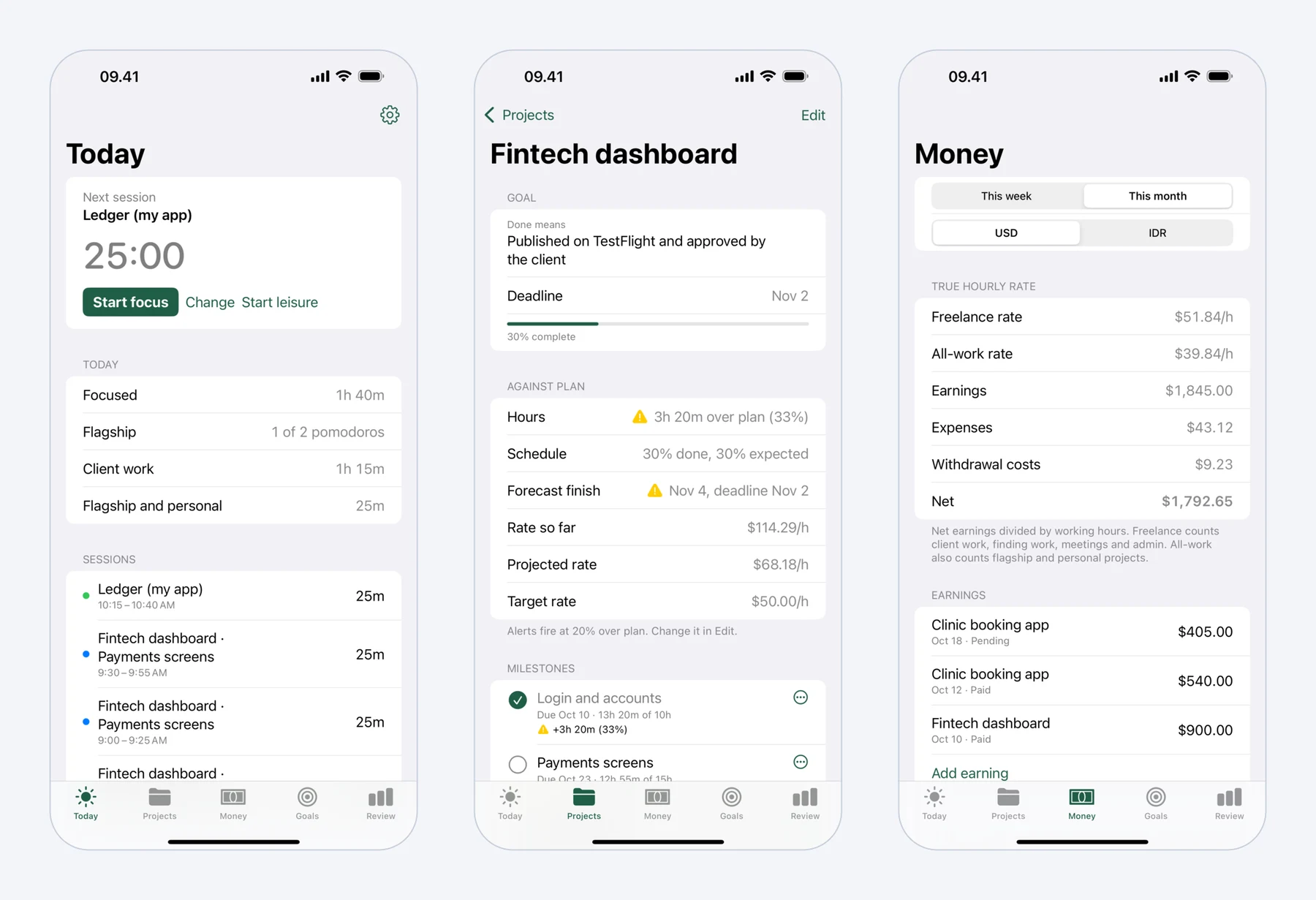 Mindset on iPhone: today's pomodoros, a fixed-price project against its plan, and what the work really paid per hour.
You pick 25 minutes of focus and 5 of rest, 50 and 10 for deep coding, or your own lengths, with a long break after every fourth round. Starting is one tap and continues with your last project and milestone, so the hours land in the right place without a timesheet. Breaks come with guided stretch routines for the neck and shoulders, wrists, lower back and eyes, and you mark each one Stretched or Skipped. The routines are general exercises, not medical advice.
What sets it apart on this list is the money side. You record earnings per project (pending or paid) and expenses such as Upwork Connects, tools, hosting and travel, in US dollars and your local currency. Mindset then shows two hourly rates, each worked out as earnings minus expenses, divided by hours: a freelance rate that counts client work, meetings and travel, finding work and admin, and an all-work rate that also counts your own products. Projects get milestones with planned dates and hours, and a notification arrives when a project runs 20% over plan (you can change the threshold) or a milestone is forecast to miss its date.
Without an account, Mindset is free on one device with all of that included. A subscription at $4.99 a month or $39.99 a year, with a two-week free trial, syncs Mac and iPhone and adds reports over longer periods. It needs macOS 15 or iOS 18 or later.
Strengths:
- Time, earnings, expenses and two real hourly rates in one place, with no separate time tracker.
- Stretch routines matched to break length, with reminders that pause during meetings and leisure.
- The free version covers everything except sync and longer reports, on one device, with no time limit.
Drawbacks:
- Not released yet, so you cannot install it today.
- It never blocks apps or websites. If blocking is what you need, Session, Flow Pro or Be Focused Pro will serve you better.
- Mac and iPhone only, with no iPad, Apple Watch, Windows or web version, and no integrations with other tools.
4. Be Focused
Be Focused from Xwavesoft is a long-running Pomodoro timer that adds a task list with notes, tags and due dates. You control it from the menu bar, and you can paste a list of tasks from another app to get started quickly.
It is free to download. Be Focused Pro, at $2.99 a month, $19.99 a year or $39.99 for life on the US App Store, adds sync across Mac, iPhone and iPad, CSV export of reports, and blocking of apps and websites in Safari, Chrome, Edge, Opera and Brave, with an allow list. The Mac version needs macOS 12 or later.
Strengths:
- Tasks and the timer in one window, which suits people who plan the day as a list.
- Global hotkeys, desktop widgets and Shortcuts support.
- The blocker covers five browsers, including Opera, which Session's blocker does not list.
Drawbacks:
- Sync, export and blocking all need Pro.
- The task features are basic compared with a real to-do app.
5. Vitamin-R
Vitamin-R from Publicspace is a Mac-only time-boxing app built around one rule: each session has one specific objective. You state it, work for a 15 to 25 minute slice, park distractions on a Now and Later board, and rate the slice afterwards. A log book and analytics show your peak-focus hours over time.
It costs $29.95 once, with no subscription, and there is a fully working 14-day trial with no sign-up. Version 4 needs macOS 13 Ventura or later and runs on Intel and Apple silicon.
Strengths:
- A one-time price in a category full of subscriptions.
- Project or client tags with CSV export, which helps if you bill by the hour.
- Optional screen locking during breaks, white noise, and a keyboard-driven command window.
Drawbacks:
- Mac only, with no iPhone companion.
- The reflective, one-objective workflow takes more effort than a plain countdown, which some people will find slow.
6. Focus
Focus from Meaningful Things is a Pomodoro-style timer with tasks, projects and time tracking, available on Mac, iPhone, iPad, Apple Watch and Apple Vision Pro. It leans hard into Apple's system features: widgets, Live Activities, Siri and Shortcuts, Spotlight, iCloud sync, and an independent Watch app.
Focus is free to start, and Focus Pro, which includes every feature, comes with a seven-day trial. The US Mac App Store lists Focus Pro at $6.99 a month and $39.99 a year, alongside several other yearly offers, so check the price shown in your region. The Mac app needs macOS 14 or later and puts the timer in the menu bar.
Strengths:
- Feels native everywhere, and the Watch app works on its own.
- Daily and weekly goals, plus bar, pie and calendar views of your stats.
Drawbacks:
- One of the pricier monthly plans, and the many price points on the App Store are confusing.
- No app or website blocking; it can only cover your screen during breaks.
7. TomatoBar
TomatoBar is a free, MIT-licensed Pomodoro timer that lives only in the macOS menu bar. It has configurable work and rest intervals, optional sounds, actionable notifications and a global hotkey, and that is about it. The latest release, 3.6.1, came out in February 2026.
It suits developers in particular. You can install it with Homebrew (brew install --cask tomatobar), control it with tomatobar:// URLs such as open tomatobar://startStop, and read a JSON log of every state change from its sandbox container to feed your own scripts.
Strengths:
- Free, open source and fully sandboxed.
- Scriptable from the terminal through its URL scheme and JSON log.
Drawbacks:
- No stats screen, no tasks, no sync and no iPhone app.
- It is distributed through GitHub and Homebrew, not the Mac App Store, so you update it yourself.
8. Focus To-Do
Focus To-Do combines a Pomodoro timer with a full task manager: projects, subtasks, recurring tasks, reminders and estimated Pomodoros per task. Its reports include focus totals, a Gantt chart of focus time and trend charts.
It is free with in-app purchases. On the US App Store, Premium is $11.99 for life or $3.99 for three months. Its main advantage is reach: it syncs across Mac, Windows, iPhone, iPad, Android and Apple Watch, and there is a Chrome extension.
Strengths:
- The only app on this list that also covers Windows and Android with the same account.
- Strong task features for a timer app, and a low lifetime price.
Drawbacks:
- The interface is busier than the Apple-only apps.
- The Mac App Store listing does not mention the strict mode and app blocking that the iPhone app has.
9. Toggl Track
Toggl Track is a time tracker first, but its desktop app for macOS has a Pomodoro timer you switch on under Preferences, on the General tab. The same mode exists in the browser extension and the iPhone and Android apps, though not in the web app. Each Pomodoro is logged as a time entry against a project, so the result is a timesheet you can report on or bill from.
The Pomodoro timer works on the Free plan. Paid plans start at $9 per user per month billed yearly, or $12 billed monthly, and add features aimed at billing and teams.
Strengths:
- If you already track time in Toggl, you do not need a second app.
- Full reporting, projects and clients, plus apps on every major platform.
Drawbacks:
- The Pomodoro mode is a setting inside a time tracker, with no break routines and no blocking.
- Toggl's support pages warn that running different Pomodoro settings in several Toggl apps at once can disrupt a running timer.
For more on this side of the problem, see our list of the best time tracking apps for freelancers.
10. Pomofocus
Pomofocus is a free Pomodoro timer that runs in a desktop or mobile browser, with downloadable desktop apps for Mac, Windows and Linux. You add tasks with an estimated number of Pomodoros, and it shows when you will finish. Reports show focus time by day, week and month.
Premium is a monthly or yearly subscription that removes ads and adds project time tracking, yearly reports, CSV download, unlimited templates and Todoist and webhook integrations. Pomofocus does not list the price on its public pages, so check it in the app before you subscribe.
Strengths:
- Works on any computer with a browser, including a client's machine where you cannot install software.
- The free tier is enough for most people.
Drawbacks:
- A browser tab is easy to close or lose among other tabs.
- No native iPhone app; on a phone it runs in the browser.
Apps we left out
Forest is a popular focus timer, but it has no native Mac app; it runs on iPhone, iPad and Android, with a browser extension for Chrome and Firefox. We cover it in our Pomodoro apps for iPhone list. Tomato 2, a menu bar timer that still appears in older roundups, has not been updated since 2021. Focus Keeper can run on Apple silicon Macs, but only as its iPad app, which the App Store marks as not verified for macOS.
Which one should you pick?
If distractions are the problem, pick Session, or Flow Pro if you would rather pay once. If you want a free timer that stays out of the way, install TomatoBar. If you plan your day as a task list, Be Focused or Focus To-Do will suit you, and Focus To-Do is the one to choose if you also use Windows or Android. If you want to pay once for a Mac-only tool with a serious method behind it, Vitamin-R is worth the trial.
If your Pomodoros need to become billable hours, Toggl Track does it today. If you are a freelancer who wants hours, earnings, expenses and stretch breaks in the same app, and can wait for the release, keep an eye on Mindset. We compare it head to head with Session in Mindset vs Session.
Prices and features were checked on the vendors' sites and the US App Store in October 2026. App Store prices vary by country, so check the price shown in your region.
FAQ
Does macOS have a built-in Pomodoro timer?
No. The Clock app on the Mac has timers you can name and restart, so you can run a 25-minute countdown by hand. It will not alternate focus and break sessions, count rounds or keep stats, which is what a Pomodoro app adds.
What is the best free Pomodoro app for Mac?
TomatoBar is the best fully free option if you only need a menu bar timer. Flow's free tier adds statistics and syncs them across Apple devices. Toggl Track's free plan is the better choice if you want every session saved as a time entry.
Which Pomodoro apps can block websites on a Mac?
Session blocks apps and websites during a session, and so do Flow and Be Focused with their Pro upgrades. Mindset, TomatoBar and Toggl Track do not block anything, so pair them with a separate blocker if you need one.
Should I use 25-minute or 50-minute sessions for coding?
Some programmers find 25 minutes too short to load a problem into their head, and switch to 50 minutes with a 10-minute break. Try each for a couple of weeks and compare how much finished work you get. Our Pomodoro for programmers guide goes into the details.