Best Pomodoro apps for iPhone
The best Pomodoro timer apps for iPhone in 2026, compared on Live Activities, widgets, Apple Watch support, app blocking and price.
For most people the best Pomodoro app on iPhone is Flow: the free version is good, it shows the timer on the Lock Screen and in the Dynamic Island, and it has a real Apple Watch app. Forest is the better choice if your phone itself is the distraction, because it blocks other apps while you focus. Session is the one to pick if you work mainly on a Mac and want the same timer on your phone. If you freelance and want each session to count toward a project's hours and hourly rate, Mindset does that on Mac and iPhone, but it is not released yet.
We make Mindset, so treat our own entry with some caution. We have tried to judge the other apps on what they do well.
Quick comparison
| App | Best for | Price (US) | Platforms |
|---|---|---|---|
| Flow | The best all-round iPhone timer | Free; Pro $2.99/month, $17.99/year or $39.99 once | iPhone, iPad, Mac, Apple Watch |
| Forest | Keeping your hands off your phone | Free with ads; Plus subscription | iPhone, iPad, Android, browser extension |
| Session | Mac users who want the timer on their phone too | Free; Pro $4.99/month or $39.99/year | iPhone, iPad, Mac |
| Mindset | Freelancers tracking time and money per project | Free on one device; $4.99/month or $39.99/year for sync | iPhone, Mac (coming soon) |
| Focus | Deep Apple integration and a standalone Watch app | Free to start; Focus Pro subscription | iPhone, iPad, Mac, Apple Watch |
| Be Focused | A simple timer with tasks and many controls | Free with ads; Pro $2.99/month, $19.99/year or $39.99 once | iPhone, iPad, Mac, Apple Watch |
| Focus To-Do | Tasks and Pomodoros across iPhone, Android and Windows | Free; Premium lifetime $11.99 | iPhone, iPad, Mac, Apple Watch, Android, Windows |
| Structured | Planning the day on a timeline | Free; Structured Pro subscription or lifetime | iPhone, iPad, Mac, Apple Watch, Android, web |
| Focus Keeper | A classic 25/5 timer that is easy to start with | Free; Pro $3.99/month or $34.99/year | iPhone, iPad, Apple Watch |
| Toggl Track | Turning Pomodoros into timesheet entries | Free plan; paid from $9 per user/month (annual) | iPhone, Android, Mac, Windows, web |
What matters on iPhone
A Pomodoro timer on a phone has a different job from one on a Mac. You lock the phone and put it down, so the timer has to be visible without opening the app, and it should let you start the next round from wherever you are.
Live Activities put a running timer on the Lock Screen and, on recent iPhones, in the Dynamic Island. Apple's guide explains where to turn them on per app. Widgets and Control Center buttons let you start or pause a session from the Lock Screen. An Apple Watch app or Watch Live Activity gives you a tap on the wrist when a round ends, which is useful when the phone is face down.
App blocking is the other big difference. Some apps here can stop you opening chosen apps during a session, which is often the whole point on a phone.
Focus modes are worth setting up alongside any timer. You can turn a Focus on from Control Center when you start a round, or schedule one for your working hours, so notifications stay quiet while you work.
| App | Live Activities | Widgets | Apple Watch | Blocks apps |
|---|---|---|---|---|
| Flow | Yes | Home and Lock Screen | App | Yes, Pro |
| Forest | Yes | Home Screen | Not listed | Yes |
| Session | Yes | Yes, with controls | Live Activity, no app | Yes (see entry) |
| Mindset | No | No | No | No |
| Focus | Yes | Yes | Standalone app | Not listed |
| Be Focused | Yes | Home and Lock Screen | App | Not listed |
| Focus To-Do | Yes | Lock Screen | App | Yes |
| Structured | Yes | Interactive | App | Not listed |
| Focus Keeper | Not listed | Not listed | App | Yes |
| Toggl Track | On Apple Watch | Yes | App | No |
"Not listed" means the feature does not appear in the app's App Store listing or website, so check before you rely on it.
1. Flow
Flow from Yugen GmbH is a clean interval timer that does everything an iPhone timer should. It shows the countdown in a Live Activity and the Dynamic Island, has Home Screen and Lock Screen widgets, and its Apple Watch app can also show a Live Activity in the Smart Stack. It syncs with Apple Calendar and Apple Health, and offers app shortcuts for setting or reading session titles.
The basics are free, with no ads and no sign-up: the timer, a choice of durations, statistics, break reminders and iCloud sync of your stats. Flow Pro adds fully custom durations and cycles, app and website blocking, calendar sync, timesheet export and a commitment mode. On the US App Store it costs $2.99 a month, $17.99 a year or $39.99 once. It needs iOS 18 or later.
Strengths:
- The most complete set of iPhone and Watch features at a low price.
- A lifetime purchase, which few rivals offer.
Drawbacks:
- Blocking and full customization need Pro.
- Apple devices only.
2. Forest
Forest from SeekrTech turns each focus session into a tree that grows while you stay off your phone. Its Deep Focus mode, free on every tier, blocks other apps during a session, and Time Guard can block apps on a schedule. Paying users can spend the coins they earn to have a real tree planted through the nonprofit Trees for the Future.
Forest is free with occasional ads, which it says never appear during a session. The Plus subscription adds a custom allow list of apps, Time Guard for several apps, focus analytics, custom tags and more soundscapes. The US App Store listed Plus at $5.99 a month or $35.99 a year when we checked, and Forest says prices vary by region. It has Live Activities and Home Screen widgets, needs iOS 16 or later, and also runs on Android and as a Chrome or Firefox extension.
Strengths:
- App blocking on the free tier, which is what many people want from a phone timer.
- The growing tree gives you a visible reason not to pick up the phone, and group sessions let friends plant together.
Drawbacks:
- No Apple Watch app listed and no native Mac app.
- The game layer and coin purchases will feel like noise if you just want a timer.
3. Session
Session is best known as a Mac app, and the iPhone app is at its best as a companion to it. A Live Activity can start on the iPhone automatically when you start a timer on the Mac, and widgets, Live Activities and Control Center buttons let you pause, take a break or abandon a session. On Apple Watch it shows a Live Activity with controls. There is no standalone Watch app; the developer wrote in 2023 that one was not worth building yet.
Session's 2024 changelog added blocking of websites and iOS apps on iPhone. Its pricing page still describes blocking as a Mac feature, so test it during the trial if phone blocking is why you are choosing it. The free plan keeps only two days of analytics; Pro is $4.99 a month or $39.99 a year, and new accounts get seven days of Pro. Session also integrates with Apple Shortcuts on iOS and can mute Slack during a session.
Strengths:
- The closest link between Mac and iPhone here: start on the Mac and the phone shows it.
- Intentions and categories give the stats some meaning.
Drawbacks:
- Expensive if you only use it on the phone.
- The free plan's two-day history is very short.
4. Mindset
Mindset is our app, a Pomodoro timer for Mac and iPhone that also tracks time and money per project for freelance software engineers. It is coming to the App Store and is not released yet.
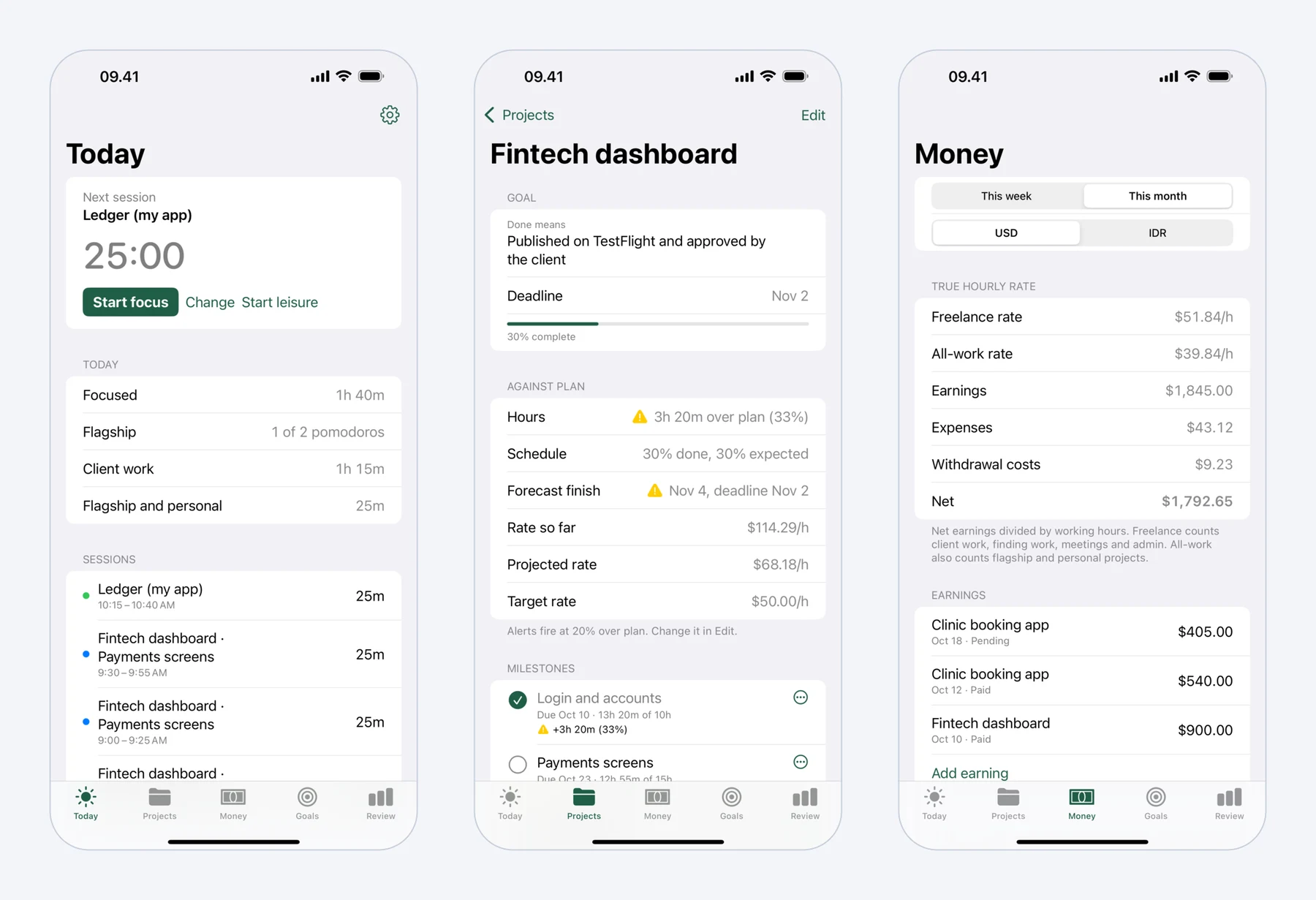 Mindset on iPhone: today's pomodoros, a fixed-price project against its plan, and what the work really paid per hour.
On iPhone you choose 25 minutes of focus and 5 of rest, 50 and 10, or your own lengths, with a long break after every fourth round. One tap starts a session on your last project and milestone. Breaks include guided stretch routines for the neck and shoulders, wrists, lower back and eyes, longer for long breaks, and you mark each one Stretched or Skipped. The routines are general exercises, not medical advice. A soft chime marks the end of focus or a break, and otherwise the app stays silent.
Behind the timer, Mindset records earnings and expenses per project in US dollars and your local currency, and shows a freelance hourly rate and an all-work rate, both worked out as earnings minus expenses, divided by hours. Projects get milestones, and you get a notification when a project runs 20% over plan or a milestone is forecast to miss its date.
It is free on one device with no account. A subscription at $4.99 a month or $39.99 a year, with a two-week trial, syncs Mac and iPhone and adds longer reports. It needs iOS 18 or macOS 15 or later.
Strengths:
- The only app here that turns sessions into project hours, earnings and an effective hourly rate.
- Stretch routines built into the breaks.
Drawbacks:
- Not out yet.
- Its feature list has no widgets, Live Activities or Apple Watch app, and it never blocks other apps, so Forest or Flow will do more to keep you off your phone.
5. Focus
Focus from Meaningful Things is a Pomodoro-style timer with tasks, projects and time tracking, made to feel like part of iOS. It has widgets, Live Activities and the Dynamic Island, Siri and Shortcuts actions, Spotlight support and iCloud sync. Its Apple Watch app works on its own, without the phone nearby.
Focus is free to start, and Focus Pro, which includes every feature, comes with a seven-day trial. The US App Store lists a $6.99 monthly plan and several yearly prices, so check what your store shows. It needs iOS 18 or later and watchOS 11 or later for the Watch app.
Strengths:
- Polished, with very good Watch support.
- Goals and charts by day and week.
Drawbacks:
- Pricing is hard to read on the App Store.
- No app blocking listed.
6. Be Focused
Be Focused from Xwavesoft is a straightforward timer with a task list. On iPhone it has Lock Screen and Home Screen widgets, Live Activities on the Lock Screen and in the Dynamic Island, and controls in Control Center and on the Action Button. It also runs on Apple Watch.
The free version shows ads. Pro, at $2.99 a month, $19.99 a year (with a seven-day trial) or $39.99 once, removes them and adds sync across iPhone, iPad and Mac, CSV export, and Shortcuts that run on timer events. It needs iOS 16 or later.
Strengths:
- Many ways to start and stop the timer without opening the app.
- Shortcuts triggers let you build your own automations; you could use one to turn on a Focus when a round starts.
Drawbacks:
- Ads in the free version.
- App blocking is a Mac feature; the iPhone listing does not mention it.
7. Focus To-Do
Focus To-Do pairs a Pomodoro timer with a full task manager. The iPhone app has Lock Screen widgets, Live Activities, an Apple Watch app with an always-on display, white noise, and a strict mode that blocks apps while the timer runs.
It is free with in-app purchases; the US App Store lists a lifetime Premium purchase at $11.99. Your tasks sync to the Mac, Windows and Android versions. It needs iOS 15 or later.
Strengths:
- Apps for Windows and Android as well as Apple devices, and a low one-time price.
- Strict mode for people who need a firm stop.
Drawbacks:
- A dense interface with a lot of settings.
- The iPhone app gets the most features; the Mac listing does not mention strict mode or blocking.
8. Structured
Structured from unorderly GmbH is a visual day planner, not a timer app, but it has a focus timer built in. The free version includes the focus timer, Live Activities, interactive widgets and sync across iPhone, iPad, Apple Watch and Mac. The full Pomodoro cycle of focus and breaks, which Structured calls Intervals, is part of Structured Pro.
Pro is sold as a monthly or yearly subscription or a lifetime purchase. The App Store shows many different prices for these, so check your region before you buy. It needs iOS 18 or later.
Strengths:
- Good if you already plan your day as blocks on a timeline.
- Strong Live Activity and widget support.
Drawbacks:
- Overkill if all you want is a Pomodoro timer.
- The Pomodoro cycle itself needs Pro.
9. Focus Keeper
Focus Keeper from PIXO is one of the older iPhone Pomodoro apps, built around the standard 25-minute session with 5-minute breaks and a longer break after four rounds. It has a time tracker with charts, an annual recap, app blocking, and an Apple Watch app.
It is free to download, with Pro at $3.99 a month or $34.99 a year for US customers. It needs iOS 16 or later.
Strengths:
- Very simple to use from the first launch.
- App blocking and a Watch app.
Drawbacks:
- The App Store lists many Pro prices, up to $199.99, without explaining the difference.
- No Live Activities or widgets mentioned in the listing.
10. Toggl Track
Toggl Track is a time tracker with a Pomodoro tab on its iPhone timer screen. Each round is saved as a time entry against a project, so your Pomodoros become a timesheet. The iPhone app has widgets that start and stop tracking, Siri support, and an Apple Watch app with a Live Activity.
The Pomodoro mode is on the free plan. Paid plans start at $9 per user per month billed yearly. It needs iOS 17.6 or later.
Strengths:
- The easiest route from Pomodoros to billable hours.
- Apps on every major platform, though the Pomodoro mode is not in the web app.
Drawbacks:
- A time tracker first, so the Pomodoro experience is basic.
- No app blocking.
If tracking is the bigger need, our list of time tracking apps for freelancers goes further.
Which one should you pick?
Pick Flow if you want the best timer on iPhone and Apple Watch for little money. Pick Forest if your phone is what pulls you away from work. Pick Session if your main timer runs on a Mac. If you live in your task list, Focus To-Do or Be Focused will fit better, and Structured suits people who plan in time blocks. If you want sessions to become billable hours, Toggl Track does it today, and Mindset will add earnings, expenses and stretch breaks for freelancers once it is out.
If you work on a Mac as well, see our list of Pomodoro apps for Mac, since several of these apps are stronger on one device than the other.
Prices and features were checked on the vendors' sites and the US App Store in October 2026. Prices differ by country, so check what your App Store shows.
FAQ
Does the iPhone have a built-in Pomodoro timer?
No. The Clock app's timer can run a single countdown, and a Focus can silence notifications, but neither alternates work and break sessions or keeps a history. A Pomodoro app adds the cycle, the round count and the stats.
Which Pomodoro app can block other apps on iPhone?
Forest blocks apps during a session on its free tier. Focus To-Do has a strict mode that blocks apps while the timer runs, and Flow Pro and Focus Keeper also offer app blocking. Session added iPhone blocking in 2024, but check it during the trial.
Can I see the Pomodoro timer on my Lock Screen?
Yes, with an app that supports Live Activities, such as Flow, Forest, Session, Focus, Be Focused, Focus To-Do or Structured. You can turn Live Activities on or off for each app in Settings.
Which Pomodoro apps work on Apple Watch?
Flow, Focus, Be Focused, Focus To-Do, Structured, Focus Keeper and Toggl Track have Watch apps. Session shows a Live Activity on the Watch but has no Watch app of its own.
What session length should I use?
Start with the classic 25 minutes of work and 5 of rest. If you write code or do other deep work, 50 and 10 often works better; our guide to Pomodoro for programmers compares the two.