Mindset vs Session
Mindset and Session compared on blocking, stretch breaks, time and money tracking, integrations and price, with a clear verdict for each kind of user.
Session is the better choice if you want a Pomodoro timer that blocks distracting apps and websites, works on iPad as well as Mac and iPhone, and plugs into Slack, Apple Calendar and Shortcuts. Mindset is the better fit for freelance software engineers who want the timer to track time and money per project, show what their work really pays per hour, and guide them through stretches during breaks. Session is available today; Mindset is coming to the App Store and is not released yet.
We make Mindset, so you should read this comparison knowing that. We have tried to describe Session as it is, including where it is clearly the stronger app.
At a glance
| Session | Mindset | |
|---|---|---|
| Availability | Available now (App Store and direct Mac download) | Coming to the App Store, not released yet |
| Platforms | Mac, iPhone, iPad, Apple Vision Pro | Mac, iPhone |
| Requirements | macOS 10.15 or iOS 13.4 or later | macOS 15 or iOS 18 or later |
| Free plan | Unlimited sessions, two days of analytics | Full timer, stretch breaks, projects, money tracking and goals on one device |
| Paid plan | $4.99/month or $39.99/year | $4.99/month or $39.99/year |
| Free trial of paid plan | 7 days | 2 weeks |
| App and website blocking | Yes (Pro) | No, never blocks |
| Guided stretch breaks | No | Yes: neck and shoulders, wrists, lower back, eyes |
| Time per project | Categories and intentions | Projects and milestones |
| Earnings and expenses | No | Yes, per project |
| Effective hourly rate | No | Two rates: freelance and all-work |
| Milestones and over-plan alerts | No | Yes |
| Currencies | Not applicable | US dollars and your local currency |
| Integrations | Slack, Apple Calendar, Apple Reminders, AppleScript, Shortcuts | None |
| Live Activities and widgets | Yes | No |
| Sync | Pro, through Session's server | Mac and iPhone, with the subscription |
What each app is for
Session from Translucent LLC is a focus timer built around intention. Before each session you say what you will work on, Session (with Pro) blocks the apps and websites you chose, and when the timer ends it asks what you learned. At the end of the day you review your sessions by category. It is a general-purpose focus tool, not tied to any one kind of work.
Mindset is a Pomodoro timer with stretch breaks that also tracks time and money per project. It is written for one reader: the freelance software engineer whose week includes client work, proposals, meetings, admin and their own product. The timer records that time as a side effect, and Mindset puts earnings and costs beside it so you can see what your work paid per hour.
Where Session is stronger
Blocking distractions
This is the biggest difference. Session blocks chosen apps and websites while a session runs and restores them afterwards. On the Mac, the website blocker works in Safari, Chrome, Brave and Edge, and Session's 2024 changelog added blocking of websites and iOS apps on iPhone too. Mindset never blocks other apps or websites. If you need software to stop you opening Slack or a news site mid-task, Session is the better pick; Mindset is not designed to block anything.
Platforms and maturity
Session runs on Mac, iPhone, iPad and Apple Vision Pro, and it supports much older systems, back to macOS 10.15 and iOS 13.4. On iPhone it has Live Activities that can start automatically when you start a timer on the Mac, widgets and Control Center buttons with timer controls, and a Live Activity on Apple Watch. It has years of releases behind it. Mindset runs on Mac and iPhone only, needs macOS 15 or iOS 18, and is not out yet.
Integrations
Session can mute selected Slack workspaces and update your Slack status during a session, create events in Apple Calendar, show Apple Reminders in its calendar, play Apple Music, and be automated with AppleScript on the Mac and Shortcuts on iOS. Mindset has no integrations with other apps.
Reflection and review
Session's intentions, notes on what you learned, and daily review are well thought out if you use a timer to build focus habits. Mindset's reports are about hours, money and plans, not reflection.
Where Mindset is stronger
Stretch breaks
Mindset's breaks come with guided routines for the parts of the body desk work strains: neck and shoulders, wrists, lower back, and eyes. Short breaks get a short routine and long breaks a longer one, and you mark each break Stretched or Skipped, so you can see whether you actually moved. Reminders pause during meetings and leisure. The routines are general exercises, not medical advice. Session reminds you to rest, but there are no guided routines in its feature list. For more on what to do during a break, see our desk stretches for programmers.
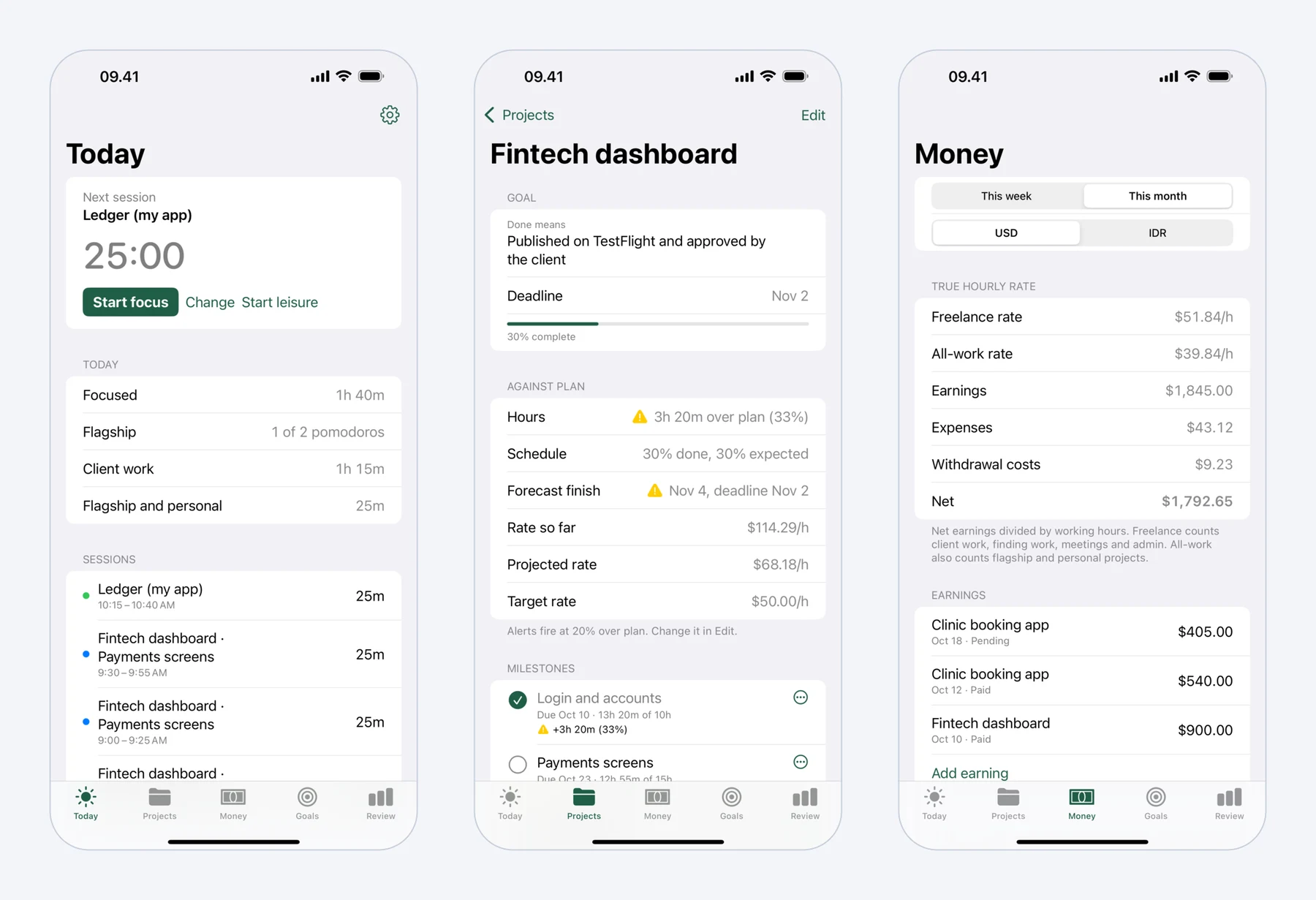 Mindset on iPhone: today's pomodoros, a fixed-price project against its plan, and what the work really paid per hour.
Time and money per project
Session tells you where your focus time went. Mindset tells you what that time earned. You record earnings per project as pending or paid, and expenses such as Upwork Connects, tools, hosting and travel to clients. A withdrawal records what actually reached your bank, so transfer fees and the exchange rate spread count as a cost. Amounts can be in US dollars and your local currency.
Two hourly rates
Mindset shows two rates, each worked out as earnings minus expenses, divided by hours. The freelance rate counts client work, meetings and travel, finding work, and admin. The all-work rate also counts hours on your own products.
Here is the example from Mindset's product page. $2,000 earned from 40 hours of client work looks like $50 an hour. Add 12 hours finding work, 6 hours of meetings and travel, and $60 spent on Upwork Connects and transport, and the freelance rate is $1,940 over 58 hours, about $33 an hour. Our guide to your real hourly rate as a freelancer shows how to work this out with your own numbers.
Milestones and alerts
Each Mindset project gets milestones with planned dates and hours. The project page compares hours against plan, progress against the schedule, the effective rate against your target, and this week's time against the weekly goal. You get a notification when a project runs 20% over plan (you can change the threshold per project) or a milestone is forecast to miss its date. Session has no project plans or budgets.
Time for your own product
Mindset puts a daily minimum for your own product, such as two pomodoros, at the top of the day. If you freelance while building something of your own, that helps keep it from sliding to the weekend.
A free tier you can keep using
Session's free plan keeps only two days of analytics, and custom session lengths need Pro. Mindset without an account includes the timer and stretch breaks, projects and time tracking, milestones and alerts, earnings and expenses, this week's and this month's rates, and goals, on one device, with your data staying on that device. You pay only for sync between Mac and iPhone and for reports over longer periods.
Price
The paid plans cost the same: $4.99 a month or $39.99 a year for each. Session gives new accounts seven days of Pro and offers students 30% off for a year; it notes that prices vary by region. Mindset's subscription has a two-week free trial, and in some countries the App Store price is lower.
The difference is what you get for free. On Session, most daily users will need Pro for custom durations, blocking and history beyond two days. On Mindset, a single-device user may never need to pay.
Which one should you pick?
Pick Session if:
- You want apps and websites blocked during focus. This is the main reason to choose it, and Mindset will never do it.
- You use an iPad, or a Mac or iPhone that cannot run macOS 15 or iOS 18.
- You rely on Slack, Apple Calendar or scripting to fit the timer into your day.
- You need a timer today.
Pick Mindset if:
- You freelance and want to know what each project really pays per hour, after fees, Connects and unpaid hours.
- You want guided stretch breaks and a record of whether you took them.
- You plan client work in milestones and want a warning before a project runs over.
- You are paid in US dollars and spend in another currency.
If you want blocking and money tracking at once, you could run Session for blocking and track projects elsewhere, but two timers in the menu bar is clumsy. Most people are better off choosing the one that matches their main problem: distraction (Session) or not knowing what their time earns (Mindset).
If neither fits, see our Session and Flow alternatives for Mac and our list of the best Pomodoro apps for Mac.
Session's prices and features were checked on its website and the US App Store in October 2026. Mindset's details come from its product page and may change before release.
FAQ
Does Mindset block apps or websites like Session?
No. Mindset tracks and reminds, but it never blocks other apps or websites. If blocking matters to you, Session is the better choice.
Is Session worth paying for?
If you use it daily and want blocking, custom durations and your full history, yes; the free plan is quite limited. If you only want a countdown, a free timer such as TomatoBar or Flow's free tier may be enough.
Is Mindset available now?
Not yet. Mindset is coming to the App Store for Mac and iPhone. The Mindset page has the current details.
Can Session track earnings or hourly rates?
No. Session tracks focus time by category and intention, but it has no earnings, expenses or rate calculations. You would need a separate time tracker or spreadsheet for that.