Pomodoro for programmers, 25/5 or 50/10?
When 25/5 pomodoros suit coding, when 50/10 or 90-minute blocks fit deep work better, and how to handle interruptions, breaks and your time log.
For most programming work, start with 50 minutes of focus and 10 minutes of rest, and keep the classic 25/5 for small tickets, tasks you keep putting off, and days broken up by meetings. A 25-minute pomodoro often ends just as you have loaded a problem into your head, and every restart costs time while you find your place again. The right length is the one your own records say you finish work in, so this guide ends with a simple way to test both.
We make Mindset, a Pomodoro timer for freelance developers, so read our view with that in mind. Everything below works with any timer, including a kitchen one.
Where the Pomodoro Technique comes from
Francesco Cirillo developed the Pomodoro Technique in the 1980s while he was a university student, timing short bursts of study with a tomato-shaped kitchen timer (official site). Pomodoro is Italian for tomato.
The version most people know goes like this: pick one task, set a timer for 25 minutes, work until it rings, take a short break of about five minutes, and take a longer break after every four pomodoros.
Cirillo's own description is broader. His site presents the method as plan, focus and reflect, and asks you to record your effort and compare estimates with reality. On his page about the philosophy behind the technique, he calls the 25-minute timing "one of many practices". Changing the length to suit your work is in the spirit of the method, not a break from it.
Why 25 minutes can break flow when you code
Programming keeps a lot of state in your head. You hold what a function should return, why a test fails, which branch you are on and what you planned to try next. When you stop, some of that fades, and you rebuild it when you sit back down.
Researchers have measured that rebuilding. Chris Parnin and Spencer Rugaber at Georgia Tech analyzed 10,000 recorded programming sessions from 85 programmers. In only 10% of the sessions did coding start within a minute of the programmer returning to the task, and only 7% of sessions involved no navigating to other code before the programmer began editing (Resumption Strategies for Interrupted Programming Tasks, published in the Software Quality Journal). Programmers rarely pick up exactly where they left off; they reread code and retrace their steps first.
The arithmetic matters too. A four-hour morning of 25/5 has eight starts. The same morning at 50/10 has four. If each start costs you a few minutes of reorienting, the shorter rhythm pays that cost twice as often.
The other problem is timing. A 25-minute bell does not know you are halfway through reading a stack trace, and the classic rule is to stop when it rings.
When 25/5 is the better choice
Short pomodoros work well when the hard part is starting, or when the work comes in small pieces:
- Tasks you are avoiding, such as invoices or a proposal. Committing to 25 minutes is easier than committing to "until it's done".
- Code review and bug triage, where each item fits in one round.
- Learning something new, when your attention runs out before 50 minutes.
- Days with meetings every hour, where a 60-minute cycle does not fit between calls.
- Low-energy days, when a long block would end in drifting.
There is some evidence that fixed breaks work better than breaks you choose as you go. In a 2023 study, Felicitas Biwer and colleagues had 87 university students study for a day with self-chosen breaks, a 6-minute break every 24 minutes, or a 3-minute break every 12 minutes. Students who chose their own breaks reported more fatigue and distraction and less concentration and motivation. Task completion was similar in all groups, and the scheduled groups got there in less time (study abstract, DOI). These were students on a single day, not developers, so take it as a hint rather than proof.
When 50/10 or 90-minute blocks suit deep work
Longer blocks fit work where the setup cost is high and the payoff comes late:
- A feature that touches several files or layers, such as a new API endpoint with its migration, model and tests.
- Debugging an intermittent failure, where you need several hypotheses in your head at once.
- A refactor where you keep the old and new shape of the code in mind until the tests pass.
A 50/10 rhythm halves the number of restarts and still gives you a real break every hour. You can go further and protect one 90-minute block in the morning for the hardest problem of the day, followed by a long break. We know of no good evidence that 90 minutes is a special number, so treat it as one more length to test.
The risk with longer blocks is skipping the break. The American Academy of Ophthalmology recommends that every 20 minutes you look at something at least 20 feet away for at least 20 seconds. In a 50-minute block, glance out of the window at the 20 and 40 minute marks without leaving your chair or your train of thought.
| Rhythm | Suits | Watch out for |
|---|---|---|
| 25/5 | Admin, code review, triage, tasks you are avoiding, meeting-heavy days | Frequent restarts on complex code |
| 50/10 | Features across several files, debugging, refactoring | Skipped breaks and stiffness |
| 90 minutes, then a long break | One hard problem a day | Fatigue, and fitting it around meetings |
How to choose: test both for two weeks
- In week one, use 25/5 for all focused work. In week two, use 50/10.
- Each time the timer rings, note in a word or two whether it interrupted a thought or arrived at a natural pause.
- At the end of each day, write down what you finished: tickets closed, pull requests opened, pages written.
- Rate your energy at the end of the day from 1 to 5.
- Compare the weeks on finished work and energy, not on pomodoro counts, which are not comparable across lengths.
You may end up mixing the two: 50/10 for coding in the morning, 25/5 for email, admin and review in the afternoon. That is a fine outcome.
Handling interruptions mid-pomodoro
Cirillo treats a pomodoro as indivisible. If it is broken, it does not count, and you start a new one. He splits interruptions into two kinds.
Internal interruptions come from you: the urge to check Slack, look up a library or fix the unrelated typo you just spotted. Write the thought on a list next to your keyboard and go straight back to the task. Most of these items can wait for the break, and some will not matter by then.
External interruptions come from other people. Cirillo's answer is to inform, negotiate and call back: tell the person you are in the middle of something, agree on a time to deal with it, and then follow up when the pomodoro ends. For a developer that might be a chat reply like this:
In the middle of a debugging session. I'll look at this at 11:30 and get back to you.
Then reply at 11:30, or people will stop trusting it.
Some things cannot wait. If production is down or a client is on the phone, abandon the pomodoro, handle it, and start a fresh one afterwards. Before you switch, take ten seconds to write the next step you were about to take, such as "check why the cache key ignores locale". That note is the quickest way back in.
In a 2008 study by Gloria Mark, Daniela Gudith and Ulrich Klocke, interrupted participants finished their tasks in less time with no loss of quality, but reported more stress, frustration, time pressure and effort. Fewer interruptions is the better fix: turn on Do Not Disturb during focus rounds and read messages on your breaks.
What to do on breaks
A break works best when it is different from the work. Email and news keep your eyes on a screen and give your head new things to think about.
On a short break, stand up, look at something far away for 20 seconds, do a quick neck and wrist stretch, and refill your water. Mayo Clinic's office ergonomics guide advises getting up and walking around as often as you can, even with a good desk setup. On a long break, leave the room. Our guide to desk stretches for programmers has a 2-minute routine for short breaks and a 5 to 10 minute routine for long ones.
Use your pomodoros as a time log
Cirillo's reflect step turns the timer into a record. Each finished pomodoro is a known block of focused time attached to a task, and a few weeks of them answer questions a feeling cannot:
- How much focused time you really get in a day.
- How long a type of task takes you. For example (a hypothetical one), if your last three API integrations took 14, 18 and 11 pomodoros of 50 minutes, your next quote has a real starting point.
- Where the interruptions come from, if you mark each broken pomodoro with its cause.
- For freelancers, how much of the week goes to client work and how much to proposals, admin and your own projects.
The log only works if logging is effortless, whether that is a tally on paper or a timer that records the project for you. If you price fixed-price work, our guide to pricing fixed-price projects from your own time data shows how to turn these numbers into a quote, and calculating your real hourly rate shows what the hours earn.
Where Mindset fits
Mindset is our Pomodoro timer for freelance software engineers, for the Mac menu bar and iPhone. It is not released yet; it is coming to the App Store, and the Mindset page has the details.
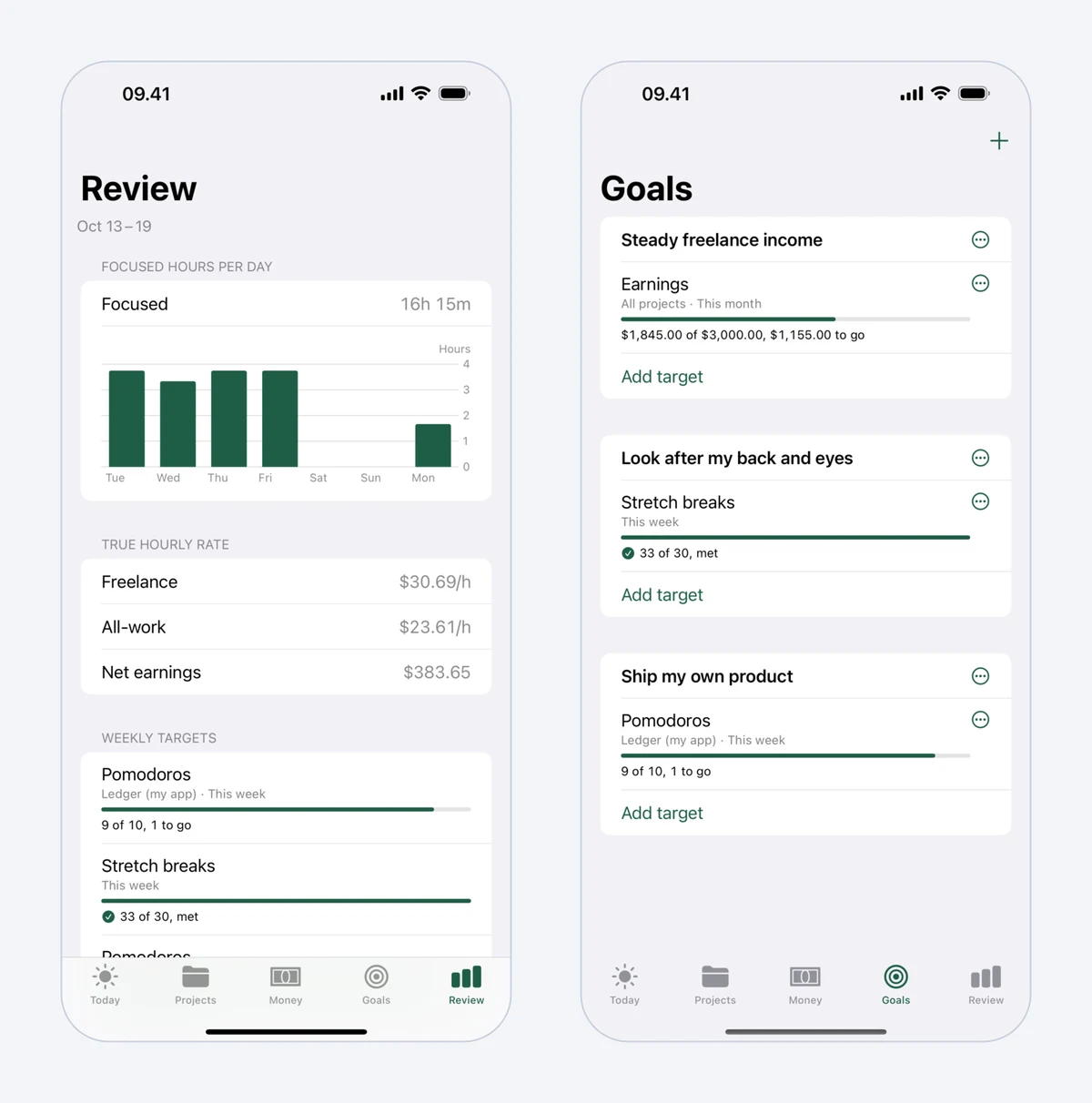 Mindset's weekly Review, with focused hours per day and time by category, beside Goals.
You choose 25 minutes of focus and 5 of rest, 50 and 10 for deep coding, or lengths of your own, with a long break after every fourth round. Starting is one tap, and it continues with your last project and milestone, so your time log builds up without a timesheet. A soft chime marks the end of focus or a break, and otherwise the app stays silent. Breaks come with guided stretch routines. Mindset never blocks apps or websites, so the decision to stay off Slack is still yours.
If you want to compare it with other timers, see our list of the best Pomodoro apps for Mac.
Which one should you pick?
Start with 50/10 for coding and 25/5 for everything that is small, dull or squeezed between meetings. Protect your breaks whichever length you use, and look away from the screen every 20 minutes. After two weeks, let your log decide.
FAQ
Is the Pomodoro Technique good for programmers?
It can be, as long as you adjust the length. Fixed rounds make it easier to start and to take the breaks you would otherwise skip. The classic 25 minutes can be short for complex coding, where 50/10 often fits better, while 25/5 suits smaller tasks.
Should I stop coding the moment the timer rings?
The classic rule is to stop. In practice, finish the line you are typing, then write a one-line note of your next step before you stand up. If the bell keeps landing mid-thought, your rounds are probably too short for that kind of work.
Is 50/10 still the Pomodoro Technique?
The classic technique uses 25-minute rounds, but Cirillo describes the 25-minute timing as one practice among many. The parts that make it work are planning one task per round, protecting the round from interruptions, taking real breaks and recording what you did. Those work at 50 minutes as well.
How many pomodoros a day is realistic?
There is no correct number. It depends on your meetings, your energy and how you count. Track your rounds for two weeks and use your own average as the baseline for planning, rather than a target someone else set.