Session and Flow alternatives for Mac
Looking past Session or Flow on the Mac? We compare cheaper, free and one-time-purchase Pomodoro timers, and say which gaps each one fills.
If Session or Flow is not working for you on the Mac, the best alternatives are Be Focused for a cheaper timer with blocking, Vitamin-R if you want to pay once, TomatoBar if you want it free and open source, and Focus if you want deep Apple integration. Toggl Track is the right move if what you need is a timesheet, and Mindset is aimed at freelancers who want time and money per project, though it is not released yet.
We make Mindset, so bear that in mind when you read its entry. We have tried to be fair to Session, Flow and every alternative here.
Why people look for an alternative
Session and Flow are both good apps, and for many people one of them is the right answer. People usually leave for one of a few reasons.
Session's price and free plan
Session Pro costs $4.99 a month or $39.99 a year, with seven days of Pro free when you create an account. The free plan includes unlimited sessions, but its analytics only cover the past two days, and custom session and break lengths, app and website blocking, Slack muting and creating calendar events are all Pro features. If you use Session every day you will probably end up paying $40 a year for a timer, which is more than some people want to spend.
Session also stores and syncs your data through its own server, and it runs only on Apple devices.
Flow's limits
Flow is much cheaper. On the US App Store, Flow Pro is $2.99 a month, $17.99 a year, or $39.99 once for life, and the free tier has no ads. The catches are that fully custom durations and cycles, app and web blocking, calendar sync and export are all in Pro, and the current version needs macOS 15 or later, which rules out older Macs.
Features neither app has
Both apps are focus timers with stats. Neither is built to:
- Plan a project with milestones and warn you when it runs over.
- Track what a project earned or cost, or work out an hourly rate.
- Guide you through stretches during breaks.
- Run on Windows or Android.
Session is also subscription-only, and neither app is open source. If one of those gaps is your reason for looking, the table below shows which alternative fills it.
Comparison table
| App | Price (US) | Blocks apps and websites | Platforms | Fills which gap |
|---|---|---|---|---|
| Session | Free; Pro $4.99/month or $39.99/year | Yes, Pro | Mac, iPhone, iPad | (the app you are replacing) |
| Flow | Free; Pro $2.99/month, $17.99/year or $39.99 once | Yes, Pro | Mac, iPhone, iPad, Apple Watch | (the app you are replacing) |
| Be Focused | Free; Pro $2.99/month, $19.99/year or $39.99 once | Yes, Pro | Mac, iPhone, iPad, Apple Watch | Tasks, lower price, older Macs |
| Vitamin-R | $29.95 once | No (optional screen lock in breaks) | Mac | No subscription, client tags |
| Focus | Free to start; Focus Pro subscription | No | Mac, iPhone, iPad, Apple Watch | Apple integration, Watch app |
| TomatoBar | Free, open source | No | Mac | Free, scriptable |
| Focus To-Do | Free; Premium lifetime $11.99 | On iPhone | Mac, Windows, iPhone, iPad, Android | Windows and Android |
| Toggl Track | Free plan; paid from $9 per user/month (annual) | No | Mac, Windows, web, iPhone, Android | Timesheets and billing |
| Mindset | Free on one device; $4.99/month or $39.99/year for sync | No, never | Mac, iPhone (coming soon) | Time and money per project, stretch breaks |
The alternatives
Be Focused
Be Focused from Xwavesoft is the closest like-for-like swap. It has a menu bar timer, a task list with notes, tags and due dates, global hotkeys and Shortcuts support. Pro adds blocking of apps and websites in Safari, Chrome, Edge, Opera and Brave, sync across Mac, iPhone and iPad, and CSV export of reports.
Pro costs $2.99 a month, $19.99 a year or $39.99 for life on the US App Store, roughly half of Session's yearly price. The Mac app needs macOS 12, so it runs on Macs that Flow's current version no longer supports. Its weak point is that the task list is basic, and everything useful beyond the timer sits behind Pro.
Vitamin-R
Vitamin-R is the answer if you dislike subscriptions. It costs $29.95 once, with a 14-day trial, and runs on macOS 13 or later. Each session starts with one specific objective, distractions go on a Now and Later board, and a log book shows your best hours for focus. You can tag sessions by project or client and export them as CSV.
It is Mac only, has no blocker beyond optional screen locking during breaks, and its reflective workflow is slower than tapping start in Session or Flow.
Focus
Focus from Meaningful Things suits people who chose Flow for its Apple feel and want more. It has tasks, projects, time tracking, goals, a menu bar timer on the Mac, iCloud sync, Siri and Shortcuts actions, and a standalone Apple Watch app. The Mac app needs macOS 14.
It is not cheaper: the US App Store lists Focus Pro at $6.99 a month or $39.99 a year, among other offers, with a seven-day trial. It has no app or website blocking.
TomatoBar
TomatoBar is a free, MIT-licensed timer that lives in the menu bar and nowhere else. It has work and rest intervals, sounds, notifications and a global hotkey. Developers will like that it installs with brew install --cask tomatobar, responds to tomatobar:// URLs, and writes a JSON log of every state change you can process yourself.
There are no stats, tasks, blocking or iPhone app. If you used Session mostly as a timer and never looked at the analytics, you may not miss them.
Focus To-Do
Focus To-Do is the pick if you also work on Windows or carry an Android phone, because it syncs tasks and Pomodoros across Mac, Windows, iPhone, iPad, Android and Apple Watch. It combines the timer with a full task manager and detailed reports, and lifetime Premium is $11.99 on the US App Store.
The interface is busier than Session's or Flow's, and its strict mode and app blocking are listed for the iPhone app, not the Mac one.
Toggl Track
If you liked Session's stats because you wanted to know where your hours went, a time tracker may serve you better. Toggl Track has a Pomodoro mode in its Mac desktop app (turn it on in Preferences), browser extension and mobile apps, and each round becomes a time entry against a project. The Pomodoro timer works on the Free plan; paid plans start at $9 per user per month billed yearly.
You lose blocking and the focused feel of a dedicated timer. For more trackers, see our list of Toggl Track alternatives for freelancers.
Mindset
Mindset is our app, a Pomodoro timer for Mac and iPhone made for freelance software engineers. It is coming to the App Store but is not released yet.
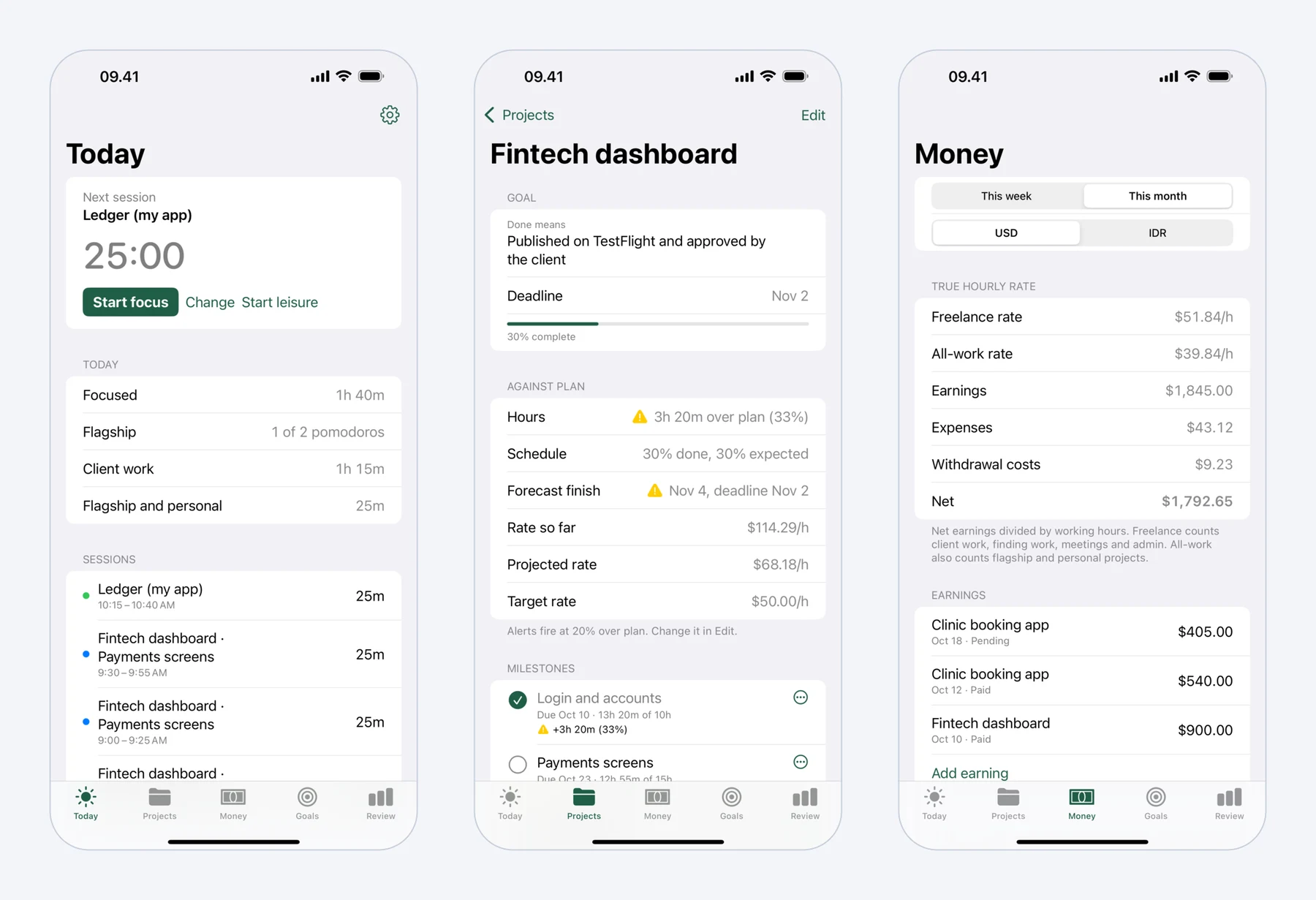 Mindset on iPhone: today's pomodoros, a fixed-price project against its plan, and what the work really paid per hour.
It fills three of the four gaps listed above; the exception is Windows and Android. The timer (25/5, 50/10 or your own lengths) records time per project and milestone as you work. You enter earnings and expenses in US dollars and your local currency, and Mindset shows a freelance hourly rate and an all-work rate, each worked out as earnings minus expenses, divided by hours. Breaks come with guided stretch routines for the neck and shoulders, wrists, lower back and eyes. Projects warn you when they run 20% over plan or a milestone is forecast to slip.
It is free on one device without an account. Sync between Mac and iPhone and longer reports cost $4.99 a month or $39.99 a year, the same as Session, with a two-week trial. It never blocks apps or websites, so if blocking is the reason you used Session or Flow Pro, keep one of them, or choose Be Focused Pro.
Which one should you pick?
Pick Be Focused if you want Session's core features, including blocking, for about half the yearly price. Pick Vitamin-R if you want to pay once and use only a Mac. Pick TomatoBar if a free menu bar timer is all you need. Pick Focus To-Do if you also use Windows or Android. Pick Toggl Track if your real goal is a timesheet.
If you freelance and want your timer to show what each project paid per hour, with stretch breaks built in, Mindset is made for that once it launches. We compare it with Session feature by feature in Mindset vs Session, and our full list of the best Pomodoro apps for Mac covers ten options.
Prices and features were checked on the vendors' sites and the US App Store in October 2026. App Store prices vary by country.
FAQ
Is Session free?
Session has a free plan with unlimited sessions and breaks, but it only keeps two days of analytics and leaves out custom durations and blocking. Pro costs $4.99 a month or $39.99 a year, with a seven-day free trial.
Does Flow have a lifetime license?
Yes. On the US App Store, Flow offers Lifetime Pro Access for $39.99 as a one-time purchase, alongside the $2.99 monthly and $17.99 yearly plans.
What is a free alternative to Session for Mac?
TomatoBar is free and open source, and runs in the menu bar. Flow's free tier and Toggl Track's free plan are also options if you want stats or time entries.
Is Session available for Windows?
No. Session runs on Mac, iPhone and iPad. If you need Windows too, Focus To-Do and Toggl Track both have Windows apps with a Pomodoro timer.