How to price fixed-price projects from your own time data
Price fixed-price work from the hours past projects really took, with milestones, a buffer, fees and costs, and a plan for when you run 20% over.
To price a fixed-price project, look up how many hours similar work actually took you, split the new project into milestones and estimate each one from those hours, add a buffer for unknowns, then multiply by your target hourly rate and add your costs and platform fees. Once the client accepts, track your hours against the plan every few days, and stop to reassess as soon as you are about 20% over. A worked example follows the steps.
We make Mindset, a Pomodoro timer with time and money tracking for freelance developers, so keep that in mind. The method works with a spreadsheet just as well.
Why your own hours beat your gut
Most people underestimate how long their own work will take, even when they know their past projects ran late. Psychologists call this the planning fallacy. In a 1994 study, Roger Buehler, Dale Griffin and Michael Ross asked 37 students when they would finish their honours thesis. On average the students predicted 33.9 days and took 55.5. Fewer than a third finished by their own best estimate, and even their worst-case guesses, at 48.6 days, came in short (Journal of Personality and Social Psychology).
The same paper points to the fix. People pictured how the task would go this time and ignored how similar tasks had gone before, and in one of the studies the optimistic bias disappeared when participants were told to connect past experiences to their prediction. For a freelancer, that means pricing from records of what past projects really took.
Step 1: collect actual hours from past projects
Gather the real hours from your last few projects. The best source is a time tracker or Pomodoro log tagged by project and task, then hourly contracts where the platform recorded your time. Failing those, rebuild rough hours from your calendar, commits and messages.
Group the hours by type of work as well as by project: "payment integration" or "App Store submission" are units you will meet again. Include the work around the code too, such as calls, updates, review rounds and deployment.
For each past project, also note what you estimated and what it finally took. The gap between the two, across several projects, tells you how big your buffer needs to be.
Step 2: split the new project into milestones
Break the project into milestones of a size you can estimate and the client can check. Each one needs:
- A deliverable the client can see, such as a build on TestFlight or an endpoint running on staging.
- Acceptance criteria, written plainly, so "done" is not a matter of opinion.
- Planned hours, from your data.
- A due date, based on how many hours a week you can give this client.
Upwork's fixed-price contracts already work this way. According to Upwork's help pages, the client funds each milestone into escrow, you submit the work, and the client has 14 days to approve it or ask for changes before the payment is released automatically (How payments for milestones work). Upwork also says not to start a milestone until it is funded. Smaller milestones mean earlier feedback and less money at risk if the project stops halfway.
Step 3: estimate each milestone from your data
For each milestone, find the closest past work and use its actual hours, not its estimate. With several comparable tasks, use the middle value for familiar work and the higher one for anything new, such as an unfamiliar API or codebase.
When you have no comparable data, make the first milestone a short, paid investigation (reading the existing code, building a small spike) and price the rest once it is done.
Step 4: add a buffer for unknowns
Even a good estimate misses things, such as an outdated dependency or a part of the codebase that is worse than it looked. A buffer pays for those without turning the project into unpaid work.
Set the buffer from your own history: use at least the average amount your past projects ran over their estimates. With no history yet, we would start at 20% to 30% and adjust once you have data.
Keep the buffer inside the price. A separate line called "buffer" invites the client to negotiate it away.
Step 5: turn hours into a price
The formula has three parts:
- Multiply estimated hours plus buffer by your target hourly rate.
- Add costs you pay for this project, such as Connects spent to win it or a staging server.
- Divide by (1 minus the platform fee), so the fee comes out of the client's payment, not your rate.
Your target rate is what you need to earn per hour after costs. Our guide to calculating your real hourly rate shows how to work it out.
On Upwork, the freelancer service fee is variable. Upwork's Help Center says it ranges from 0% to 15% per contract, that you see it before you submit a proposal or accept an offer, and that it stays fixed for that contract (Learn about the Freelancer Service Fee, checked in October 2026). Confirm the current rate on your own proposal. Our guide to Upwork fees and Connects covers the details.
A worked example
This example is hypothetical. The project, numbers and dates are made up to show the method.
A client wants subscriptions added to their existing iOS app: a paywall, the purchase flow, a server endpoint that records subscription status, and the App Store submission. You plan to give this client about 20 hours a week, starting Monday 2 November 2026.
Your last two purchase flows were estimated at 16 and 20 hours and took 21 and 24. Your last six fixed-price projects ran 18% over estimate on average. You split the work like this:
| Milestone | Deliverable | Planned hours | Due |
|---|---|---|---|
| 1. Technical plan | Written plan, product IDs set up in App Store Connect | 6 | Wed 4 Nov |
| 2. Purchase flow | Paywall, purchase and restore working on TestFlight | 22 | Fri 13 Nov |
| 3. Subscription status | Endpoint that records and returns status, with tests | 16 | Fri 20 Nov |
| 4. Release | Testing, fixes and App Store submission | 10 | Fri 27 Nov |
| Total | 54 |
Now the price:
Estimated hours                 54
Buffer, 20% (rounded)          +11
Hours to price                  65

65 hours x $60 target rate     $3,900
Costs (Connects, staging)        +$45
Needed after fees              $3,945

Assumed service fee 10%
$3,945 / (1 - 0.10)            $4,383
Quote, rounded                 $4,400
Split the $4,400 across the milestones in proportion to their planned hours: $490, $1,790, $1,305 and $815.
Check what you would earn. After the 10% fee, you receive $3,960, and after the $45 of costs you keep $3,915. If the project takes the planned 54 hours, that is $72.50 an hour. If it uses the full buffer at 65 hours, you get $60.23, your target. If it runs to 75 hours, it falls to $52.20.
Step 6: track hours against the plan
Record your hours per milestone as you work, and compare them with the plan at least twice a week, so you notice early when it slips.
Back to the example. At the end of the second week, milestones 1 and 2 are done:
| Milestone | Planned hours | Actual hours | Difference |
|---|---|---|---|
| 1. Technical plan | 6 | 7 | +17% |
| 2. Purchase flow | 22 | 27 | +23% |
| Total so far | 28 | 34 | +21% |
You have used 6 of your 11 buffer hours with half the project still to go. If milestones 3 and 4 run 21% over as well, the project ends at about 65 hours, right at the edge of your buffer, and one more surprise puts you below your target rate.
What to do at 20% over plan
Treat about 20% over plan as the point to stop and decide. First, find the cause. In the example, testing renewals and cancellations took longer because no past project had needed it. Causes usually fall into a few groups:
- You underestimated. The work was in scope and simply took longer.
- The scope grew. The client asked for things that were not in the milestone description.
- The client slowed you down, with late answers or repeated rounds of feedback.
- Something outside both of you broke, such as an API change.
Then act on it:
- If you underestimated, absorb it from the buffer, re-estimate the remaining milestones, and record the lesson for the next quote.
- If the scope grew, treat it as a change request (next section). Don't absorb it quietly.
- If dates are at risk, tell the client now, with a new date, rather than on the due date.
- Don't make up the hours by skipping tests. That moves the cost into bugs you fix for free later.
If you have a buffer of 20%, an alert at 20% over plan arrives when the buffer is already gone. A lower threshold, such as 10%, gives you a warning halfway through.
Renegotiating scope changes
Scope changes are normal; unpriced ones turn fixed-price projects into losses. The milestone descriptions and acceptance criteria from step 2 make the conversation possible, because both sides can see what was agreed.
When a request falls outside the agreed scope:
- Acknowledge it and say plainly that it is new work.
- Estimate it from your data, the same way as the original milestones.
- Give the client the price and the effect on dates.
- Let them choose: add it as a new milestone, swap it for something already planned, or leave it for a later phase.
A short message is enough:
Happy to add the annual plan with a free trial. It isn't in the agreed milestones,
so I'd add it as a new milestone: about 8 hours, $540, due 25 November,
which moves the release to 2 December. Or we can do it after launch.
Which do you prefer?
On Upwork, you can propose a new milestone from the contract page, and the client accepts and funds it before you work on it (Propose or respond to milestone changes). Adding a new milestone is usually cleaner than trying to change one that is already active.
Where Mindset fits
Mindset is our Pomodoro timer with time and money tracking for freelance software engineers on Mac and iPhone. It is not released yet; it is coming to the App Store, and the Mindset page has the details.
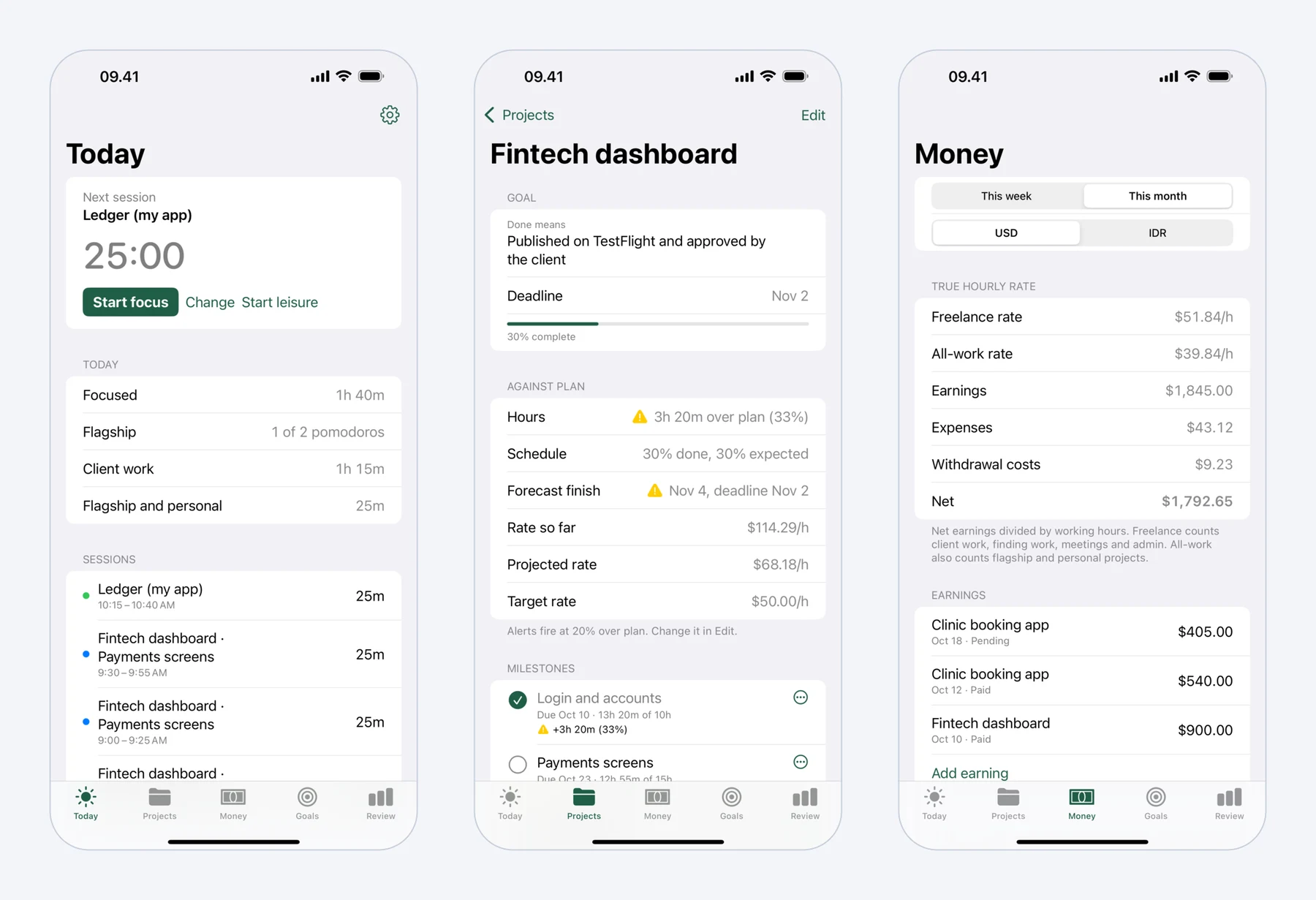 Mindset on iPhone: today's pomodoros, a fixed-price project against its plan, and what the work really paid per hour.
Each project in Mindset gets milestones with planned dates and hours, and the timer records your time. The project page compares hours against the plan, progress against the schedule, and your effective rate against your target. A notification arrives when a project runs 20% over plan, and you can change that threshold per project, for example to 10% when your buffer is 20%. Mindset also tells you when a milestone is forecast to miss its date. You can record expenses such as Connects, tools and hosting next to your earnings, and Mindset works out rates as earnings minus expenses, divided by hours.
FAQ
How much buffer should I add to a fixed-price project?
Base it on your own history: look at how far over estimate your last several projects ran and use at least the average. Without history, 20% to 30% is a sensible place to start. Use more for unfamiliar technology, a new client or code you have not seen.
How do I include Upwork fees in a fixed price?
Work out what you need after fees (hours times rate, plus costs), then divide by one minus the fee. With a 10% fee, divide by 0.9. Check the fee shown on your proposal, since Upwork's freelancer fee varies by contract.
Is fixed-price or hourly better for freelancers?
Hourly moves the risk of overruns to the client, which suits vague or open-ended work. Fixed price suits work you can describe well and have done before, and if you estimate well it can pay more per hour than hourly. Good time records make fixed-price work much less risky.