Building your own product while freelancing
How to build a side product while freelancing, with a daily minimum, fixed time slots, a clear view of what it costs per hour, and contract clauses to check.
To build your own product while freelancing, give it a daily minimum small enough to survive a heavy client week (two pomodoros is a good start), a weekly target, and fixed slots in your calendar, and run it with the same milestones and deadlines you would give a client. Measure what it costs you by comparing your hourly rate on client work with your rate across all work, product included. And before you write much code, read your client contracts for clauses about intellectual property and side projects.
Nicecoder is a small software studio that builds its own apps alongside client work, and Mindset, which comes up below, is one of them. Read this with that in mind.
Why your product keeps losing to client work
Client work has a deadline, a person waiting for an answer, and money arriving this week. Your product has none of those. So when a client asks for a quick change, the product loses, and it keeps losing until weeks have passed without a commit.
This is a scheduling problem more than a willpower problem. The steps below give the product what client work already has: a fixed time, a target and someone (you) checking progress.
Protect a daily minimum
Pick a minimum amount of product work you do every working day, whatever the client load. Two pomodoros is a good default. At 25 minutes each, that is 50 minutes a day, a little over four hours a week. At 50 minutes each, it is 100 minutes a day, a little over eight hours a week.
The minimum has to be small enough that you can keep it on your worst day. A target of four hours a day sounds better, but you will break it the first week a client launch goes badly, and once broken it stops working. Two rounds you never skip will get further than four hours you skip twice a week.
A few habits make the minimum easier to keep:
- Do it first, before you open client messages, if your clients' time zones allow it.
- End each session by writing down the next small task, so tomorrow's first round starts without deciding what to do.
- Count the day as done once the minimum is done. Anything more is a bonus, not the new standard.
If you are new to working in timed rounds, our guide to Pomodoro for programmers explains how to choose between 25/5 and 50/10.
Set a weekly target
The daily minimum is the floor. A weekly target is what you aim for. For example (a hypothetical number), you might aim for ten hours a week on the product, with the daily minimum covering four to eight of those hours, depending on round length, and the rest coming from longer sessions on light client days.
A weekly target gives you room to move. In a quiet client week you can spend a whole afternoon on the product. In a heavy one you drop to the minimum without feeling you have failed. Check it once a week, on Friday for instance: hours against target, and what actually shipped.
Give the product fixed time slots
"I'll work on it when I have time" doesn't work, because free time does not appear on its own. Put the product in your calendar the way you would put a client call:
- A short daily slot for the minimum, such as 08:00 to 09:45 on weekdays.
- One longer block a week for harder work, such as Friday afternoon.
Then protect those slots like client meetings. If something urgent lands on one, move it to another time that week instead of cancelling it. Let clients know your working hours so they don't expect replies during your product slot.
Treat your product like a client
You already know how to run a project for someone else. Do the same for yourself:
- Write a short brief: who the product is for, the problem it solves and what the first version includes.
- Split the first version into milestones with planned hours and dates, the same way you would for fixed-price client work. Our guide to pricing fixed-price projects from your own time data covers how to estimate them.
- Send yourself a weekly status note, as you would to a client: what got done, what slipped and why.
- Set a budget in hours and money, and decide in advance what would make you change direction.
- Push back on your own scope creep. Ask what you would tell a client who kept adding features before launch.
Ship small pieces early, such as a TestFlight build for a few people or a landing page. Something real in front of users gives you feedback that months of private work cannot.
Measure what the product costs you
Time on your product is time you are not billing. That is fine as long as you know the price. The clearest way to see it is to compare two hourly rates, each worked out as earnings minus expenses, divided by hours:
- Your freelance rate counts client work, meetings and travel, finding work, and admin. Our guide to calculating your real hourly rate explains why the non-billable hours belong in it.
- Your all-work rate adds the hours you spent on your own products, along with whatever they earned and cost.
Here is a hypothetical month to show how it works:
| Freelance rate | All-work rate | |
|---|---|---|
| Earnings | $6,000 | $6,000 (the product earned nothing yet) |
| Expenses | $300 | $350 (adds $50 of product hosting) |
| Hours | 120 | 150 (adds 30 product hours) |
| Rate | $47.50 an hour | about $37.70 an hour |
The 30 hours on the product lowered your rate across all work by about $10 an hour. Put another way, if you could have filled those hours with client work at your freelance rate, they were worth about $1,425 that month. That is what the product cost you.
That number is not a reason to stop. It turns a vague worry into a figure you can decide with: is this product worth about $1,400 a month of your time right now? Watch how the gap changes over the months. If the product starts earning, say $600 a month in the same example, the all-work rate rises to about $41.70 and the gap narrows. If the gap keeps growing and nothing is shipping, that tells you something too.
Avoid burnout
Freelancing plus a product is two jobs. Burnout can build slowly enough that you notice it late. The World Health Organization describes burn-out as a syndrome caused by chronic workplace stress that has not been managed well, marked by exhaustion, growing mental distance or cynicism about your work, and reduced effectiveness at it (WHO). The WHO classifies it as an occupational phenomenon, not a medical condition.
Some limits help:
- Set a ceiling on total weekly hours across client work and product, and stick to it.
- Keep at least one day a week free of both.
- During a big client deadline, drop the product to the daily minimum on purpose, instead of letting it slide to nothing or squeezing it into late nights.
- Take real breaks during the day. Stand up, move and look away from the screen; our guide to desk stretches for programmers has short routines.
Watch for warning signs: dreading opening the repository, months without a free weekend, sleep getting worse, or client work slipping in quality. If exhaustion or low mood lasts, talk to a doctor or a mental health professional.
Read your contracts before you build
This section is general information, not legal advice. Contract law differs between countries, and contracts differ between clients. If anything is unclear, ask a lawyer where you live.
Before you put serious work into a product, read every active contract and look for:
- Intellectual property assignment. A clause that assigns the work you deliver is normal. A broad clause that assigns everything you create during the contract, whether or not it is for the client, could reach your product.
- Pre-existing work. Some contracts have a section for work you already own. List your product and any libraries you reuse there.
- Non-compete and conflict-of-interest terms, especially if your product serves the same market as a client.
- Exclusivity or minimum hours, which can appear in retainers and agency subcontracts.
- Confidentiality. Never use a client's code, data or unreleased ideas in your product, whatever the contract says about IP.
On Upwork, Upwork's own default terms (the Optional Service Contract Terms) apply unless you and the client agree on something else. Under them, the client owns the work product once you have been paid in full. Technology you developed outside the contract stays yours, and if you build it into a deliverable, the client gets a licence to use it. Clients can also add their own NDA or IP agreement, and that changes the picture, so read those carefully. The current terms are in the Upwork Legal Center.
Good habits make ownership easier to show if it is ever questioned. Keep the product in its own repositories and accounts, work on it in your own time and on your own equipment, and let your commit history show when the work was done. If a contract is unclear, ask the client to confirm in writing that your product is outside its scope.
Where Mindset fits
Mindset is our Pomodoro timer with time and money tracking for freelance software engineers, on Mac and iPhone. It is not released yet; it is coming to the App Store, and the Mindset page has the details.
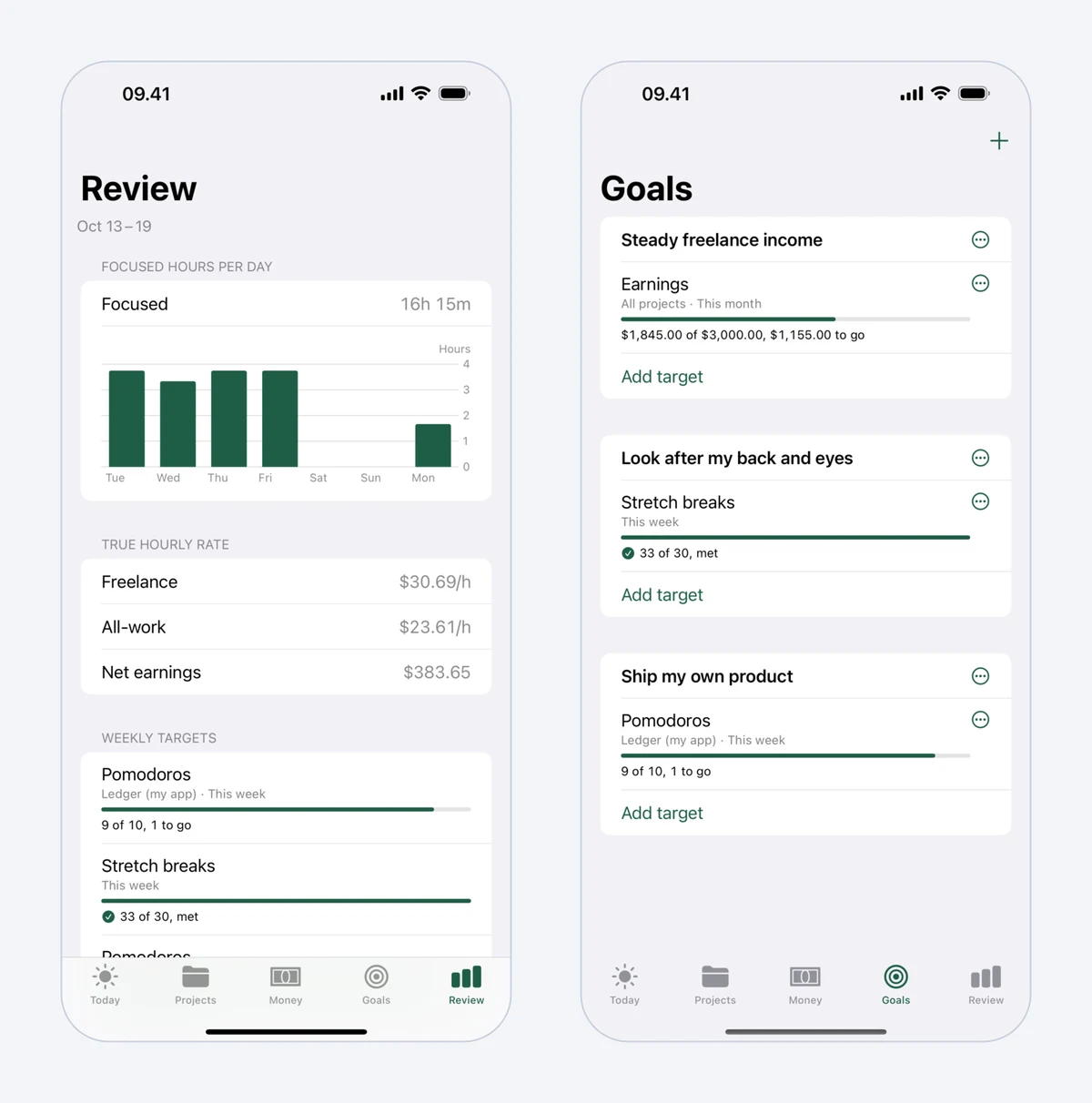 Mindset's weekly Review, with focused hours per day and time by category, beside Goals.
Two of its features match this guide. A daily minimum for your own product, such as two pomodoros, sits at the top of the day, so it is the first thing you see. And Mindset shows both hourly rates from this guide: the freelance rate, counting client work, meetings and travel, finding work and admin, and the all-work rate, which also counts hours on your own products. Mindset is free on one device, and a subscription adds sync between Mac and iPhone and reports over longer periods.
FAQ
Can I build my own product while freelancing on Upwork?
Usually, yes, as long as your contracts allow it. Under Upwork's default terms, technology you developed outside a contract stays yours, but clients can add their own agreements, so read each one for IP, non-compete and exclusivity clauses. This is not legal advice; ask a lawyer if a clause is unclear.
How many hours a week should I spend on a side product?
There is no right number. Start with a daily minimum you can always keep, such as two pomodoros (about four to eight hours a week depending on round length), and a weekly target you can hold for months. Consistency matters more than size.
When should I cut my freelance hours for my product?
Look at your numbers before your hopes. If the product is earning, the gap between your freelance rate and your all-work rate is shrinking, and you have savings to cover lean months, reducing client hours can make sense. If none of that is true yet, a steady daily minimum is the safer path.
Who owns code I write for my own product while on a client contract?
It depends on your contract. Assignment clauses that only cover delivered work leave your product alone, while broad clauses that cover everything you create during the contract may not. Keep the product separate, never use client material, and get advice from a lawyer where you live if you are unsure.